

Pockli Scan: Document Scanner
Romvalor Productivity iPhoneiPadiPod touch
Pockli Scan: Document Scanner is a free Productivity app for iPhone and iPad by Romvalor. Rated 5.0/5 from 1 ratings. Requires iOS 18.6.
- Rating
- 5.0
- 1 ratings
- Price
- Free
- on the App Store
- Size
- 10 MB
- Age 4+
- Updated
- Jul 6
- 2026 · v1.3.0
Screenshots


About Pockli Scan: Document Scanner
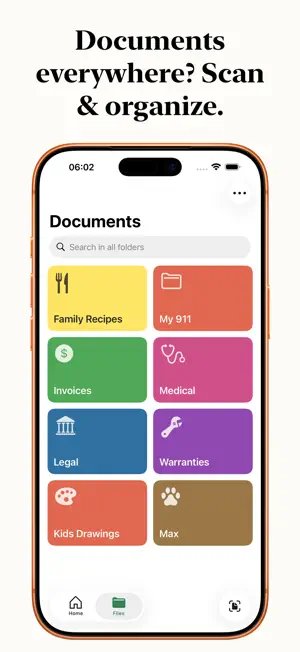
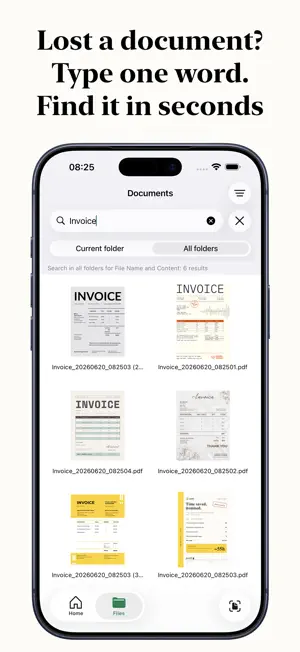
Your documents deserve a home — on your device, yours alone. Pockli is the document scanner that helps you organize your life, not just your files. Scan a receipt, a contract, an ID, your kid's drawing — anything. Pockli gives it a name, a folder, and a place. No more searching through camera rolls. No more "where did I put that?" SCAN IN SECONDS Hold your phone over the page. Tap once. The scan comes out sharp, straight, and ready — a single page or a whole stack. A FOLDER FOR EVERYTHING Create folders that match your life — Family Recipes, Apartment Lease, Paris 2024. Pick a color, choose a symbol, and make each one yours. Set a folder up once, then scan straight into it — every scan comes out the same, named, sized, and ready to find. FIND ANY WORD Pockli remembers the words inside your scans. Search "invoice" or "Dr. Martinez" — find it in seconds, across every folder. PRIVATE BY DESIGN Your scans live on your device and your iCloud — secure and private, nowhere else. No third-party servers, no tracking, no surprises. Your documents are yours. ANNOTATE AND SIGN Mark up your scans with a pen, highlighter, or text. Add your signature. Add a sticker. Everything you need, built in. TAGS Go beyond folders. Tag a document with "urgent," "tax," or "shared" and find it from anywhere. FAVORITES One tap to mark your most important documents. Access them instantly from the Favorites folder. SYNC ACROSS DEVICES iCloud keeps everything in sync across your iPhone and iPad. Scan on one device, find it on the other. POCKLI PRO Pockli Pro removes the limits — unlimited folders, search inside every scan, folder rules, annotations, and tags. Everything Pockli does, with nothing in the way. One purchase, yours for good — no subscription. — Built by a team that actually uses it. Every day. For everything. We're crafting apps we love to use. Terms of Service: https://pockli.com/terms Privacy Policy: https://pockli.com/privacy Apple EULA: https://www.apple.com/legal/internet-services/itunes/dev/stdeula/
What’s new
Version 1.3.0 · Updated July 6, 2026
Scan straight from your Home Screen. Add the Pockli widget, pick a folder, and scan right into it — no need to open the app first. The small widget holds one folder, the medium holds up to four. Plus reliability, accessibility, and dark-mode fixes throughout.
App privacy
The developer, Romvalor, reported these privacy practices to Apple.
Data Not Collected
The developer does not collect any data from this app.
Alternatives to Pockli Scan: Document Scanner
Looking for apps like Pockli Scan: Document Scanner? Here are 6 similar apps on the App Store. The highest rated is jottie: smart notes (5.0/5), and all 6 are free to download.
-
 PDF Viewer and Editor - AI
-
 kept · Document Organizer
-
 LuNote: Notes, Tasks, Planner
-
 1Shelf: AI Document Organizer
3.0
1Shelf: AI Document Organizer
3.0
-
 jottie: smart notes
5.0
jottie: smart notes
5.0
-
 Screenshot Search: CaptureMind
| App | Rating | Price | Last updated | Compare |
|---|---|---|---|---|
| Pockli Scan: Document Scanner | 5.0 / 5 (1 rating) | Free | July 6, 2026 | |
| PDF Viewer and Editor - AI | – | Free | Mar 27, 2026 | Compare |
| kept · Document Organizer | – | Free | Sep 24, 2026 | Compare |
| LuNote: Notes, Tasks, Planner | – | Free | Oct 17, 2026 | Compare |
| 1Shelf: AI Document Organizer | 3.0 / 5 (2) | Free | Sep 25, 2026 | Compare |
| jottie: smart notes | 5.0 / 5 (3) | Free | Feb 6, 2026 | Compare |
| Screenshot Search: CaptureMind | – | Free | Sep 7, 2026 | Compare |