

LuNote: Notes, Tasks, Planner
Lu Apps LLC Productivity iPhoneiPadiPod touch
LuNote: Notes, Tasks, Planner is a free Productivity app for iPhone and iPad by Lu Apps LLC. Requires iOS 17.0. Updated October 22, 2026.
- Price
- Free
- on the App Store
- Size
- 21 MB
- Age 4+
- Updated
- Oct 22
- 2026 · v1.38
Screenshots

About LuNote: Notes, Tasks, Planner
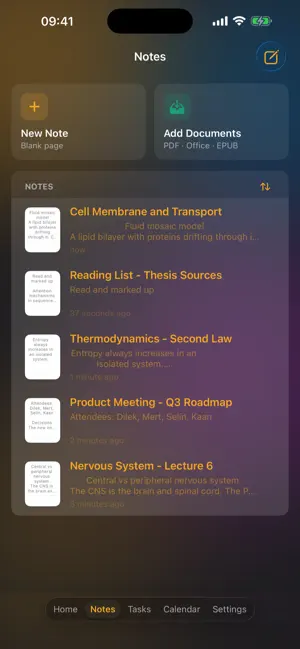
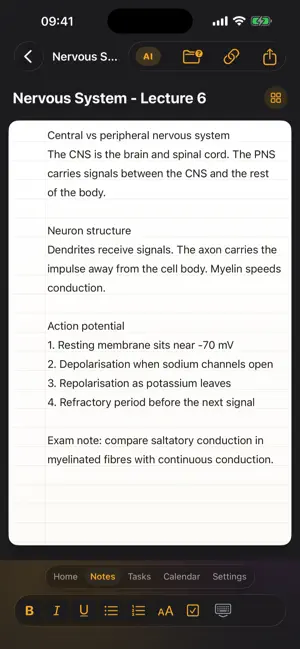
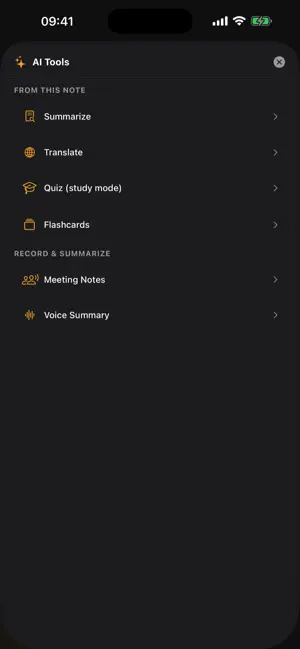
LuNote brings your handwriting, documents, tasks and calendar into one place. WRITE BY HAND Use Apple Pencil on blank, lined or grid paper. Choose from several pen tips and adjust thickness. Mix handwriting with typed text and images on the same page. WORK ON DOCUMENTS Open PDFs, Word files, presentations and ebooks, then annotate them directly. Read in page-turning mode or scroll normally, whichever suits you. AI THAT HELPS Summarise a note, ask questions about a document, or turn what you wrote into flashcards for studying. PLAN YOUR DAY Tasks with subtasks and due dates, a calendar that syncs with your system calendar, and a focus timer for deep work sessions. CAPTURE ANYTHING Scan documents with your camera and get searchable text through OCR. Record lectures or meetings and turn them into transcripts. BRING EVERYTHING IN Import from Notability and GoodNotes. Open PDFs, Word, PowerPoint and web pages straight into LuNote. EVERYWHERE YOU WORK Your notes, documents and drawings stay in sync on iPhone and iPad through iCloud. Home Screen widgets keep today's tasks and notes in view. MAKE IT YOURS 25 themes, paper styles and reading backgrounds. Siri Shortcuts for the way you work. LuNote is free to start. Premium unlocks unlimited notes, the AI assistant, voice recording, the scanner and sync across your devices. The subscription supports Family Sharing. LuNote Premium is an auto-renewing subscription, offered monthly or yearly. Payment is charged to your Apple Account at confirmation of purchase. The subscription renews automatically unless cancelled at least 24 hours before the end of the current period. You can manage or cancel it any time in your Apple Account settings. Privacy Policy: https://lunote.app/privacy.html Terms of Use (EULA): https://lunote.app/terms.html Questions or feedback: [email protected]
What’s new
Version 1.38 · Updated October 22, 2026
This release contains internal improvements and stability fixes.
App privacy
The developer, Lu Apps LLC, reported these privacy practices to Apple.
Data Linked to You
The following data, which may be collected and linked to your identity, may be used for the following purposes:
- Purchases: Purchase History
Used for: App Functionality
Data Not Linked to You
The following data, which may be collected but is not linked to your identity, may be used for the following purposes:
- Contact Info: Email Address, Name
- Identifiers: User ID
- Diagnostics: Crash Data, Performance Data
Used for: App Functionality
Alternatives to LuNote: Notes, Tasks, Planner
Looking for apps like LuNote: Notes, Tasks, Planner? Here are 6 similar apps on the App Store. The highest rated is Libreto (5.0/5), and all 6 are free to download.
-
 DefterPad: Handwritten Notes
-
 Tuplet
-
 Pocket Pages: Life Planner
-
 Libreto
5.0
Libreto
5.0
-
 StudyMapp: Revise Notes & PDFs
-
 Reader Ink: PDF Editor & Sign
| App | Rating | Price | Last updated | Compare |
|---|---|---|---|---|
| LuNote: Notes, Tasks, Planner | – | Free | October 22, 2026 | |
| DefterPad: Handwritten Notes | – | Free | Oct 19, 2026 | Compare |
| Tuplet | – | Free | Oct 20, 2026 | Compare |
| Pocket Pages: Life Planner | – | Free | Oct 1, 2026 | Compare |
| Libreto | 5.0 / 5 (1) | Free | Oct 5, 2026 | Compare |
| StudyMapp: Revise Notes & PDFs | – | Free | Oct 12, 2026 | Compare |
| Reader Ink: PDF Editor & Sign | – | Free | Sep 20, 2026 | Compare |