

DefterPad: Handwritten Notes
AHMET OGUZHAN TEKIN Productivity iPad
DefterPad: Handwritten Notes is a free Productivity app for iPad by AHMET OGUZHAN TEKIN. Requires iOS 17.0. Updated October 19, 2026.
- Price
- Free
- on the App Store
- Size
- 24 MB
- Age 4+
- Updated
- Oct 19
- 2026 · v1.1
Screenshots



About DefterPad: Handwritten Notes
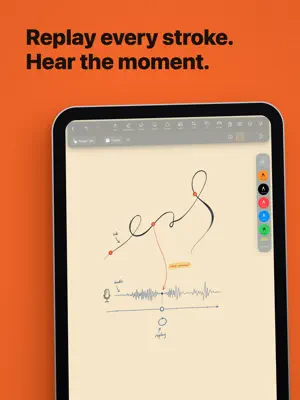
Your notebook should fit the way you think. DefterPad is a handwriting notebook for iPad that gives you control over the page and the space around it. Choose the look, arrange the tools you reach for most, and decide how much interface stays on screen. When you want the page to take over, switch to a compact workspace and keep writing. MAKE THE WORKSPACE YOURS Set the mood with app themes, accent colors, and atmospheric tints. Choose Normal, Night, or Sepia pages. Pick a cover, use one of your own photos, or build a look with colors, gradients, and textures. Keep favorite pens close. Create different Favorites sets for different kinds of work. Reorder the main toolbar, hide tools you do not need, and tune its transparency until the workspace feels right. WRITE WITHOUT BREAKING YOUR FLOW Use pens, highlighters, and the eraser with Apple Pencil. Apple Pencil Pro gestures including squeeze, barrel roll, hover, and double tap are built into the writing experience. Select handwriting, shapes, photos, stickers, or text together. Move, rotate, resize, flip, duplicate, and recolor them with full undo. Shape recognition, a ruler, a laser pointer, and a quick page snip are there when you need them. Start with blank, lined, grid, dotted, or Cornell paper in several page sizes. Move through a notebook vertically or horizontally, or open a two page spread when you want a broader reading view. WORK DIRECTLY ON PDFS Import a PDF as its own notebook or place its pages inside an existing one. Write, highlight, and add material on top with the same tools you use everywhere else. Export one page, a selected range, or an entire notebook as a PDF. Choose the quality and appearance, keep chapter outlines, or print directly from the app. You can also scan paper with the camera, clean it up, and turn it into notebook pages. RETURN TO HOW AN IDEA HAPPENED Ink Replay brings a page back stroke by stroke on a timeline you can scrub at your own pace. Record audio while you write and play it back with your handwriting appearing in step. Tap a stroke to return to the moment it was written. A finished page can carry the explanation, conversation, or lecture behind it. STUDY FROM THE PAGE ITSELF Snip any part of your notes into a flashcard and review it with built in spaced repetition. Cover an answer with a Revealer, keep a floating scratchpad nearby, or open the calculator without leaving the notebook. Presentation mode turns a notebook into a clean full screen canvas with zoom and a laser pointer. It works for reviewing on your own, explaining an idea, or teaching from the page. KEEP EVERYTHING WITHIN REACH Organize notebooks with folders, tags, favorites, page bookmarks, and outlines. Search titles, typed text, and text inside imported PDFs. Find notebook titles through Spotlight, and recover accidental deletions from the 30 day trash. Your notebooks can appear in the Files app. Share PDFs, images, and text into DefterPad from other apps. Use widgets, Siri, Shortcuts, Split View, biometric locks, and Auto Backup to make the notebook part of the way you already use your iPad. Optional iCloud sync keeps notebooks together across your own iPads when you choose to turn it on. Choose the page. Shape the tools. Make the notebook yours.
What’s new
Version 1.1 · Updated October 19, 2026
New • Lock Page: rest your hand while you write • Share a page as an image • Recent notebooks Fixes and improvements
App privacy
The developer, AHMET OGUZHAN TEKIN, reported these privacy practices to Apple.
Data Not Collected
The developer does not collect any data from this app.
Alternatives to DefterPad: Handwritten Notes
Looking for apps like DefterPad: Handwritten Notes? Here are 6 similar apps on the App Store. The highest rated is Notelit (5.0/5), and all 6 are free to download.
-
 AI Handwriting to Text Maker
-
 Dijital Planlayıcı Ajanda
-
 Notelit
5.0
Notelit
5.0
-
 AI Handwriting Pen+
-
 Notepen: Notes & Planner
-
 PlainBoard: Sketch Pad
| App | Rating | Price | Last updated | Compare |
|---|---|---|---|---|
| DefterPad: Handwritten Notes | – | Free | October 19, 2026 | |
| AI Handwriting to Text Maker | – | Free | Jul 13, 2026 | Compare |
| Dijital Planlayıcı Ajanda | – | Free | Oct 20, 2026 | Compare |
| Notelit | 5.0 / 5 (1) | Free | Oct 15, 2026 | Compare |
| AI Handwriting Pen+ | – | Free | Mar 6, 2026 | Compare |
| Notepen: Notes & Planner | – | Free | Oct 11, 2026 | Compare |
| PlainBoard: Sketch Pad | – | Free | Jun 18, 2026 | Compare |