

Notepen: Notes & Planner
Hamdi Tug Productivity iPhoneiPadiPod touch
Notepen: Notes & Planner is a free Productivity app for iPhone and iPad by Hamdi Tug. Requires iOS 17.0. Updated October 24, 2026.
- Price
- Free
- on the App Store
- Size
- 4 MB
- Age 4+
- Updated
- Oct 24
- 2026 · v1.1
Screenshots


About Notepen: Notes & Planner
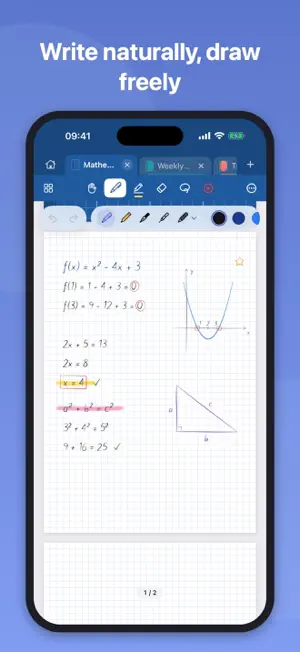
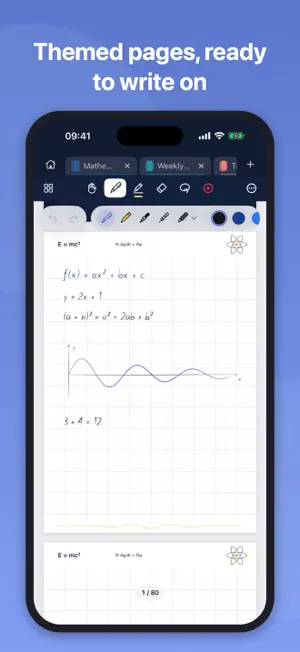
Notepen brings the feel of a paper notebook to your iPad and iPhone. Write, sketch and plan with Apple Pencil on pages that look like real paper. NEW: SPECIAL PENS, THEMED NOTEBOOKS AND A LASER POINTER • 7 special pens: neon, rainbow, metallic, glitter, gradient, dashed and embossed • Discover: ready-made themed notebooks, planners, calendars and journals — name them as you like • Themed pages with original drawings, ready to write on • Laser pointer: present your notes with a glowing trail that fades away • Hand tool: scroll and browse without writing WRITE NATURALLY • Ballpoint, pencil and fountain pen, highlighter, eraser, lasso and ruler • Palm rejection: rest your hand on the screen while you write • Fine control of width and opacity, custom colors TEMPLATES FOR EVERYTHING • Ruled, grid, dotted, Cornell and music staff pages • Daily, weekly and monthly planners, sprint plan, meeting notes, habit tracker and priority matrix • A4, A5 and A6 in portrait or landscape, shown at their real size MAKE IT YOURS • 24 covers; white, cream, kraft, textured or dark paper • Adjustable line intensity so your writing stands out STAY ORGANIZED • Open notebooks in tabs and switch with a tap • Folders, favorites and search • Add, duplicate and delete pages; lock the zoom SHARE, STAY PRIVATE • Export any notebook as a PDF • Everything is stored on your device. No account, no ads, works offline. Available in 25 languages.
What’s new
Version 1.1 · Updated October 24, 2026
• 7 special pens: neon, rainbow, metallic, glitter, gradient, dashed and embossed • Discover: ready-made themed notebooks, planners, calendars and journals — name them as you like • Themed pages with original drawings, ready to write on • Laser pointer: present your notes with a glowing trail that fades away • Hand tool: scroll and browse without writing • Smoother scrolling and faster new pages • The pen palette can now be folded away
App privacy
The developer, Hamdi Tug, reported these privacy practices to Apple.
Data Not Linked to You
The following data, which may be collected but is not linked to your identity, may be used for the following purposes:
- Usage Data: Product Interaction
Used for: Analytics
Alternatives to Notepen: Notes & Planner
Looking for apps like Notepen: Notes & Planner? Here are 6 similar apps on the App Store. The highest rated is Mirror.ly (5.0/5), and all 6 are free to download.
-
 LOCKEDIN: To Do Lists & Notes
-
 Mirror.ly
5.0
Mirror.ly
5.0
-
 Журнал Зала
-
 Dijital Planlayıcı Ajanda
-
 PlannexPro
5.0
PlannexPro
5.0
-
 DailyOS: task manager
5.0
DailyOS: task manager
5.0
| App | Rating | Price | Last updated | Compare |
|---|---|---|---|---|
| Notepen: Notes & Planner | – | Free | October 24, 2026 | |
| LOCKEDIN: To Do Lists & Notes | – | Free | Oct 12, 2026 | Compare |
| Mirror.ly | 5.0 / 5 (2) | Free | Oct 5, 2026 | Compare |
| Журнал Зала | – | Free | Oct 15, 2026 | Compare |
| Dijital Planlayıcı Ajanda | – | Free | Oct 20, 2026 | Compare |
| PlannexPro | 5.0 / 5 (1) | Free | Oct 21, 2026 | Compare |
| DailyOS: task manager | 5.0 / 5 (2) | Free | Apr 15, 2026 | Compare |