

ColorCalendar - Color Planner
Matthias Golla Productivity iPhoneiPadiPod touchMacApple Watch
ColorCalendar - Color Planner is a free Productivity app for iPhone and iPad by Matthias Golla. Requires iOS 26.0. Updated October 5, 2026.
- Price
- Free
- on the App Store
- Size
- 12 MB
- Age 4+
- Updated
- Oct 5
- 2026 · v1.3
Screenshots
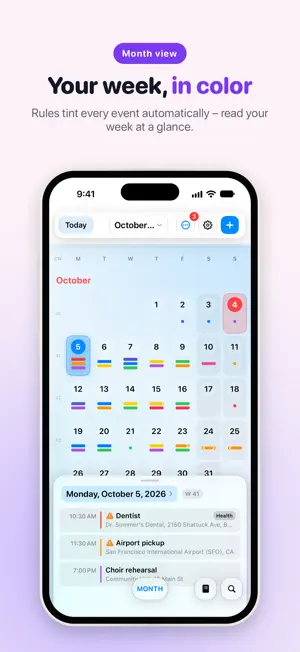


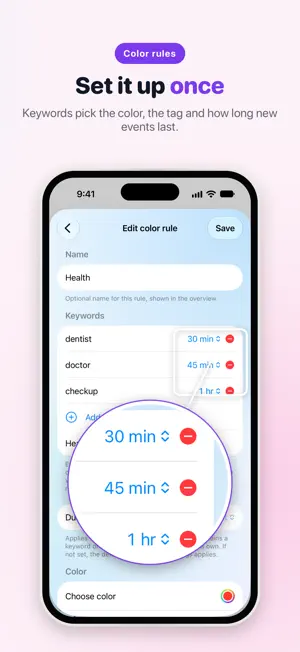
About ColorCalendar - Color Planner
Your calendar can do better than gray on gray. ColorCalendar tints your events automatically using rules you set up once – “dentist” turns red, “choir” turns purple, “school” turns yellow. You’ll read your week at a glance without reading a single event. ColorCalendar works directly with the calendars you already have (iCloud, Google, Exchange, CalDAV, subscribed calendars) – nothing moves, everything stays in sync. AS FAST AS YOU THINK • Create events in natural language: “tomorrow 3pm dentist” – done. • Repeating events, too: “rehearsal every Monday 7pm” or “every first Wednesday of the month until December”. • Six views, one swipe: day, 2-day, week, month, list, year. • Fluid 120 Hz scrolling and pinch-zoom – built like a system app. • Month view with a pull-up day panel: overview on top, details below. COLOR WITH A SYSTEM • Color rules: keyword → color, applied automatically to every matching event. • Exact matches, word boundaries, or smart similarity – your choice. • Custom colors for single events or whole series, too. ALWAYS IN SIGHT • Widgets for your Home and Lock Screen. • Apple Watch app with complications – your next events on your wrist. • Event details with map preview and travel time. FOR FULL CONTROL: COLORCALENDAR PRO • Unlimited color rules (3 are free). • “Time to leave” alerts with live travel time to your destination. • Edit subscribed calendars: mirroring makes read-only calendars editable. • Duplicate manager: detect and merge duplicate events across calendars. • Smart location suggestions from your event history. • Event attachments, backup & export, pro widgets and watch complications. ColorCalendar Pro is €9.99 per year after a 14-day free trial. One purchase covers iPhone, iPad, and Mac (Universal Purchase). The subscription renews automatically and can be cancelled anytime in Settings. Without Pro, ColorCalendar remains a fully capable free calendar – all views, all your events, natural language input, and 3 color rules included. MORE TO COME ColorCalendar is under active development and the next versions are already in the works. Feature requests and bug reports are genuinely welcome – they go straight into the plan. YOUR DATA IS YOURS ColorCalendar collects no data. Your events stay in your calendar accounts; your settings sync only through your personal iCloud key-value storage. No accounts, no tracking, no ads. Privacy policy: https://matthiasgolla.de/apps/colorcalendar/datenschutz Terms of use: https://www.apple.com/legal/internet-services/itunes/dev/stdeula/
What’s new
Version 1.3 · Updated October 5, 2026
ColorCalendar joins the system • Siri: “Move the dentist to Thursday”, “Cancel choir practice”, “Add lunch with Anna tomorrow at noon in ColorCalendar” – with Apple Intelligence on iOS 27 and macOS 27. • Ask: “What’s on tomorrow?”, “Do I have conflicts tomorrow?”, “Show my sports events this week” – color rules work as categories, only in ColorCalendar. • Search: Your events appear in Search on the Home Screen and in Spotlight on the Mac; one tap opens them. Turn it off in Settings › Siri & Search. • Control Center, Lock Screen and Action button: “New event” and “Next event” in one tap. • Shortcuts: Every action is also available in the Shortcuts app. Month view, reimagined • At the smallest size, one colorful bar per day; above it, wide color bars that spring into their next shape as you pinch. From four events on, “+N” shows what else is coming. • After a longer break or on a new day, the app opens on today again. • Day view: Swiping to the next day keeps the time of day in place. Also new • Events with “ENTFÄLLT:” (cancelled) in the title no longer get alerts or Live Activities. • Calendar mirroring: Lost subscriptions can be restored, and removed copies can be brought back from the Inbox. • English: Times follow your device (3:00 PM), and missing translations are filled in. • Natural language input: “tomorrow” and weekdays now always count from today. • The week view reliably starts on the day you picked.
App privacy
The developer, Matthias Golla, reported these privacy practices to Apple.
Data Not Collected
The developer does not collect any data from this app.
Alternatives to ColorCalendar - Color Planner
Looking for apps like ColorCalendar - Color Planner? Here are 6 similar apps on the App Store. The highest rated is DoTree - Task Organizer (5.0/5), and all 6 are free to download.
-
 Home Upkeep - Josh Approved
-
 Grid Habit
-
 DoTree - Task Organizer
5.0
DoTree - Task Organizer
5.0
-
 Oriio: AI Calendar Assistant
5.0
Oriio: AI Calendar Assistant
5.0
-
 AlvisQuest-Notes,Flashcards,AI
-
 Polygenda – Calendar Week+Year
| App | Rating | Price | Last updated | Compare |
|---|---|---|---|---|
| ColorCalendar - Color Planner | – | Free | October 5, 2026 | |
| Home Upkeep - Josh Approved | – | Free | Sep 9, 2026 | Compare |
| Grid Habit | – | Free | Aug 19, 2026 | Compare |
| DoTree - Task Organizer | 5.0 / 5 (1) | Free | Aug 12, 2026 | Compare |
| Oriio: AI Calendar Assistant | 5.0 / 5 (4) | Free | Oct 11, 2026 | Compare |
| AlvisQuest-Notes,Flashcards,AI | – | Free | Oct 16, 2026 | Compare |
| Polygenda – Calendar Week+Year | – | Free | Oct 15, 2026 | Compare |