

Polygenda – Calendar Week+Year
Mario Gersbach Productivity iPhoneiPadiPod touch
Polygenda – Calendar Week+Year is a free Productivity app for iPhone and iPad by Mario Gersbach. Requires iOS 17.6. Updated September 27, 2026.
- Price
- Free
- on the App Store
- Size
- 19 MB
- Age 4+
- Updated
- Sep 27
- 2026 · v1.2.1
Screenshots

About Polygenda – Calendar Week+Year
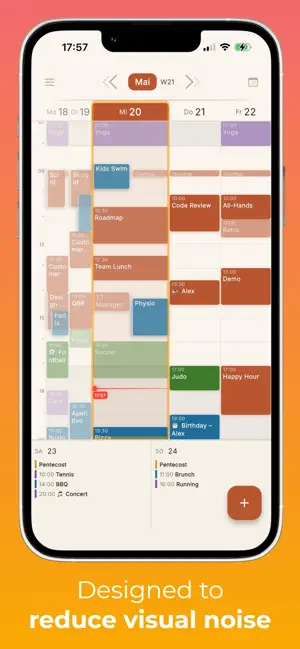
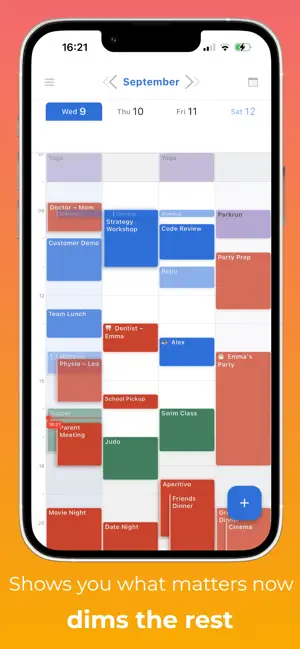
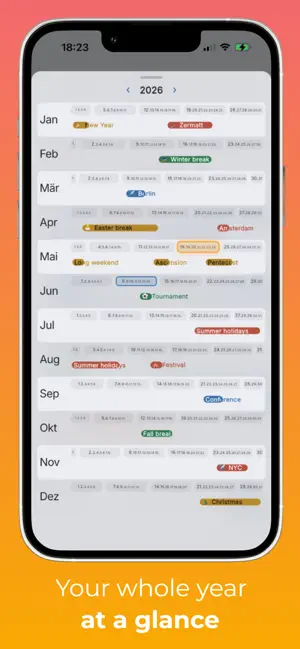
A calendar that finally shows the big picture. Most calendar apps stop at month view. Polygenda gives you a year view that actually shows what's happening: every trip, vacation and multi-day project rendered as a coloured bar, so you can see your whole year at a glance — and instantly spot the free weeks. THE BEST WEEK VIEW IN PORTRAIT • Reads every calendar that already shows in Apple Calendar — Google, iCloud, Outlook, Exchange and more • Designed for one-handed use on your phone — no rotating, no squinting • Handles 3+ overlapping calendars cleanly with an L-shape layout • All-day events stack neatly above the time grid • Recurring events appear in a muted colour, so one-time events stand out • Tap any event for full details and quick edit A YEAR VIEW LIKE NOTHING ELSE • 12 months at a glance, every week visible • Multi-day events as coloured bars across the weeks they cover • See vacations, school terms, sprints and trips in their real context • The current week glows softly, so you always know where you are • Tap any week to jump straight into it WORKS WITH YOUR EXISTING CALENDARS • Reads from Apple Calendar, Google, iCloud, Exchange, Outlook and any account you've added to iOS • Apple Calendar stays your default — widgets, Siri and email invitations keep working as before. Polygenda runs alongside; nothing to import. • No new account, no sign-up, no sync server — your data stays on your device • No ads. No tracking. No subscription. MADE FOR PEOPLE JUGGLING LIVES • Parents tracking school events alongside work meetings • Couples merging two busy schedules • Anyone planning trips and wanting to see them in a yearly context WILL POLYGENDA SEE YOUR CALENDARS? Polygenda only reads calendars you've added to iOS Settings → Mail → Accounts. A few cases where the week may look empty: • Outlook app — work events stay inside Outlook unless you also add the Microsoft 365 / Exchange account in iOS Settings. • TimeTree, Cozi & similar — keep events in their own cloud; not visible to any other calendar app. • CalDAV configured inside another app — add the server natively under iOS Settings → Mail → Add Account → Other → Add CalDAV. Full guide: polygenda.com/calendars FREE AND PRIVATE Polygenda is free, ad-free, and reads only the calendars you give it permission to. We don't run servers, we don't store your events, we don't have an account system. Available in 9 languages: English, German, French, Spanish, Italian, Portuguese, Japanese, Simplified Chinese and Korean. Designed and built for iPhone. iOS 17 or later.
What’s new
Version 1.2.1 · Updated September 27, 2026
Search. Type part of a title, a place or a note and Polygenda finds every matching event from a year back to a year ahead. Tap a result to jump to that week and open the event. A repeating event collapses to one row showing its next date. One menu instead of two icons. Search, Month & Year, Choose calendars, Settings and Tips now sit behind a single button on the right, which leaves the header title room to be bigger. Tapping the date still opens the year overview. Recent changes. Polygenda checks your calendars a few times a day and lists anything that has gone missing, moved to another time or newly appeared — useful when someone else has been editing a shared family calendar. A dot on the menu button marks what you have not looked at yet. If a whole calendar suddenly empties out, the week view warns you, and a deleted one-off event can be handed back to your calendar app with its title, date and time already filled in. Hide this calendar, straight from an event. One tap takes an unwanted feed out of the week, day and year views, and puts it back whenever you like. The year view now opens instantly instead of waiting on a spinner, and stepping from December into January no longer pauses to load. The event detail sheet shows your notes, and the single-day view swipes smoothly between days. Fixed: the Today button occasionally not jumping back, zooming out of a day landing in the wrong week, tapping a week in the year view picking a different one, events ending at midnight rendering as a sliver, and "Add to calendar" sometimes hanging after you had saved.
App privacy
The developer, Mario Gersbach, reported these privacy practices to Apple.
Data Not Collected
The developer does not collect any data from this app.
Alternatives to Polygenda – Calendar Week+Year
Looking for apps like Polygenda – Calendar Week+Year? Here are 6 similar apps on the App Store. The highest rated is Roomy Calendar: Simple Planner (5.0/5), and 5 of the 6 are free to download.
-
 WeekPace
-
 SimpleToDo:Do List & Calendar
-
 ColorCalendar - Color Planner
-
 Roomy Calendar: Simple Planner
5.0
Roomy Calendar: Simple Planner
5.0
-
 Jahresblick
-
 Full Year Calendar - Planner
1.0
Full Year Calendar - Planner
1.0
| App | Rating | Price | Last updated | Compare |
|---|---|---|---|---|
| Polygenda – Calendar Week+Year | – | Free | September 27, 2026 | |
| WeekPace | – | Free | May 13, 2026 | Compare |
| SimpleToDo:Do List & Calendar | – | Free | Jul 29, 2025 | Compare |
| ColorCalendar - Color Planner | – | Free | Oct 2, 2026 | Compare |
| Roomy Calendar: Simple Planner | 5.0 / 5 (1) | Free | Sep 28, 2026 | Compare |
| Jahresblick | – | 1.99 USD | Sep 18, 2026 | Compare |
| Full Year Calendar - Planner | 1.0 / 5 (1) | Free | Sep 16, 2026 | Compare |