

CarSweep: Car Audio & Room EQ
Jannes Oppermann Utilities iPhoneiPadiPod touch
CarSweep: Car Audio & Room EQ is a free Utilities app for iPhone and iPad by Jannes Oppermann. Rated 3.3/5 from 6 ratings. Requires iOS 18.6.
- Rating
- 3.3
- 6 ratings
- Price
- Free
- on the App Store
- Size
- 3 MB
- Age 4+
- Updated
- Oct 20
- 2026 · v2.2
Screenshots
About CarSweep: Car Audio & Room EQ
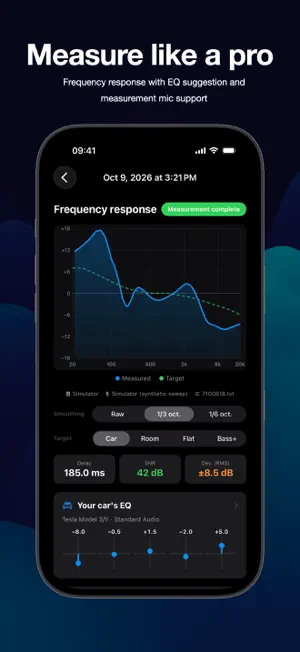
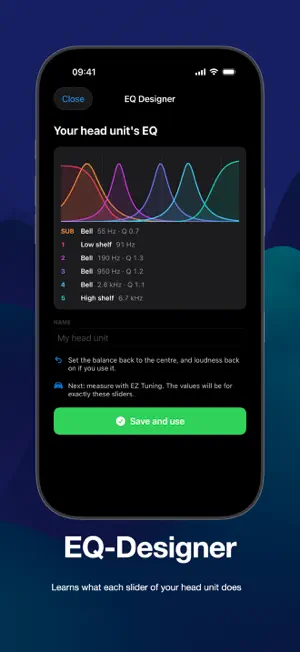
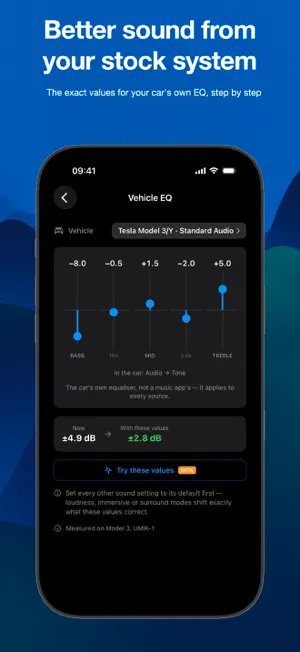
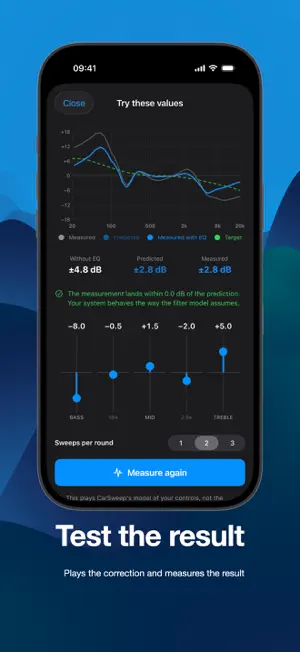
Better sound from the system you already have. CarSweep measures your car or your living room with your iPhone and tells you exactly what to set: the sliders of your car's own EQ, the tone controls of your amplifier, or filters for your DSP. Tighter bass, clearer vocals, highs without the harshness. Your car is boomy in one seat and thin in the next, and your living room has that one bass note that drones. Turning the bass knob never really fixes either. That is not your gear. That is the room, and that is what CarSweep corrects. No laptop, no measurement rig, no acoustics degree. HOW IT WORKS CarSweep plays a sweep through your system over Bluetooth, AirPlay or cable and records it with the iPhone mic, or with a USB measurement mic if you own one. It computes the frequency response on the phone and works out the correction from there. EZ TUNING: ONE SWEEP AND YOU ARE DONE 1. Pick your car stereo or your amplifier 2. Set the volume with pink noise 3. Run one sweep 4. Read the value for every control you have YOUR CAR'S OWN EQ Your screen has five or six sliders, not a band grid. CarSweep knows how those controls are built, solves them together and shows the same row of sliders with a number on each. Profiles for Tesla Model 3/Y (standard and premium audio) and VW/Audi with MIB3, plus the classic bass, mid and treble set. EQ DESIGNER FOR ANY HEAD UNIT Your car is not on the list? Move each slider all the way up and down while CarSweep listens, and it learns what that slider really does: filter type, frequency, width and dB per step. From then on, EZ Tuning gives you the exact setting in your stereo's own steps. NEW: ROOM MODE – ROOM CORRECTION FOR HI-FI The same app for the living room. CarSweep measures left, right and left again in one go, so each speaker gets its own correction and you learn which one is closer, to a fraction of a millisecond. • Room modes by name: the note that drones, with a narrow filter on exactly that frequency • Filters for your PC or DSP: export for Equalizer APO, CamillaDSP and miniDSP, delay included • Or values for the bass and treble controls of your amplifier or AV receiver, with an honest note when those controls cannot fix it • No boost below 300 Hz, where a boost mostly makes the boom louder CHECK THE EQ INSTEAD OF TRUSTING IT CarSweep can play the sweep again with the correction already in the test signal and measure what your system does with it. If the result does not match the prediction, it says so and revises the numbers. EXPERT MODE AND LIVE RTA • Frequency response with target curves, delay and signal to noise • Parametric or fixed band EQ, 6 to 31 bands or your own grid • JSON export, UMIK-1 and other USB mics with calibration files • Live third octave RTA with pink noise FREE AND PRO Free covers 250 Hz to 10 kHz, the bass, mid and treble controls of a car stereo, the bass and treble of an amplifier, and a 6-band EQ. One purchase, no subscription, adds: • The full range from 20 Hz to 20 kHz, where the subwoofer and the boom live • Room modes, filter export and left/right time alignment • EQ Designer and vehicle profiles for specific factory systems • The EQ test, parametric EQ, every band grid and your own • External USB measurement microphones and their calibration files Only the external microphone needs extra hardware. The rest works with the iPhone you already have. No account, no tracking, no ads. Measurements stay on your phone.
Ratings & reviews
3.3
6 ratings
What’s new
Version 2.2 · Updated October 20, 2026
Read your measurement down to the decibel, and get help right where you need it. • Touch and hold the frequency response to read exact values: frequency, your level, the target and how far off you are. • Built-in guides: tap the question mark in Expert mode and in the EQ Designer for a step-by-step guide with screenshots. • Music plays fine but CarSweep stays silent? Some head units only play sound from apps that report "playing". Turn on Settings → Playback → Report playback to the stereo. • More reliable measurement microphones: a connected UMIK-1 can be picked before the first measurement, and CarSweep warns you before the iPhone mic records instead. • Fixed a crash that could occur when starting a measurement, especially on iOS 27. Room (beta): • Bass and treble settings for your amplifier are now worked out from both speakers playing together, the way you actually listen. • Room modes are named more reliably, and CarSweep tells you when your left and right speakers differ a lot in the treble.
App privacy
The developer, Jannes Oppermann, reported these privacy practices to Apple.
Data Not Collected
The developer does not collect any data from this app.
Alternatives to CarSweep: Car Audio & Room EQ
Looking for apps like CarSweep: Car Audio & Room EQ? Here are 6 similar apps on the App Store. The highest rated is WrenchTime: Car Maintenance (5.0/5), and all 6 are free to download.
-
 SpectralScan Audio Analyzer dB
4.9
SpectralScan Audio Analyzer dB
4.9
-
 WrenchTime: Car Maintenance
5.0
WrenchTime: Car Maintenance
5.0
-
 HouseCurve
4.7
HouseCurve
4.7
-
 SixTen DSP Bluetooth Control
2.4
SixTen DSP Bluetooth Control
2.4
-
 EZY-DSP
3.5
EZY-DSP
3.5
-
 Wavelet Equalizer FX - AutoEq
2.3
Wavelet Equalizer FX - AutoEq
2.3
| App | Rating | Price | Last updated | Compare |
|---|---|---|---|---|
| CarSweep: Car Audio & Room EQ | 3.3 / 5 (6 ratings) | Free | October 20, 2026 | |
| SpectralScan Audio Analyzer dB | 4.9 / 5 (14) | Free | Oct 17, 2026 | Compare |
| WrenchTime: Car Maintenance | 5.0 / 5 (12) | Free | Oct 15, 2026 | Compare |
| HouseCurve | 4.7 / 5 (263) | Free | Oct 6, 2026 | Compare |
| SixTen DSP Bluetooth Control | 2.4 / 5 (18) | Free | Aug 21, 2026 | Compare |
| EZY-DSP | 3.5 / 5 (14) | Free | Jun 25, 2025 | Compare |
| Wavelet Equalizer FX - AutoEq | 2.3 / 5 (12) | Free | Jul 6, 2026 | Compare |