

HouseCurve
Greg Wilding Utilities iPhoneiPadiPod touch
HouseCurve is a free Utilities app for iPhone and iPad by Greg Wilding. Rated 4.7/5 from 263 ratings. Requires iOS 18.6. Updated October 6, 2026.
- Rating
- 4.7
- 263 ratings
- Price
- Free
- on the App Store
- Size
- 11 MB
- Age 4+
- Updated
- Oct 6
- 2026 · v6.1.0
Screenshots


About HouseCurve
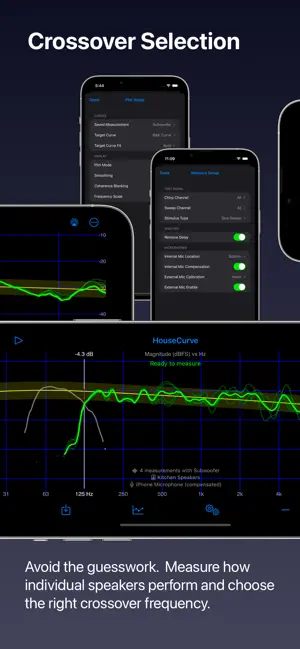
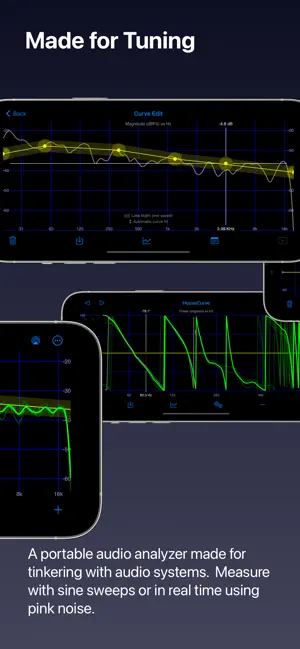
HouseCurve is a multi-tool for audio systems. Use it for room correction, adjusting equalizers, setting subwoofer phase, choosing crossovers and more. Features: * Sine sweep and real time pink noise measurements * Sweep measurements can be averaged as they are collected * Alternatively, use real time tool to collect moving mic measurements (MMM) * Compare measurements to a selected target curve * Create and edit target curves * Generate room correction filters (PEQ or FIR) * Filters compatible with a variety of systems including Roon, Volumio, CamillaDSP, EqualizerAPO, miniDSP and Crestron DM NAX * Display magnitude, phase and group delay * Use with built-in or external microphones * Connect with AirPlay, Bluetooth, headphone jack (analog) or use external stimulus HouseCurve measures in-room frequency response by listening to your audio system play a sine sweep. Measurements are displayed on top of a target curve, making it easy to see where adjustment is needed. Multiple measurements can be averaged to fully capture how the system sounds in the listening area. With small changes and repeat measurements, you can manually tune your system to the target curve. If your audio system has a parametric equalizer or convolution engine, HouseCurve can automatically generate filter settings to match the target curve. HouseCurve can help with home and car audio system tuning, from system equalization and room correction to subwoofer time alignment and speaker placement. Visit housecurve.com for more information on how HouseCurve works and how to use it. HouseCurve will produce acceptable results with the built in iPhone/iPad microphone. Using calibrated external microphones will provide higher accuracy. The free version of HouseCurve can measure your audio system and display a magnitude plot (aka "frequency response"). Additional features, such as room correction filter generation, advanced measurement tools and target curve editing can be obtained via in-app purchases.
Ratings & reviews
4.7
263 ratings
What’s new
Version 6.1.0 · Updated October 6, 2026
What's new * Users can view and compare saved measurements with Measurements tool. * Connection prompt can be dismissed by tapping it. * User is notified when one year subscription expires. Major changes under the hood * HouseCurve was refactored to use a newer UI toolkit (SwiftUI). This paves the way for new kinds of measurements and better plot control (and some minor items like supporting Apple's Liquid Glass style). If you notice any odd behaviour, please let me know at [email protected].
App privacy
The developer, Greg Wilding, reported these privacy practices to Apple.
Data Not Linked to You
The following data, which may be collected but is not linked to your identity, may be used for the following purposes:
- Usage Data: Product Interaction
Used for: Analytics
Alternatives to HouseCurve
Looking for apps like HouseCurve? Here are 6 similar apps on the App Store. The highest rated is Decibel Meter · Sound Analyzer (4.7/5), and 5 of the 6 are free to download.
-
 Frequency Analyzer
4.5
Frequency Analyzer
4.5
-
 Decibel : dB sound level meter
4.6
Decibel : dB sound level meter
4.6
-
 Decibel X:dB Sound Level Meter
4.6
Decibel X:dB Sound Level Meter
4.6
-
 CarSweep: Car Audio & Room EQ
3.3
CarSweep: Car Audio & Room EQ
3.3
-
 Decibel Meter · Sound Analyzer
4.7
Decibel Meter · Sound Analyzer
4.7
-
 Sound Meter (SPL meter)
| App | Rating | Price | Last updated | Compare |
|---|---|---|---|---|
| HouseCurve | 4.7 / 5 (263 ratings) | Free | October 6, 2026 | |
| Frequency Analyzer | 4.5 / 5 (180) | Free | Oct 3, 2026 | Compare |
| Decibel : dB sound level meter | 4.6 / 5 (36,148) | Free | Feb 12, 2026 | Compare |
| Decibel X:dB Sound Level Meter | 4.6 / 5 (163,256) | Free | Oct 11, 2026 | Compare |
| CarSweep: Car Audio & Room EQ | 3.3 / 5 (6) | Free | Oct 20, 2026 | Compare |
| Decibel Meter · Sound Analyzer | 4.7 / 5 (1,308) | Free | Oct 1, 2026 | Compare |
| Sound Meter (SPL meter) | – | 0.99 USD | Jun 5, 2026 | Compare |
Compare HouseCurve with the top alternatives: ratings, updates, ASO score and keyword gaps →