

Find My Earbuds: Bluetooth
Peter Muniu Utilities iPhoneiPadiPod touch
Find My Earbuds: Bluetooth is a free Utilities app for iPhone and iPad by Peter Muniu. Requires iOS 15.0. Updated October 27, 2026.
- Price
- Free
- on the App Store
- Size
- 35 MB
- Age 4+
- Updated
- Oct 27
- 2026 · v1.8
Screenshots
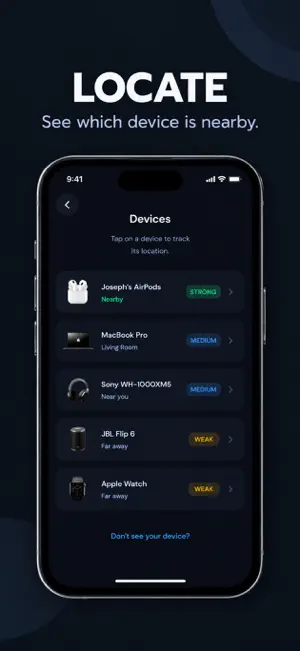


About Find My Earbuds: Bluetooth
# Find My Earbuds: Device Finder Lost your earbuds, headphones, smartwatch, speaker, or another Bluetooth device? **Find My Earbuds: Device Finder** helps you quickly scan for nearby Bluetooth devices and locate them using real-time Bluetooth signal strength. Whether your earbuds are under the couch, your headphones are in another room, or your Bluetooth device is nearby but out of sight, the app helps you find it faster. ## Find My Earbuds Looking for a quick way to **find your earbuds**? Start a Bluetooth scan to discover nearby devices, select your earbuds, and follow the live signal strength. As you move closer to your lost device, the signal can become stronger, helping you narrow down its location. ## Find My Bluetooth Device Need to **find a Bluetooth device**? Scan for nearby Bluetooth devices and view their signal strength in real time. Use the signal to determine whether you are getting closer to or farther away from your device. ## Find My Headphones Lost your headphones? Use the Bluetooth scanner to detect nearby headphones and other compatible Bluetooth devices. Check the signal strength as you move around to help locate your device. ## Features • Find lost earbuds quickly • Find nearby Bluetooth devices • Scan for nearby Bluetooth devices • Live Bluetooth signal strength • Device distance estimation • Fast Bluetooth scanner • Simple and easy-to-use interface • Modern and lightweight design • Smooth and responsive performance ## Works With • Wireless earbuds • Bluetooth headphones • Smartwatches • Bluetooth speakers • Phones • Tablets • Laptops • Bluetooth trackers • Other nearby Bluetooth devices ## How to Find a Lost Earbud or Bluetooth Device 1. Open the app and start scanning. 2. Find your lost device in the list of nearby Bluetooth devices. 3. Select the device you want to locate. 4. Follow the Bluetooth signal strength as you move around. 5. When the signal gets stronger, you're getting closer to your device. **Lost an earbud or Bluetooth device? Don't worry — start scanning and find it faster.**
What’s new
Version 1.8 · Updated October 27, 2026
ui updates Pricing updated based on customers feedback
App privacy
The developer, Peter Muniu, reported these privacy practices to Apple.
Data Not Collected
The developer does not collect any data from this app.
Alternatives to Find My Earbuds: Bluetooth
Looking for apps like Find My Earbuds: Bluetooth? Here are 6 similar apps on the App Store. The highest rated is Scanvera: QR & Barcode Kit (5.0/5), and all 6 are free to download.
-
 Scanvera: QR & Barcode Kit
5.0
Scanvera: QR & Barcode Kit
5.0
-
 BudGuard
5.0
BudGuard
5.0
-
 StowSnap
5.0
StowSnap
5.0
-
 FindBud: Find Lost Device
-
 Air Finder: My Lost Device
-
 Find My AirPhone:Device Finder
| App | Rating | Price | Last updated | Compare |
|---|---|---|---|---|
| Find My Earbuds: Bluetooth | – | Free | October 27, 2026 | |
| Scanvera: QR & Barcode Kit | 5.0 / 5 (1) | Free | Sep 24, 2026 | Compare |
| BudGuard | 5.0 / 5 (1) | Free | Jul 31, 2026 | Compare |
| StowSnap | 5.0 / 5 (1) | Free | Apr 1, 2026 | Compare |
| FindBud: Find Lost Device | – | Free | Jan 24, 2026 | Compare |
| Air Finder: My Lost Device | – | Free | Oct 9, 2026 | Compare |
| Find My AirPhone:Device Finder | – | Free | Mar 22, 2026 | Compare |