

Air Finder: My Lost Device
Isa COSKUN Utilities iPhoneiPadiPod touch
Air Finder: My Lost Device is a free Utilities app for iPhone and iPad by Isa COSKUN. Requires iOS 17.0. Updated October 9, 2026.
- Price
- Free
- on the App Store
- Size
- 27 MB
- Age 4+
- Updated
- Oct 9
- 2026 · v1.0.4
Screenshots



About Air Finder: My Lost Device
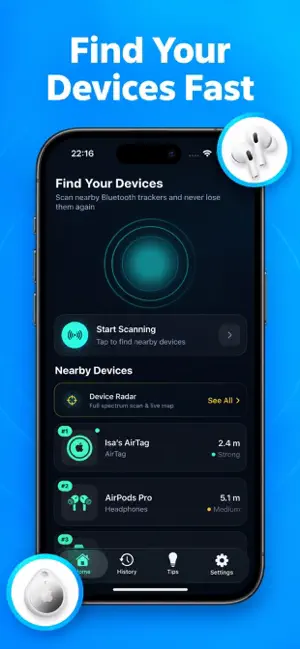
Can't find your AirPods, headphones, or Apple Pencil? Bluetooth Finder: Lost Device helps you locate supported Bluetooth accessories nearby using live signal strength, a radar-style view, and estimated distance. Whether your earbuds slipped between the cushions or you misplaced a Bluetooth accessory around the house, start a scan and follow the signal to narrow your search. FIND YOUR BLUETOOTH DEVICES Search for compatible AirPods, wireless earbuds, headphones, Apple Pencil, speakers, smartwatches, and fitness trackers. Supported iPhone and iPad devices may also appear when they broadcast a detectable Bluetooth Low Energy signal. LIVE SIGNAL TRACKING Select a detected device and watch its signal strength change as you move. Walk slowly, compare readings, and focus your search on areas with a stronger signal. RADAR & DISTANCE ESTIMATES Use the radar-style display and estimated distance to help explore your surroundings. Get additional clues about how close a detected accessory may be. BLUETOOTH SCANNER See nearby compatible BLE devices in one place. Review detected device names and available signal information to help identify the accessory you are looking for. SEARCH HISTORY & SCAN DETAILS Revisit previous searches and recorded scan information. Review available device details, signal readings, and distance estimates from your scans. HOW TO FIND A DEVICE 1. Turn on Bluetooth and allow Bluetooth access. 2. Open the app and scan for nearby devices. 3. Select the accessory you recognize. 4. Move slowly while watching the signal strength. 5. Search nearby areas where the signal is stronger. DESIGNED FOR EVERYDAY SEARCHES • Look for misplaced wireless earbuds at home. • Search for supported headphones near your desk. • Locate a compatible Apple Pencil around your workspace. • Find a nearby Bluetooth speaker or fitness tracker. • Check which compatible BLE accessories are within range. BEFORE YOU START Your accessory must be powered on, within Bluetooth range, and broadcasting a detectable BLE signal. Compatibility depends on the device model and its current state. Some devices may not appear while asleep, connected to another device, or inside a closed charging case. Signal strength and distance estimates can fluctuate because of walls, furniture, interference, and device hardware. They provide search guidance, not an exact position or direction. This app scans nearby Bluetooth signals. It does not provide remote GPS tracking or access to Apple's Find My network. PREMIUM FEATURES Upgrade for unlimited Bluetooth scans and additional tracking features. Choose a monthly subscription, yearly subscription, or one-time lifetime purchase. Current prices and included features are displayed in the app before purchase. Payment is charged to your Apple Account at confirmation of purchase. Subscriptions automatically renew unless canceled at least 24 hours before the current period ends. Your account is charged for renewal within 24 hours before the end of the current period. Manage or cancel subscriptions in your Apple Account settings. The lifetime purchase does not renew. Bluetooth Finder: Lost Device is an independent app and is not affiliated with or endorsed by Apple Inc. AirPods, Apple Pencil, iPhone, and iPad are trademarks of Apple Inc. Product names describe compatibility where applicable. Privacy Policy : https://blanchedalmond-whale-655962.hostingersite.com/privacy.html Terms of Use : https://blanchedalmond-whale-655962.hostingersite.com/terms.html
What’s new
Version 1.0.4 · Updated October 9, 2026
bugs fixed
App privacy
The developer, Isa COSKUN, reported these privacy practices to Apple.
Data Used to Track You
The following data may be used to track you across apps and websites owned by other companies:
- Identifiers: Device ID
Data Not Linked to You
The following data, which may be collected but is not linked to your identity, may be used for the following purposes:
- Identifiers: Device ID
- Usage Data: Advertising Data
Used for: Third-Party Advertising
Alternatives to Air Finder: My Lost Device
Looking for apps like Air Finder: My Lost Device? Here are 6 similar apps on the App Store. The highest rated is Finder Radar (5.0/5), and 5 of the 6 are free to download.
-
 Finder Radar
5.0
Finder Radar
5.0
-
 Nearon: Bluetooth Finder
5.0
Nearon: Bluetooth Finder
5.0
-
 Metal Detector · Key Finder
-
 Find My Earbuds: Bluetooth
-
 URL Unraveler
-
 RoomRadar: Device Finder
3.0
RoomRadar: Device Finder
3.0
| App | Rating | Price | Last updated | Compare |
|---|---|---|---|---|
| Air Finder: My Lost Device | – | Free | October 9, 2026 | |
| Finder Radar | 5.0 / 5 (1) | Free | Apr 2, 2026 | Compare |
| Nearon: Bluetooth Finder | 5.0 / 5 (2) | Free | Sep 26, 2026 | Compare |
| Metal Detector · Key Finder | – | 9.99 USD | May 26, 2026 | Compare |
| Find My Earbuds: Bluetooth | – | Free | Oct 27, 2026 | Compare |
| URL Unraveler | – | Free | Feb 20, 2026 | Compare |
| RoomRadar: Device Finder | 3.0 / 5 (2) | Free | Jun 30, 2026 | Compare |