

PDF Sign: Signature Maker
Hayrettin Ata Erdal Business iPhoneiPadiPod touch
PDF Sign: Signature Maker is a free Business app for iPhone and iPad by Hayrettin Ata Erdal. Requires iOS 17.0. Updated September 26, 2026.
- Price
- Free
- on the App Store
- Size
- 13 MB
- Age 4+
- Updated
- Sep 26
- 2026 · v1.4
Screenshots



About PDF Sign: Signature Maker
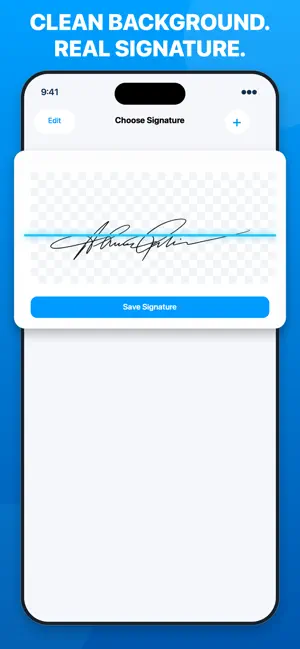
Sign PDFs with the signature you actually write on paper. PDF Sign & Scan turns your handwritten signature into a clean, reusable signature for digital documents. Scan it once, place it precisely, fill forms, scan paper documents, and share the finished PDF—without printing. CREATE A CLEAN SIGNATURE FROM PAPER • Write your signature on paper and scan it with your camera • Remove the background for a clean, natural result • Save your signature once and reuse it whenever you need it SIGN AND FILL PDFS • Import a PDF from your device • Add your saved signature to any page • Move and resize it for precise placement • Fill forms and review the finished document before sharing SCAN PAPER DOCUMENTS TO PDF • Capture paper documents with your iPhone or iPad camera • Turn them into clean, shareable PDFs • Continue directly from scanning to signing MADE FOR EVERYDAY DOCUMENTS Use PDF Sign & Scan for contracts, agreements, NDAs, waivers, consent forms, leases, work documents, applications, and other everyday paperwork. FROM PAPER TO SIGNED PDF 1. Scan and save your handwritten signature 2. Import a PDF or scan a paper document 3. Place your signature and fill the form 4. Save and share the finished PDF No printing. No awkward finger-drawn signatures. Your real handwriting, ready whenever you need it. Privacy Policy: https://sites.google.com/view/pdfsign-privacy-policy?usp=sharing Terms of Use: https://sites.google.com/view/pdf-sign-terms-of-use?usp=sharing
What’s new
Version 1.4 · Updated September 26, 2026
Simplified the subscription screen for a clearer purchase experience.
App privacy
The developer, Hayrettin Ata Erdal, reported these privacy practices to Apple.
Data Not Linked to You
The following data, which may be collected but is not linked to your identity, may be used for the following purposes:
- Identifiers: Device ID
- Usage Data: Product Interaction
- Diagnostics: Crash Data
- Purchases: Purchase History
Used for: Analytics, App Functionality
Alternatives to PDF Sign: Signature Maker
Looking for apps like PDF Sign: Signature Maker? Here are 6 similar apps on the App Store. The highest rated is Signature Creator - SignCraft (5.0/5), and all 6 are free to download.
-
 Task Point: Focus Todo Planner
-
 Signature Creator - SignCraft
5.0
Signature Creator - SignCraft
5.0
-
 Fill & Sign PDF Forms
-
 Clube L Center
-
 Sign Lite
-
 FormSign: Fill & Sign PDF
| App | Rating | Price | Last updated | Compare |
|---|---|---|---|---|
| PDF Sign: Signature Maker | – | Free | September 26, 2026 | |
| Task Point: Focus Todo Planner | – | Free | Oct 26, 2026 | Compare |
| Signature Creator - SignCraft | 5.0 / 5 (1) | Free | Jul 10, 2026 | Compare |
| Fill & Sign PDF Forms | – | Free | Oct 8, 2026 | Compare |
| Clube L Center | – | Free | Feb 10, 2026 | Compare |
| Sign Lite | – | Free | Aug 5, 2026 | Compare |
| FormSign: Fill & Sign PDF | – | Free | Oct 17, 2026 | Compare |