

FormSign: Fill & Sign PDF
Sahil Jain Productivity iPhoneiPadiPod touch
FormSign: Fill & Sign PDF is a free Productivity app for iPhone and iPad by Sahil Jain. Requires iOS 17.0. Updated October 17, 2026.
- Price
- Free
- on the App Store
- Size
- 2 MB
- Age 4+
- Updated
- Oct 17
- 2026 · v1.3
Screenshots



About FormSign: Fill & Sign PDF
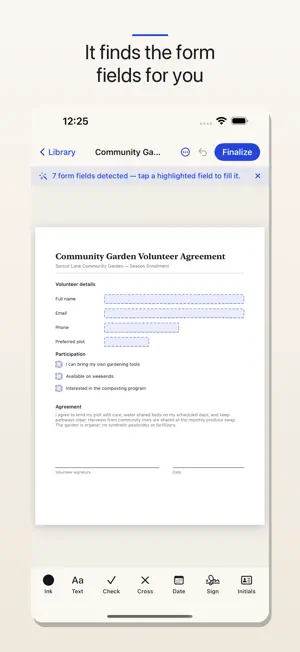
Fill out and sign PDF documents right on your iPhone and iPad — leases, contracts, waivers, school and medical forms, freelance agreements — without a subscription and without your documents ever leaving your device. FormSign is built for the moment a real form lands in your inbox and needs to go back signed today. Import it, fill it, sign it, send it. That's the whole app. FILL ANY PDF • Automatic form-field detection — official PDFs with real fields become tappable instantly • Tap anywhere to add text, checkmarks, X-marks, and dates on scanned or flat forms • Move, resize, and recolor every mark; ink in black, blue, or red • Save "Your Info" once — name, email, phone, address — and fill future forms with a tap • Find any word inside a document with in-document search SIGN YOUR WAY • Draw your signature with a finger or Apple Pencil • Or type it in a handwriting-style font • Save your signature and initials for one-tap reuse on every document • Add a date next to your signature automatically SCAN PAPER • Snap a photo of a paper form and turn it into a fillable PDF • Automatic edge detection and perspective correction FINISH & SHARE • Flatten and finalize so your entries and signature are burned in permanently — no editable layers, no tampering • The finished PDF opens correctly in any viewer, on any device • Share by email, AirDrop, Messages, or save to Files • Save any page as an image to your Photos PRIVATE BY DESIGN Your documents and signatures never leave your device. FormSign has no servers, no account, and collects nothing. There is no cloud to route your lease or medical form through — because there shouldn't be. PAY ONCE. YOURS FOREVER. Your first 5 documents are free, with every feature included. After that, one single purchase unlocks unlimited documents forever — on every device signed into your Apple Account. No monthly fee. No annual fee. No "upgrade to continue." A note on signatures: FormSign applies a visual signature mark, which is broadly accepted for everyday agreements under most e-signature laws. For documents that require a certified or notarized e-signature, use a certified service. This isn't legal advice. Made by Ashvara.
What’s new
Version 1.3 · Updated October 17, 2026
New in 1.3, built from your requests: • Cleaner editing: tools for a selected field now sit in a bar below the page, so nothing covers your text. • Text size: make any field's text bigger or smaller with A− / A+. • Duplicate: copy a field (same size and style) and drag it into place. • Import your signature from a photo or file. FormSign removes the paper background and keeps only the ink, right on your device.
App privacy
The developer, Sahil Jain, reported these privacy practices to Apple.
Data Not Collected
The developer does not collect any data from this app.
Alternatives to FormSign: Fill & Sign PDF
Looking for apps like FormSign: Fill & Sign PDF? Here are 6 similar apps on the App Store. The highest rated is FormFill: Fill & Sign PDF (5.0/5), and all 6 are free to download.
-
 FormFill: Fill & Sign PDF
5.0
-
 SingleForm
-
 PDF Signer & Form Filler
-
 FormDrop
-
 PDF Fill & Sign Editor
-
 Kinster: Family Forms
5.0
| App | Rating | Price | Last updated | Compare |
|---|---|---|---|---|
| FormSign: Fill & Sign PDF | – | Free | October 17, 2026 | |
| FormFill: Fill & Sign PDF | 5.0 / 5 (1) | Free | Oct 13, 2026 | Compare |
| SingleForm | – | Free | May 10, 2026 | Compare |
| PDF Signer & Form Filler | – | Free | Sep 4, 2026 | Compare |
| FormDrop | – | Free | Jul 27, 2026 | Compare |
| PDF Fill & Sign Editor | – | Free | Sep 30, 2026 | Compare |
| Kinster: Family Forms | 5.0 / 5 (1) | Free | Aug 29, 2026 | Compare |