

PainterLab:Paint Mixing
建波 胡 Graphics & Design iPhoneiPadiPod touch
PainterLab:Paint Mixing is a free Graphics & Design app for iPhone and iPad by 建波 胡. Requires iOS 15.6. Updated August 18, 2026.
- Price
- Free
- on the App Store
- Size
- 24 MB
- Age 4+
- Updated
- Aug 18
- 2026 · v1.0
Screenshots


About PainterLab:Paint Mixing
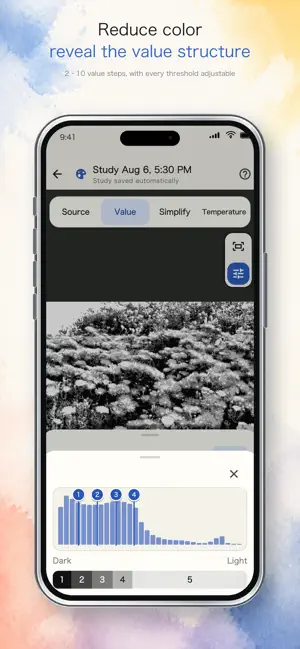
PainterLab turns any photo into a practical painting study you can observe, simplify, and mix from. It is not a coloring game, and it does not paint for you. PainterLab helps painters and art students understand color shapes, value structure, and temperature relationships, then translate selected screen colors into real-paint mixing ideas. SIMPLIFY COMPLEX SCENES Organize a busy photo into clear, paintable color shapes. Explore natural color blocks, limited palettes, and region-based forms, then adjust detail and smoothing for your study. SEE THE VALUE STRUCTURE Compress an image into 2–10 value levels to study large light-and-dark relationships, grayscale organization, and Notan. Use the adjustable histogram to control each value boundary. UNDERSTAND COLOR TEMPERATURE Compare cool, neutral, and warm relationships across the image. Adjust balance and smoothing to reveal the overall temperature structure more clearly. TURN SCREEN COLORS INTO REAL PAINT Select a color from the original photo or a simplified color shape. PainterLab uses your chosen paint palette to suggest practical paint combinations and mixing proportions. You can also photograph your mixed paint and compare it with the target color. BUILD YOUR OWN PAINT PALETTES Choose the physical paints you already own and organize them into custom palettes. Mixing recipes are calculated using the palette selected for each study. SAVE EVERY STUDY Your source photo, observation modes, adjustments, and sampled colors are saved in the Study Library, so you can return and continue practicing at any time. KEY FEATURES • Photo-to-color-shape simplification • Value studies and Notan analysis • Warm and cool color-temperature analysis • Color sampling and real-paint mixing recipes • Custom physical-paint palettes • Study Library with automatic saving • On-device photo processing PainterLab includes free basic features. PainterLab Pro unlocks unlimited studies, additional simplification styles, fine detail controls, and other advanced features. Subscription options and local pricing are shown by the App Store before purchase and can be managed or canceled through your App Store account. Privacy Policy: https://wavecave-studio.uk/painterlab/privacy-policy Terms of Use: https://wavecave-studio.uk/painterlab/terms-of-service
App privacy
The developer, 建波 胡, reported these privacy practices to Apple.
Data Not Collected
The developer does not collect any data from this app.
Alternatives to PainterLab:Paint Mixing
Looking for apps like PainterLab:Paint Mixing? Here are 6 similar apps on the App Store.
-
 PaintSteps
-
 ART to RELAX
-
 Painter's Toolkit: Color Match
-
 Tinto Color Palette
-
 Art Reference: Value Study
-
 Tattoo Stencil Maker: Print
| App | Rating | Price | Last updated | Compare |
|---|---|---|---|---|
| PainterLab:Paint Mixing | – | Free | August 18, 2026 | |
| PaintSteps | – | Free | Sep 15, 2026 | Compare |
| ART to RELAX | – | Free | Apr 13, 2026 | Compare |
| Painter's Toolkit: Color Match | – | Free | Sep 15, 2026 | Compare |
| Tinto Color Palette | – | Free | May 20, 2026 | Compare |
| Art Reference: Value Study | – | Free | Sep 9, 2026 | Compare |
| Tattoo Stencil Maker: Print | – | Free | Aug 26, 2026 | Compare |