

Readium: Text to Speech PDF
Raquib Ul Alam Productivity iPhoneiPadiPod touch
Readium: Text to Speech PDF is a free Productivity app for iPhone and iPad by Raquib Ul Alam. Rated 5.0/5 from 4 ratings. Requires iOS 16.4.
- Rating
- 5.0
- 4 ratings
- Price
- Free
- on the App Store
- Size
- 106 MB
- Age 12+
- Updated
- Oct 13
- 2026 · v1.0.33
Screenshots


About Readium: Text to Speech PDF
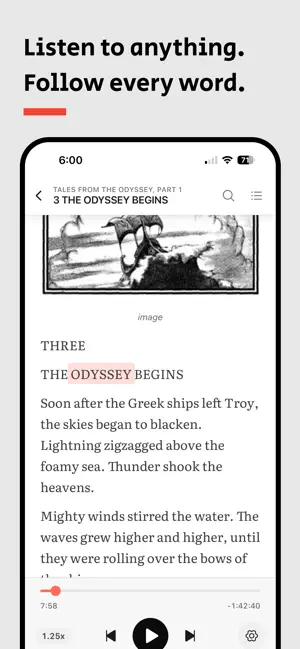
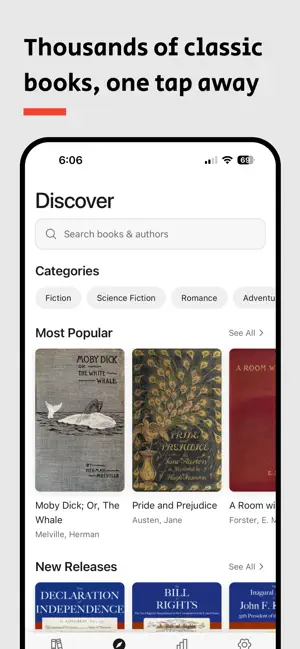
Turn any book, PDF, or web article into a natural-sounding audiobook — and follow every word as it's read aloud. Lifelike voices, online or offline. Read faster, remember more. Readium reads your books, PDFs, articles, and documents out loud with beautiful, human-sounding voices — while highlighting each word in real time so your eyes and ears work together. It's the calm, private way to get through your reading list. WHY READIUM • Listen and follow along — real-time word highlighting keeps you focused and boosts recall • Lifelike AI voices plus built-in device voices that work fully offline • Beautiful, distraction-free reader — 4 themes (Light, Dark, Slate, Sepia) and reading fonts • Background playback with lockscreen media controls showing the book title and author • Adjustable speed, sentence skip, and a sleep-friendly experience • Thousands of classic books from Project Gutenberg — one tap to add to your library • Optimized for iPhone and iPad, including split-view multitasking IMPORT ANYTHING • EPUB, PDF, MOBI, AZW3, and FictionBook (FB2) • Plain text, Markdown, and HTML files • Web articles — browse to any page inside Readium and add it with a tap • Share sheet — send a link from Safari or any other app straight to your library • Rename titles and edit authors to keep your library tidy HOW IT WORKS 1. Import a book, PDF, or paste a web link 2. Pick a voice — a lifelike AI voice or a device voice that works offline 3. Press play and follow the highlighted words VOICES IN YOUR LANGUAGE English, Spanish, French, German, Portuguese, and Bangla — with more on the way. Preview any voice before you pick. GREAT FOR Commuters and multitaskers. Students and researchers. Readers with dyslexia, ADHD, or low vision. Anyone who wants a beautiful, listen-along reading experience. Reading, but faster — and finally enjoyable. Download Readium and start listening.
What’s new
Version 1.0.33 · Updated October 13, 2026
- New: Give your books a fresh look with Libron, a new reading font you can choose in Settings or preview during setup. - New: Explore the open-source credits behind Readium from Settings, even when you're offline. - Fixed: Get back to listening with cloud voices - a connection issue no longer stops them from reading your books aloud. - Improved: some UX button enhancements - Improved: Editing a web address now fits neatly into the browser's address bar, with a cleaner look as you find your next read.
App privacy
The developer, Raquib Ul Alam, reported these privacy practices to Apple.
Data Not Linked to You
The following data, which may be collected but is not linked to your identity, may be used for the following purposes:
- Identifiers: Device ID
- Usage Data: Product Interaction
- User Content: Other User Content
- Diagnostics: Crash Data, Performance Data
Used for: Analytics, App Functionality
Alternatives to Readium: Text to Speech PDF
Looking for apps like Readium: Text to Speech PDF? Here are 6 similar apps on the App Store. The highest rated is ONarrator: Offline Read Aloud (5.0/5), and all 6 are free to download.
-
 Vox - Offline Audio Generator
1.0
Vox - Offline Audio Generator
1.0
-
 ONarrator: Offline Read Aloud
5.0
ONarrator: Offline Read Aloud
5.0
-
 Readium: Text to Speech
-
 In My Voice
3.0
In My Voice
3.0
-
 Jot – Offline Notes & AI
1.0
Jot – Offline Notes & AI
1.0
-
 Lesscreen: Screen Time Limit
| App | Rating | Price | Last updated | Compare |
|---|---|---|---|---|
| Readium: Text to Speech PDF | 5.0 / 5 (4 ratings) | Free | October 13, 2026 | |
| Vox - Offline Audio Generator | 1.0 / 5 (1) | Free | Jun 17, 2026 | Compare |
| ONarrator: Offline Read Aloud | 5.0 / 5 (1) | Free | Oct 16, 2026 | Compare |
| Readium: Text to Speech | – | Free | Sep 15, 2026 | Compare |
| In My Voice | 3.0 / 5 (1) | Free | Jun 4, 2025 | Compare |
| Jot – Offline Notes & AI | 1.0 / 5 (1) | Free | May 27, 2026 | Compare |
| Lesscreen: Screen Time Limit | – | Free | Oct 1, 2026 | Compare |