

LayerClip
RECURSIVE, LLC Photo & Video iPhoneiPadiPod touch
LayerClip is a free Photo & Video app for iPhone and iPad by RECURSIVE, LLC. Requires iOS 26.0. Updated October 23, 2026.
- Price
- Free
- on the App Store
- Size
- 216 MB
- Age 4+
- Updated
- Oct 23
- 2026 · v1.5
Screenshots

About LayerClip
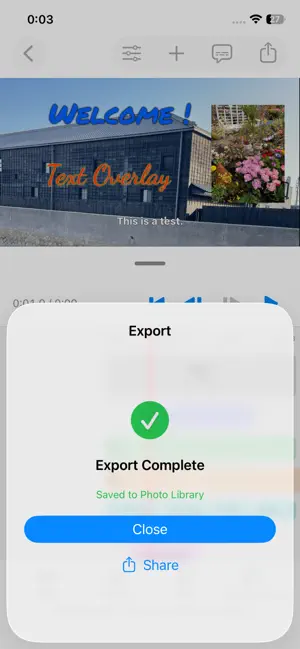
[ Ultra-Fast, Lightweight Video Editing Built for Creators ] Tired of bloated, slow video editors with expensive recurring subscriptions? LayerClip is built natively for iOS to deliver a blazing-fast, lightweight editing experience. From launch to timeline preview and 4K export, everything feels instantaneous. With on-device automatic transcription, creating captivating Reels, TikToks, and YouTube Shorts has never been easier. ◆ Key Features [ 1. Lightning-Fast Auto Captions ] - Transcribe audio into dynamic subtitles in seconds with a single tap. - 100% on-device processing: secure, private, and ultra-fast. - Fully customize fonts, colors, strokes, and positioning. [ 2. Intuitive Multi-Layer Timeline ] - Layer multiple text tracks, images, and overlays seamlessly. - Smooth timeline scrubbing and instant preview without frame drops. - Precise trimming, splitting, and arrangement. [ 3. High-Quality 4K Export ] - Export your projects in crisp 4K resolution without quality loss. - Optimized native rendering engine cuts down waiting time significantly. ◆ Flexible Pricing Designed for You Choose the plan that best fits your workflow, including a Lifetime option for those who prefer to avoid monthly subscriptions: - Monthly Plan - Annual Plan (with a 7-day Free Trial) - Lifetime Access (One-time purchase, pay once and keep forever) ◆ Privacy-First Architecture All transcription and video processing are performed entirely on your device. Your videos and audio are never uploaded to any external servers. Terms of Service: https://your-domain.com/terms Privacy Policy: https://your-domain.com/privacy
What’s new
Version 1.5 · Updated October 23, 2026
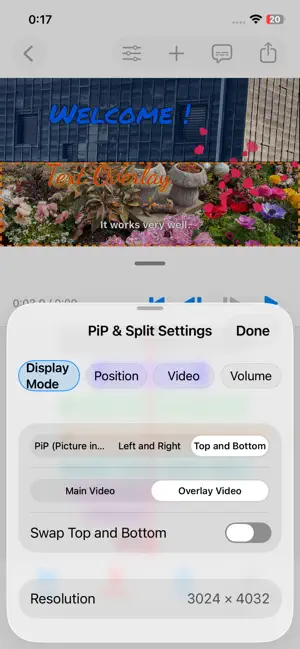
[New Features & Major Editing Enhancements] • Full Undo & Redo Support: Easily undo or redo any action across both timeline editing (trimming, splitting, reordering, duplicating, deleting) and subtitle editing with convenient buttons in the top navigation bar. • Clip Duplication: Duplicate any timeline block (video clips, titles, effects, BGM, and PiP overlays) in a single tap. When duplicating video clips, choose between duplicating just the video or keeping all associated titles, subtitles, and effects. • Smart Scene Following: Titles, subtitles, visual effects, and PiP clips now automatically stay attached and track with their respective video clips whenever you trim, split, reorder, or ripple-edit the main track. • Multi-Layer Visual Effects: Stack multiple effect clips across separate lanes to combine different visual filters and particle effects simultaneously. • Redesigned Editing Toolbar: Streamlined the bottom toolbar into four spacious buttons (Split, Duplicate, Delete, Edit) featuring an all-new delete menu with full-lane subtitle clearing.
Alternatives to LayerClip
Looking for apps like LayerClip? Here are 6 similar apps on the App Store. The highest rated is SkipMov - Pick Best Moments (5.0/5), and 5 of the 6 are free to download.
-
 VideoPlayerS - Media Player
-
 SkipMov - Pick Best Moments
5.0
-
 Video Splitter - BlitzCut AI
4.4
-
 GifMov - Gif Maker
4.7
-
 T Viewer - 動画保存 再生速度変更
5.0
-
 BlackVideo (One-Touch Rec!)
4.3
| App | Rating | Price | Last updated | Compare |
|---|---|---|---|---|
| LayerClip | – | Free | October 23, 2026 | |
| VideoPlayerS - Media Player | – | Free | Sep 16, 2026 | Compare |
| SkipMov - Pick Best Moments | 5.0 / 5 (1) | Free | Jun 13, 2026 | Compare |
| Video Splitter - BlitzCut AI | 4.4 / 5 (20) | Free | Oct 6, 2026 | Compare |
| GifMov - Gif Maker | 4.7 / 5 (26) | Free | Aug 14, 2026 | Compare |
| T Viewer - 動画保存 再生速度変更 | 5.0 / 5 (1) | Free | Jul 25, 2026 | Compare |
| BlackVideo (One-Touch Rec!) | 4.3 / 5 (44) | 1.99 USD | Oct 2, 2026 | Compare |
Compare LayerClip with the top alternatives: ratings, updates, ASO score and keyword gaps →