

Goal Timer: Time Track Goals
Vladyslav Nedodaiev Productivity iPhoneiPadiPod touch
Goal Timer: Time Track Goals is a free Productivity app for iPhone and iPad by Vladyslav Nedodaiev. Rated 5.0/5 from 1 ratings. Requires iOS 15.0.
- Rating
- 5.0
- 1 ratings
- Price
- Free
- on the App Store
- Size
- 44 MB
- Age 4+
- Updated
- Oct 1
- 2026 · v1.5
Screenshots


About Goal Timer: Time Track Goals
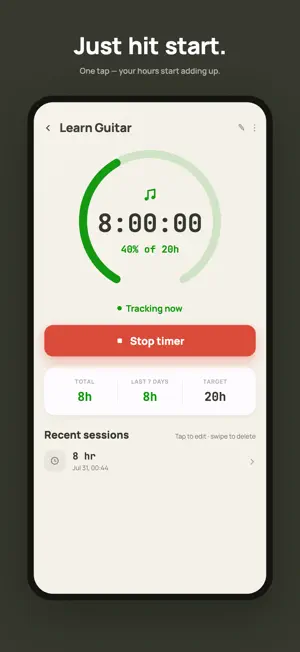
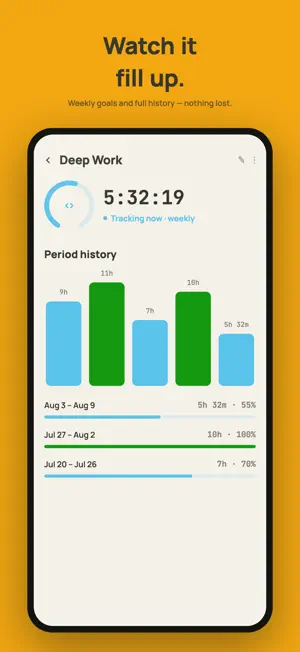
Goal Timer is a warm, encouraging stopwatch for the time you put into what matters — measured in hours, not checkmarks. Habit apps ask "did you?" Goal Timer asks "how much?" A single tap starts the clock. Whenever you work toward a goal, start the timer and forget it's running — your hours quietly accumulate into visible, compounding progress. THE HOURS ADD UP Most tracking apps count streaks and checkmarks. Goal Timer counts the one thing that actually builds skills, fitness, and craft: time. See total hours tracked, your last 7 days, and how close you are to your target — with a live count-up and full per-period history. THREE TAPS TO VISIBLE PROGRESS 1. Name your goal, pick a colour, and — if you like — set a target. 2. Whenever you work on it, start the timer. 3. Watch the hours add up toward what matters. BUILT TO BE TRUSTWORTHY The timer is timestamp-based, so your time is safe even if the app closes, restarts, or your phone dies mid-session. Run several timers at once — deep work and a workout, together. An ongoing notification shows every running timer, and you can stop it right from the notification shade. ONE-TIME TOTALS OR RECURRING GOALS Accumulate hours toward a single lifetime target, or set a goal that resets each day or week. Every finished period is quietly filed into a history you can look back on, so your stats keep their full story. SEE WHERE YOUR HOURS GO Insights turn your sessions into a picture: a 26-week activity heatmap, weekly charts, your best day of the week, and time-of-day patterns — for a single goal or everything at once. Free, because seeing your effort is the whole point. KEEP THE STREAK GOING Show up and your streak grows — a day at a time, or a period at a time for recurring goals — with milestones at 3, 7, 14, 30 days and beyond. Miss a day? A streak freeze bridges it so one off day doesn't wipe weeks of consistency. FOCUS, ON PURPOSE Need to lock in? Start a Focus session — a countdown, Pomodoro cycles, or open-ended — with the screen kept awake and distractions out. Every minute still logs straight to the goal. (Pro) HOME-SCREEN WIDGETS Start, stop, and glance at your progress from a home-screen widget — no need to open the app to keep the hours honest. HONEST, EDITABLE HISTORY Forgot to stop a timer? Tap any past session to fix its length, date, and time. Log time after the fact. Close a finished goal and reopen it whenever you like. Your tracked hours stay accurate. EASY ON THE EYES A warm, considered palette with a beautiful dark mode across every screen and widget. No clutter, no guilt, no noise. FREE TO USE — NO ADS The full core loop is free and genuinely useful: track up to 3 goals, run a timer, and see your progress, history, insights, and streaks. No ads, ever, on any tier. GO PRO WHEN YOU'RE READY Goal Timer Pro unlocks scale and depth: • Unlimited goals — track everything, not just three • Focus Mode — distraction-free countdown, Pomodoro, or open-ended sessions • Multiple timers running at once — several goals in parallel • Edit & add time entries — keep your hours accurate • Export to CSV — your data, whenever you want it • Unlimited streak freezes — Free protects one off day a month; Pro freezes as many as you need WHO IT'S FOR Anyone giving real time to something that matters — deep work and side projects, language learning and practice, workouts and training, reading and study, meditation and creative craft. If it's worth your hours, it's worth tracking. Vague intention, made visible. Start giving your goals the time they deserve. The hours add up. TERMS & PRIVACY Terms of Use (EULA): https://www.apple.com/legal/internet-services/itunes/dev/stdeula/ Privacy Policy: https://goal-timer.com/privacy.html
What’s new
Version 1.5 · Updated October 1, 2026
Five new Pro features, and a clearer look back at your hours. • Focus soundscapes (Pro): rain, a river, ocean waves, wind, a café, a train and more play while you focus, fade out for breaks and keep going with the screen locked • Forecast (Pro): each goal shows when your hours will reach the next milestone at your recent pace • iCloud sync (Pro): your goals and sessions on every iPhone, iPad and Mac signed in to your Apple Account • Siri, Shortcuts and the Action Button (Pro, iOS 17+): start and stop timers without opening the app • Calendar export (Pro): every finished session appears in a "Goal Timer" calendar • Goal history, redesigned: sessions grouped by day, your whole history as you scroll, and a period chart you can tap through • Your year so far: open your Year in Hours from Settings any time • Dates and durations follow your language, and Ukrainian now uses the app's own typeface • Rate and share Goal Timer from Settings • Fewer prompts: notifications are asked for when you start your first timer The hours add up.
App privacy
The developer, Vladyslav Nedodaiev, reported these privacy practices to Apple.
Data Not Collected
The developer does not collect any data from this app.
Alternatives to Goal Timer: Time Track Goals
Looking for apps like Goal Timer: Time Track Goals? Here are 6 similar apps on the App Store. The highest rated is OverRun: Presentation Timer (5.0/5), and all 6 are free to download.
-
 Focalify
-
 WeeklyBlocks: Weekly Planner
-
 GOAL - Habit & Progress
-
 Calume - Time tracker
-
 OneTap
-
 OverRun: Presentation Timer
5.0
OverRun: Presentation Timer
5.0
| App | Rating | Price | Last updated | Compare |
|---|---|---|---|---|
| Goal Timer: Time Track Goals | 5.0 / 5 (1 rating) | Free | October 1, 2026 | |
| Focalify | – | Free | Jul 12, 2026 | Compare |
| WeeklyBlocks: Weekly Planner | – | Free | Aug 6, 2026 | Compare |
| GOAL - Habit & Progress | – | Free | Oct 5, 2026 | Compare |
| Calume - Time tracker | – | Free | Sep 22, 2026 | Compare |
| OneTap | – | Free | Jul 10, 2025 | Compare |
| OverRun: Presentation Timer | 5.0 / 5 (1) | Free | Oct 12, 2026 | Compare |