

WeeklyBlocks: Weekly Planner
MUHAMMET ALPEREN SIVGIN Productivity iPhoneiPadiPod touch
WeeklyBlocks: Weekly Planner is a free Productivity app for iPhone and iPad by MUHAMMET ALPEREN SIVGIN. Requires iOS 17.0. Updated August 6, 2026.
- Price
- Free
- on the App Store
- Size
- 29 MB
- Age 4+
- Updated
- Aug 6
- 2026 · v1.4
Screenshots


About WeeklyBlocks: Weekly Planner
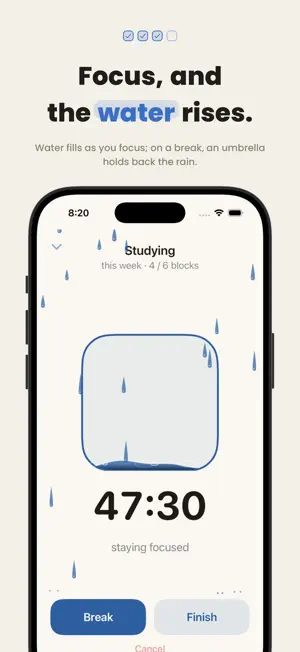
Plan your week, not your day. Say "I'll run 5 times this week". It doesn't matter which days, only that your blocks are filled before the week ends. For the work that needs focus, there's a Pomodoro timer: focus, and your blocks fill. No account, no ads, no internet required. Most to-do apps work daily: do this today, that tomorrow. But habits settle into a weekly rhythm, not a daily one. Missing one day breaks nothing; what matters is reaching your goal by the end of the week. You can set two kinds of goals: - Weekly -- a fixed number of blocks each week (like 4 workouts a week) - Deadline -- a total by a set date (like 20 chapters in 30 days) In timed sessions you watch the water rise as you focus, and an umbrella stops the rain when you take a break. The timer isn't limited to a single block either: fill blocks back to back, and leftover minutes carry into the next one. Not sure how long you'll go? Start without a target. It comes with a safety limit you can remove. A sample week: On Monday you create a "Reading" session with a goal of 5 blocks a week. For each session you start the timer, focus, and fill a block. When you fill the fifth on Friday, your week is complete. New week, a clean start. - Works offline. Backs up automatically to your own iCloud when your device is signed in - Stats show how long you actually worked, alongside the estimate - Turkish and English. Switch language inside the app - No ads, no accounts, nothing to distract you
What’s new
Version 1.4 · Updated August 6, 2026
What's new: -- Music on the focus screen: 14 lofi tracks to listen to while the timer runs. Tap the sound button at the top right, pick a style, shuffle, or choose a single track. The tracks ship inside the app, so no connection is needed. -- Plays in the background: the music keeps going while the screen is locked and stops on its own when the session ends. -- Polite to other apps: if you start Spotify or a podcast, our music steps aside, and it will not come back if you were the one who stopped it. -- Long press the sound button to pause.
App privacy
The developer, MUHAMMET ALPEREN SIVGIN, reported these privacy practices to Apple.
Data Not Collected
The developer does not collect any data from this app.
Alternatives to WeeklyBlocks: Weekly Planner
Looking for apps like WeeklyBlocks: Weekly Planner? Here are 6 similar apps on the App Store. The highest rated is Goal Timer: Time Track Goals (5.0/5), and all 6 are free to download.
-
 Planex360
-
 Habition - Habit Tracker
-
 Otto: AI Calendar & Planner
-
 Streakly-Daily Habit Tracker
-
 EverDay - Weekly Planner
-
 Goal Timer: Time Track Goals
5.0
Goal Timer: Time Track Goals
5.0
| App | Rating | Price | Last updated | Compare |
|---|---|---|---|---|
| WeeklyBlocks: Weekly Planner | – | Free | August 6, 2026 | |
| Planex360 | – | Free | Mar 5, 2026 | Compare |
| Habition - Habit Tracker | – | Free | Jun 21, 2026 | Compare |
| Otto: AI Calendar & Planner | – | Free | Aug 4, 2026 | Compare |
| Streakly-Daily Habit Tracker | – | Free | Apr 22, 2026 | Compare |
| EverDay - Weekly Planner | – | Free | Oct 15, 2026 | Compare |
| Goal Timer: Time Track Goals | 5.0 / 5 (1) | Free | Oct 1, 2026 | Compare |