

DUMP: Carousel & Collage
Gul Eda Aydemir Photo & Video iPhoneiPadiPod touch
DUMP: Carousel & Collage is a free Photo & Video app for iPhone and iPad by Gul Eda Aydemir. Requires iOS 18.6. Updated October 19, 2026.
- Price
- Free
- on the App Store
- Size
- 193 MB
- Age 12+
- Updated
- Oct 19
- 2026 · v3.0
Screenshots

About DUMP: Carousel & Collage
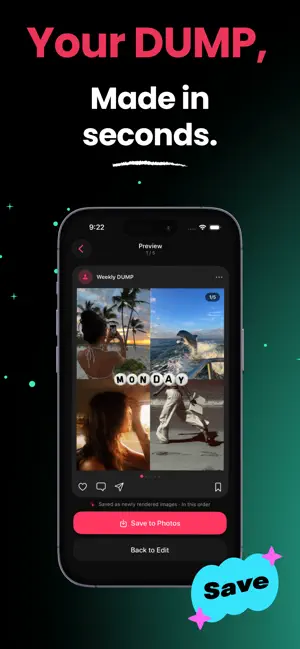
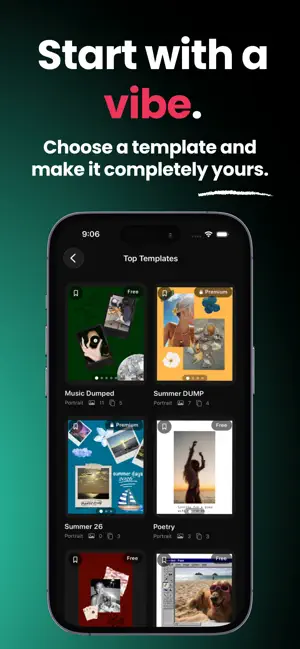
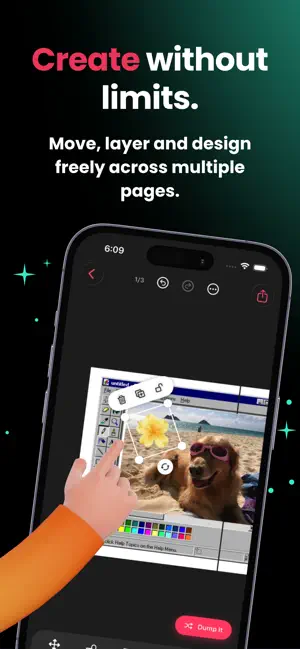
DUMP turns your camera roll into a share-ready photo dump in under a minute. Pull photos and videos from your Favorites, a specific album, or a random selection of your library. DUMP builds the order, lets you swap anything you don't like, and previews the result exactly the way it will look on your feed. SWIPE CAROUSEL - Every photo or video becomes its own slide - Swipe to preview, just like a real carousel post - Replace any slide randomly or pick it yourself - Drag to reorder before you export - Original quality: no compression, no re-encoding CANVAS PAGES - Build multi-page layouts on a freeform canvas - Move, scale, rotate, and crop any element - Mix photo and video layers on the same page - Full undo and redo GRIDS & TEMPLATES - Ready-made grid layouts with adjustable spacing - Ratio presets for square, portrait, and story sizes - Start from a template and drop your media straight in - Save your own layouts and reuse them later FRAMES, STICKERS & TEXT - Polaroid, film, and minimal border frames - Sticker packs and freehand drawing - Text styles with fonts, colors, and shadows - Solid, gradient, and textured backgrounds - Filters and per-photo adjustments EXPORT - Save straight into a new Photos album named after your project - Slides stay in the exact order you set - Export photos and videos together - Live progress, retry, and clear error states BUILT FOR SPEED - No account and no sign-up - Works fully offline - Light and dark mode - English and Turkish - Pick your own accent color PRIVACY Your photos and videos never leave your device. DUMP reads your library only to build your dump, and only after you grant permission. Nothing is uploaded and nothing is shared unless you tap share yourself. DUMP PREMIUM Premium unlocks unlimited projects, larger dumps, premium templates, frames, stickers, text styles, filters, and accent colors. Terms of Use: https://guledaaydemir.github.io/DUMP/terms.html Privacy Policy: https://guledaaydemir.github.io/DUMP/privacypolicy.html EULA : https://www.apple.com/legal/internet-services/itunes/dev/stdeula/ Pick it. Make it. DUMP it.
What’s new
Version 3.0 · Updated October 19, 2026
DUMP 3.0 is here - with new ways to turn your camera roll into something worth sharing. And, as always, plenty of little improvements to make creating feel smoother. Pick it. Make it. DUMP it!
App privacy
The developer, Gul Eda Aydemir, reported these privacy practices to Apple.
Data Not Collected
The developer does not collect any data from this app.
Alternatives to DUMP: Carousel & Collage
Looking for apps like DUMP: Carousel & Collage? Here are 6 similar apps on the App Store. The highest rated is 333: Carousel & Collage Maker (5.0/5), and all 6 are free to download.
-
 Fotario: Collage Maker, Editor
-
 333: Carousel & Collage Maker
5.0
333: Carousel & Collage Maker
5.0
-
 Photo Dump: Carousel Maker
1.0
Photo Dump: Carousel Maker
1.0
-
 Mivly
Mivly
-
 Triply: Travel Photo Editor
-
 LUMENKORN
| App | Rating | Price | Last updated | Compare |
|---|---|---|---|---|
| DUMP: Carousel & Collage | – | Free | October 19, 2026 | |
| Fotario: Collage Maker, Editor | – | Free | Sep 20, 2026 | Compare |
| 333: Carousel & Collage Maker | 5.0 / 5 (4) | Free | Sep 29, 2026 | Compare |
| Photo Dump: Carousel Maker | 1.0 / 5 (1) | Free | Aug 11, 2026 | Compare |
| Mivly | – | Free | Oct 16, 2026 | Compare |
| Triply: Travel Photo Editor | – | Free | Oct 11, 2026 | Compare |
| LUMENKORN | – | Free | Sep 15, 2026 | Compare |