

Accounova
文超 宋 Finance iPhoneiPadiPod touch
Accounova is a free Finance app for iPhone and iPad by 文超 宋. Rated 5.0/5 from 1 ratings. Requires iOS 18.0. Updated September 12, 2026.
- Rating
- 5.0
- 1 ratings
- Price
- Free
- on the App Store
- Size
- 7 MB
- Age 4+
- Updated
- Sep 12
- 2026 · v1.3
Screenshots
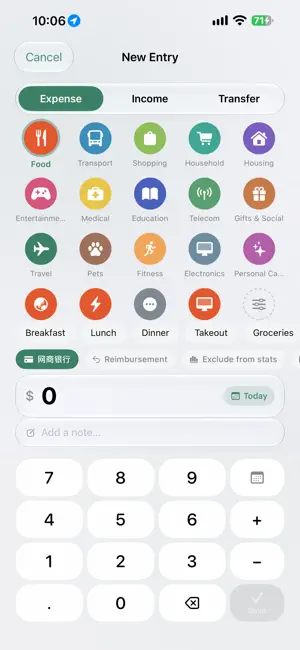

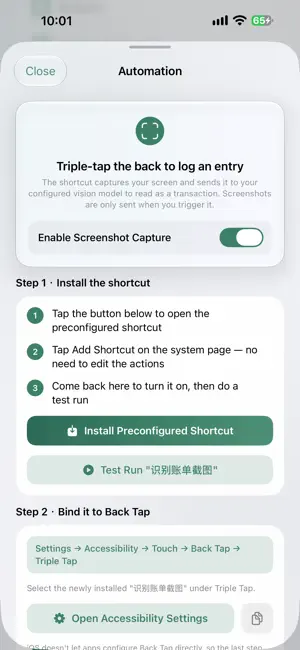

About Accounova
The hardest part of tracking expenses isn't the math — it's remembering to do it. Accounova cuts logging down to a single sentence. ■ Three ways to log Say it: "Coffee 6 bucks" — the amount, category, and note are filled in for you. Snap it: Point it at a receipt, an order confirmation, or a payment screenshot. The AI reads the amount and merchant. Type it: Describe it like a text message. "Groceries yesterday, 84 at Trader Joe's" lands on the right date. Prefer to do it yourself? Manual entry is always two taps away. ■ Everything a real ledger needs · Multiple ledgers — keep personal, household, and business separate · Accounts — cash, checking, savings, credit cards, PayPal, Venmo, with transfers between them · Categories and subitems — not just "Food," but "Food / Lunch" · Monthly budgets — set a total or per-category limit and see overspending early · Scheduled entries — rent, subscriptions, loan payments post themselves · Reimbursements — flag what you fronted and track what's still owed · Exclude from stats — loans and internal transfers stay out of your real spending ■ Statistics you'll actually read See trends by month, by year, or by category, and tap any category to drill down to individual transactions. The calendar view shows which days cost you the most. A home screen widget keeps this month's total one glance away. ■ Siri and Shortcuts "Log an expense in Accounova." "How much did I spend this month?" "Read a receipt screenshot." Log and check without opening the app. ■ Your data is yours Accounova has no account system and no servers. Everything is stored on your device and synced through your own private iCloud database — we can't see it and we can't reach it. AI features are optional and use your own API key from a provider you choose . The key is stored in your device's keychain. When you use AI, the relevant entry data goes directly from your phone to that provider — never through us. No key, no problem: logging, budgets, statistics, accounts, and iCloud sync all work fully without one.
What’s new
Version 1.3 · Updated September 12, 2026
What’s New: • Added OpenCode Zen and Go support for text and image bookkeeping, with compatibility across model APIs. • Added a ledger selector to the review screen so you can move entries between ledgers. • Added inclusion rules, exclusion rules, and default payment account settings for each ledger. • Kept the original card design. Screenshot entries and single text entries are still saved automatically, with no extra confirmation.
App privacy
The developer, 文超 宋, reported these privacy practices to Apple.
Data Not Collected
The developer does not collect any data from this app.
Alternatives to Accounova
Looking for apps like Accounova? Here are 6 similar apps on the App Store. The highest rated is iMoney - Money Notebook (5.0/5), and all 6 are free to download.
-
 Brote
Brote
-
 MonthLedger
-
 PayDock
-
 Light Flow: Easy Cash Tracker
-
 iMoney - Money Notebook
5.0
iMoney - Money Notebook
5.0
-
 FinWall Budget & Savings
| App | Rating | Price | Last updated | Compare |
|---|---|---|---|---|
| Accounova | 5.0 / 5 (1 rating) | Free | September 12, 2026 | |
| Brote | – | Free | Aug 26, 2026 | Compare |
| MonthLedger | – | Free | Oct 21, 2026 | Compare |
| PayDock | – | Free | Sep 20, 2026 | Compare |
| Light Flow: Easy Cash Tracker | – | Free | Sep 7, 2026 | Compare |
| iMoney - Money Notebook | 5.0 / 5 (3) | Free | Oct 5, 2026 | Compare |
| FinWall Budget & Savings | – | Free | Sep 12, 2026 | Compare |
Compare Accounova with the top alternatives: ratings, updates, ASO score and keyword gaps →