

MonthLedger
启弘 夏 Finance iPhoneiPadiPod touch
MonthLedger is a free Finance app for iPhone and iPad by 启弘 夏. Requires iOS 17.0. Updated October 21, 2026.
- Price
- Free
- on the App Store
- Size
- 14 MB
- Age 4+
- Updated
- Oct 21
- 2026 · v2026.10.1
Screenshots
About MonthLedger
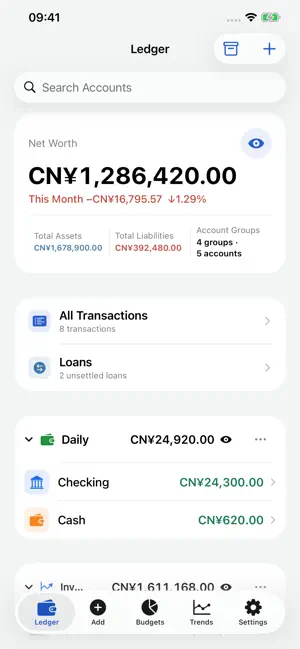
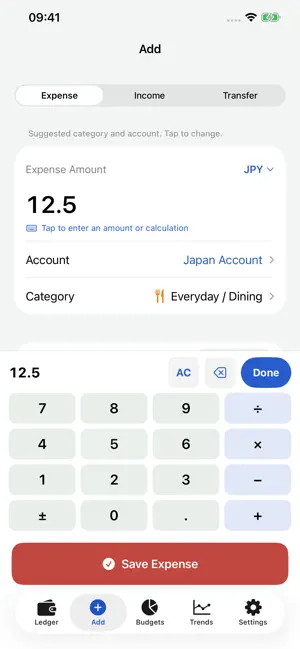
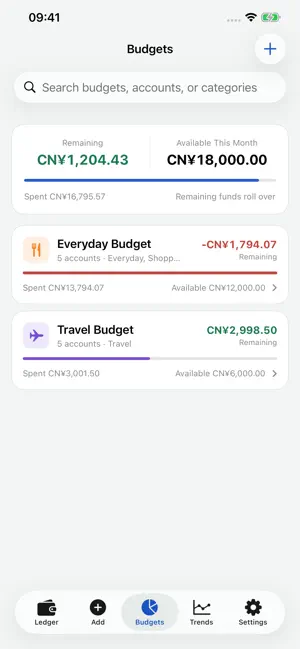
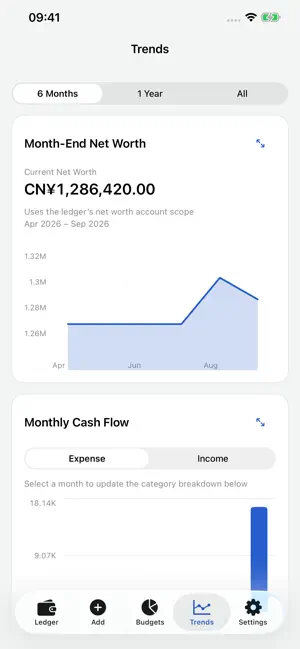
Open MonthLedger and start recording right away. The app opens directly to transaction entry, helping you capture everyday income and expenses and review your budgets and assets month by month. It is free to use, with no ads, subscriptions or in-app purchases. No account, login or bank connection is required. START SIMPLE Begin with income and expense entry. Enable accounts, transfers, tags, budgets, trends, loans, multiple currencies, widgets and shortcuts when you need them. Turning a feature off keeps its data. EVERYDAY BOOKKEEPING • Record expenses, income, transfers, refunds and balance adjustments. • Calculate amounts directly, keep unfinished entries and swap transfer accounts in one tap. • Type tags or choose from existing groups. Add notes and custom categories. • Search, filter, edit and reconcile transactions. Add currencies, categories and subcategories from the entry pickers while keeping your draft. Link refunds or shared-expense reimbursements recorded as negative expenses to the original expense, then review linked entries and the net expense. YOUR MONTH, YOUR ACCOUNTS • Set your reporting start day and each credit card’s statement period. • Group accounts and choose which groups count toward net worth. Ledger totals, trends and widgets use the same selection. • Review monthly spending, income and net worth. Carry unused budgets and overspending into the next month. • Track money borrowed or lent, schedule entries and archive reconciled history into monthly summaries. Explore features with step-by-step guides and a separate sample ledger, without changing your own data. Revisit introductions and fixes by version. Copy a transaction into an editable form before saving. Batch-change accounts and categories, including retained archived records, with multiple source accounts and optional tag filters. Review trends over a custom date range. YOUR DATA STAYS WITH YOU Your ledger is stored locally and shared with the app’s own widgets. No tracking or third-party analytics. Export CSV or full JSON backups. Optionally enable daily backups to a folder you choose in iCloud Drive, or preview and restore a saved backup. iOS schedules background backups; missed backups run when you next open the app. This is file backup, not live ledger sync. Restoring replaces the local ledger after creating a recovery point. Keep the last 7 days of app-generated iCloud backups by default, choose a custom retention period, or confirm deletion in the app. Cleanup after a successful new backup keeps at least the latest valid copy. Search currencies by code or name. Record 16 major cryptocurrencies, including BTC and ETH, and estimate their value in your base currency. Optional online reference rates use ExchangeRate-API and Coinbase, with Currency API and Kraken as fallback sources. Requests contain currency codes, not your ledger or holdings; providers may process necessary network information. Rates are estimates and remain editable. No wallet connection or cryptocurrency trading. Questions, ideas or bug reports? Contact [email protected]. MonthLedger is for personal record keeping, not professional financial advice.
What’s new
Version 2026.10.1 · Updated October 21, 2026
• Add currencies and categories while entering a transaction. New items are selected after saving; your amount, account and note stay intact. Open a primary category to add a subcategory alongside its existing items. • Link negative expenses to the original expense for refunds and shared-expense reimbursements. Review linked entries and net expense, including multiple reimbursements and cross-account links. • Subcategory charts use distinct colors matched to the list, consistent across months and changes in amount rankings. • Reconciliation and balance options appear directly in entry and editing forms. • Entry layouts and full-screen trends adapt to window size while preserving drafts during layout changes. • Try the new entry and linked-expense features in complete guides with an isolated sample ledger.
App privacy
The developer, 启弘 夏, reported these privacy practices to Apple.
Data Linked to You
The following data, which may be collected and linked to your identity, may be used for the following purposes:
- Identifiers: Device ID
- Other Data: Other Data Types
Used for: App Functionality
Alternatives to MonthLedger
Looking for apps like MonthLedger? Here are 6 similar apps on the App Store. The highest rated is Accounova (5.0/5), and all 6 are free to download.


| App | Rating | Price | Last updated | Compare |
|---|---|---|---|---|
| MonthLedger | – | Free | October 21, 2026 | |
| Budget Ladder | – | Free | May 2, 2026 | Compare |
| Accounova | 5.0 / 5 (1) | Free | Sep 12, 2026 | Compare |
| SubRadar: Track Subscriptions | – | Free | Jul 2, 2026 | Compare |
| PocketPlan AI | 5.0 / 5 (1) | Free | Sep 21, 2026 | Compare |
| Brote | – | Free | Aug 26, 2026 | Compare |
| PayDock | – | Free | Sep 20, 2026 | Compare |
Compare MonthLedger with the top alternatives: ratings, updates, ASO score and keyword gaps →