

Varde: Camera Viewer
Robert Hansen Utilities iPad
Varde: Camera Viewer is a free Utilities app for iPad by Robert Hansen. Requires iOS 18.0. Updated September 29, 2026.
- Price
- Free
- on the App Store
- Size
- 5 MB
- Age 4+
- Updated
- Sep 29
- 2026 · v1.9.1
Screenshots



About Varde: Camera Viewer
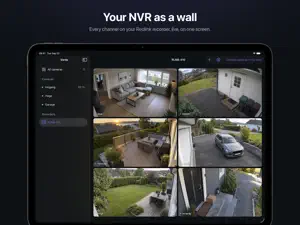
Varde is a paid app. Try it free: twenty views of your own cameras and recordings, of up to five minutes each, then one purchase unlocks everything. No subscription. The camera check is always free, so you can confirm your camera works before you pay. The purchase covers both iPad and Apple TV. Your Reolink cameras, on your iPad. Varde shows the cameras you already own — battery-powered and wired, doorbells and fixed cameras alike. No cloud service, no subscription. The iPad talks to the cameras on your own network, and nothing leaves the house. WHAT IT DOES • Live view from every camera, full screen — with sound, zoom and focus where the camera has them • Recordings from the camera's own memory card — or from the hard drive in your NVR — in a panel beside the picture, which keeps playing while you browse. Sorted by day and by what triggered them: a person, a vehicle, an animal, a visitor at the door • Scrubbing, ±10 seconds, and the next clip one tap away • A card for each camera with its last picture, battery level and Wi-Fi signal. Hold a card for the menu, drag to rearrange • Reolink NVRs: add the recorder and see all its cameras at once, across the whole screen. Choose which ones appear and in what order • Battery cameras are woken and handled gently: Varde retries by itself while a sleeping camera gets its radio up, instead of showing you an error you cannot act on ONE APP, TWO SCREENS Varde is the same app on Apple TV. The camera list and the purchase follow your Apple Account, so what you add on the iPad with a keyboard is ready on the television. When a stream will not open, Varde says why in plain words and what to do next — not a code from a network stack. HONEST ABOUT WHAT IT IS Varde is an independent app. It is not made by Reolink, and it works with the cameras you already have. Battery-powered models are supported, not only wired ones. Passwords are stored in the iCloud keychain, never in plain text. BEFORE YOU START Your cameras must be set up in the Reolink app first. Varde does not connect them to your network — it shows them. iPad asks for permission to use the local network the first time. Say yes — without it Varde cannot find the cameras. If the cameras are on a different network than the iPad, RTSP has to be switched on in the camera. Varde explains how, when it is needed. Battery-powered cameras must be on the same network as the iPad. Cameras on 4G or mobile networks cannot be shown. Reolink's Go series and other LTE models are not on your own network and have neither RTSP nor ONVIF.
What’s new
Version 1.9.1 · Updated September 29, 2026
Fixes a bug where the live view on iPad could stay on “connecting” without ever starting. Pictures now come up as they should, from single cameras and from NVR channels alike.
App privacy
The developer, Robert Hansen, reported these privacy practices to Apple.
Data Not Collected
The developer does not collect any data from this app.
Alternatives to Varde: Camera Viewer
Looking for apps like Varde: Camera Viewer? Here are 6 similar apps on the App Store. The highest rated is emiit (5.0/5), and all 6 are free to download.
-
 Cam Hub: ONVIF NVR Viewer
-
 RTSP Mixer: IP Camera Viewer
-
 Track VTS
-
 RadTool
-
 So Brite Lighting
-
 emiit
5.0
| App | Rating | Price | Last updated | Compare |
|---|---|---|---|---|
| Varde: Camera Viewer | – | Free | September 29, 2026 | |
| Cam Hub: ONVIF NVR Viewer | – | Free | Oct 20, 2026 | Compare |
| RTSP Mixer: IP Camera Viewer | – | Free | Oct 19, 2026 | Compare |
| Track VTS | – | Free | Mar 21, 2026 | Compare |
| RadTool | – | Free | Jun 24, 2025 | Compare |
| So Brite Lighting | – | Free | Jun 11, 2025 | Compare |
| emiit | 5.0 / 5 (2) | Free | Feb 6, 2025 | Compare |