

Cam Hub: ONVIF NVR Viewer
Yu-Chiao Wang Utilities iPhoneiPadiPod touchApple Watch
Cam Hub: ONVIF NVR Viewer is a free Utilities app for iPhone and iPad by Yu-Chiao Wang. Requires iOS 26.5. Updated October 20, 2026.
- Price
- Free
- on the App Store
- Size
- 17 MB
- Age 4+
- Updated
- Oct 20
- 2026 · v1.6.1
Screenshots



About Cam Hub: ONVIF NVR Viewer
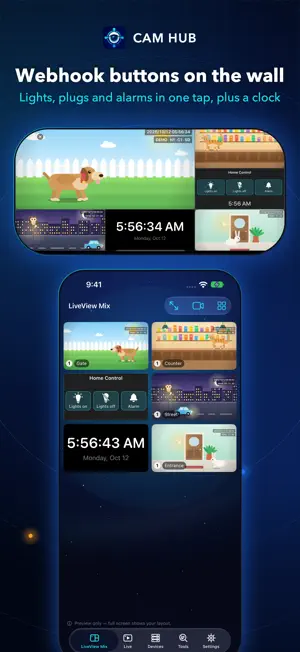
Works on iPhone, iPhone Duo, iPad, Apple Watch, Apple TV, and Mac with Apple silicon. Don’t want to create a vendor account or enable a cloud service just to view your own cameras? Cam Hub is a camera viewing app built around direct equipment connections. With compatible equipment, you do not need to create an additional account for the app or sign in to the equipment vendor’s cloud platform. Reducing unnecessary account registration and cloud dependency gives you more control and privacy in your surveillance setup. Key features: • Add and view compatible network cameras • Connect to selected compatible NVR, DVR, and NAS surveillance systems • Support for open protocols such as ONVIF and RTSP video streaming • Use LiveView Mix to put pictures from different cameras, different NVRs, and different locations on one monitoring wall, and connect it to Home Assistant at the same time to control IoT devices • View live video from different equipment and recorders on a single screen • Search and play recordings when supported by the equipment • Optimized for iPhone Duo, with a layout for the outer display and the unfolded inner display Sharing and backup: • Share cameras with other people as one encrypted code that carries their sign-in details, optionally locked with a PIN or a password • Back up settings to iCloud to set up your own devices quickly, or to move to a new iPhone or iPad Compatibility: Cam Hub currently works with a wide range of ONVIF-compatible IP cameras, NVR/DVR recorders, and NAS surveillance systems. Available features vary depending on the equipment model, firmware version, supported connection protocols, stream format, account permissions, and network configuration. Your equipment must provide a connection method supported by Cam Hub. Some equipment may require ONVIF, RTSP, or another relevant service to be enabled in its administration settings. You must still use the address, port, username, and password configured on your equipment. Cam Hub does not bypass existing access controls or security mechanisms. ONVIF, Home Assistant, and other related names are trademarks or identifiers of their respective owners. Cam Hub is independently developed and operates through compatible connection protocols made available by the equipment. A successful connection indicates technical compatibility between the equipment and the protocols or features used by Cam Hub. It does not imply affiliation, partnership, sponsorship, or endorsement by their respective owners. Apple TV, Apple Watch, and automation: • Use LiveView Mix, full-screen video, and supported recording playback on iPhone, iPad, and Apple TV • Transfer supported settings to Apple TV through an encrypted iCloud backup • Add webhook buttons to LiveView Mix — any HTTP or HTTPS request (your own method, headers and body), so Home Assistant, Node-RED or your own server can drive shutters, water heaters, lights and more in one tap • Apple Watch: tap your LiveView Mix webhook buttons right from your wrist (set up on iPhone) User manual: every feature, step by step https://cam-hub.almx.cc/guide.html Terms of Use (Apple Standard EULA): https://www.apple.com/legal/internet-services/itunes/dev/stdeula/
What’s new
Version 1.6.1 · Updated October 20, 2026
• New Apple Watch app: tap your LiveView Mix control-panel buttons right from your wrist, and choose per button whether the watch sends it itself or through your iPhone. • Much better ONVIF support: more cameras and recorders now connect, play back and respond to PTZ reliably, recordings appear under the right recorder channel, and a camera without storage of its own now says so. • On most cameras and recorders, playback now follows the device’s own date and time – even when you watch from another time zone or your device uses a different calendar. • Walls with many cameras open faster and stay steadier, and offline cameras are no longer retried over and over. • Fixes for IPv6 addresses, NAS sign-in, PTZ stop and recorder event search.
App privacy
The developer, Yu-Chiao Wang, reported these privacy practices to Apple.
Data Not Collected
The developer does not collect any data from this app.
Alternatives to Cam Hub: ONVIF NVR Viewer
Looking for apps like Cam Hub: ONVIF NVR Viewer? Here are 6 similar apps on the App Store. The highest rated is Smart RTSP: IP Camera Viewer (4.5/5), and all 6 are free to download.
-
 Smart RTSP: IP Camera Viewer
4.5
-
 Omnicam - Stream Hub
-
 IP Camera Viewer: Cam Hero
4.5
-
 IP Camera Viewer & Monitor
4.3
-
 Streamie: IP Camera Streaming
4.5
-
 UniCam: IP Camera Viewer
4.5
| App | Rating | Price | Last updated | Compare |
|---|---|---|---|---|
| Cam Hub: ONVIF NVR Viewer | – | Free | October 20, 2026 | |
| Smart RTSP: IP Camera Viewer | 4.5 / 5 (4) | Free | Oct 22, 2026 | Compare |
| Omnicam - Stream Hub | – | Free | Apr 28, 2026 | Compare |
| IP Camera Viewer: Cam Hero | 4.5 / 5 (28) | Free | Sep 21, 2026 | Compare |
| IP Camera Viewer & Monitor | 4.3 / 5 (27) | Free | Oct 19, 2026 | Compare |
| Streamie: IP Camera Streaming | 4.5 / 5 (135) | Free | Oct 10, 2026 | Compare |
| UniCam: IP Camera Viewer | 4.5 / 5 (50) | Free | Oct 4, 2026 | Compare |