
Dual Camera: Front & Back Shot
Vasundhara Infotech LLP Photo & Video iPhoneiPadiPod touch
Dual Camera: Front & Back Shot is a free Photo & Video app for iPhone and iPad by Vasundhara Infotech LLP. Rated 1.0/5 from 1 ratings. Requires iOS 15.0.
- Rating
- 1.0
- 1 ratings
- Price
- Free
- on the App Store
- Size
- 91 MB
- Age 4+
- Updated
- Sep 26
- 2026 · v1.2
Screenshots

About Dual Camera: Front & Back Shot
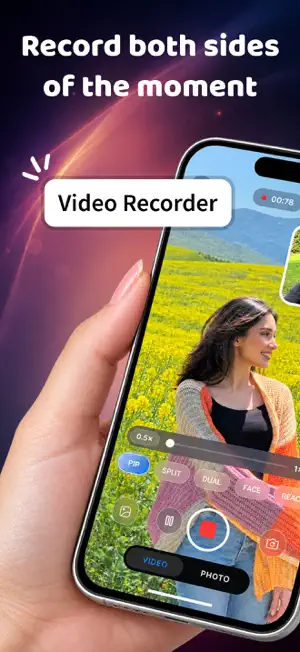
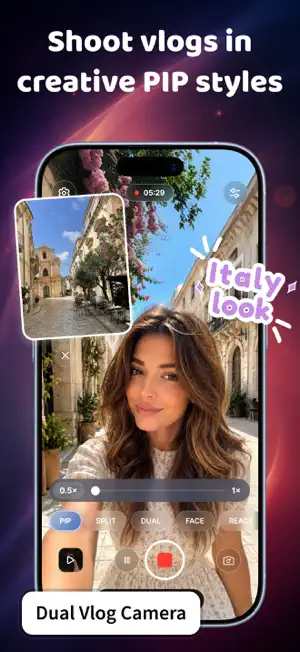
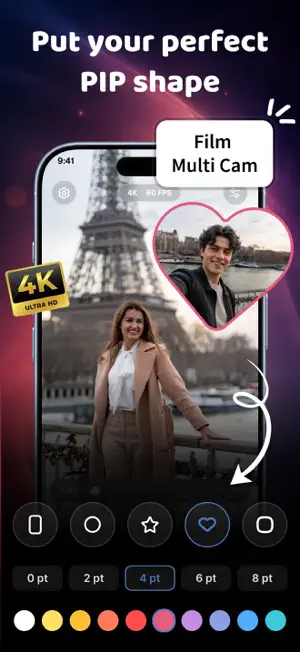
Record from both cameras at the same time. Dual Camera: Front & Back Shot lets you capture front and back camera footage simultaneously so you never have to choose between what you see and how you react to it. Whether you are recording a travel vlog, capturing a special moment, or creating content that shows both sides of the story, Double Take Video Recorder gives you the creative tools to shoot, style, and share dual camera videos like never before. Key Features of Dual Camera: Front & Back Shot 1. Dual Camera Recording Record from both front and back camera at the same time. Choose from video, photo, portrait mode with depth blur, or slow motion at 120 and 240 fps. Switch between cameras, zoom from 0.5x to 4x, adjust exposure manually, and use a grid overlay to frame your shot. 2. Layout & Composition Modes Pick from 7 layout modes including Picture in Picture, Split Screen, Single, FaceCam, Face and Media, Mixover, and Website mode. Split screen comes with 7 sub-variants like diagonal, halves, and stacked cards. Picture in Picture supports 10 shapes including circle, heart, star, and flower, all draggable, resizable, and customizable with border color and width. 3. Video Quality & Export Double Take Video Recorder lets you record in 720p, 1080p, or 4K. Choose frame rates of 24, 30, or 60 fps, or slow motion at 120 and 240 fps. Export your composited video or save front and back streams separately to Photos or Files. Supports H.264 and HEVC codecs in portrait and landscape orientations. 4. Creative Tools Choose from 9 color filters with an intensity slider. Adjust brightness, contrast, saturation, warmth, and tint. Add motion blur with light, medium, or strong presets. Overlay text, date, time, location name, address, coordinates, or a watermark with full styling options including opacity, shadow, stroke, and position. 5. Website Mode Open any webpage live behind your camera with a floating face cam overlay and person cutout. Includes address bar, back, forward, and refresh controls. Why Choose Dual Camera: Front & Back Shot? - Record from front and back camera at the same time - 7 layout modes with split screen, picture in picture, and more - Slow motion recording at 120 and 240 fps - 9 color filters with brightness, contrast, and saturation controls - Add text, date, location, and watermark to your videos - Save your video as one combined clip or as two separate streams Dual Camera: Front & Back Shot is built for content creators, vloggers, and anyone who wants to tell a richer story with their phone camera. From duoshot dual camera layouts to slow motion and cinematic filters, every tool you need for creative dual shot recorder content is right here. Every moment has two sides. Record both at once and tell the full story the way it actually happened, from your perspective and the world in front of you at the same time. Disclaimer: This app offers paid features that require an additional purchase for full access. To enjoy all the content and functionality, a subscription is required. Privacy Policy: https://vasundharaapps.com/dual-camera-front-back-shot-ios/privacy-policy Terms of Service: https://vasundharaapps.com/dual-camera-front-back-shot-ios/terms-of-use
What’s new
Version 1.2 · Updated September 26, 2026
Thanks for staying with us! The new version offers: - Bug fixes and performance improvements. - Improve User Experience - We love getting feedback from all of you! Please leave your feedback.
App privacy
The developer, Vasundhara Infotech LLP, reported these privacy practices to Apple.
Data Used to Track You
The following data may be used to track you across apps and websites owned by other companies:
- Other Data: Other Data Types
Data Not Linked to You
The following data, which may be collected but is not linked to your identity, may be used for the following purposes:
- Other Data: Other Data Types
Used for: Third-Party Advertising, Other Purposes
Alternatives to Dual Camera: Front & Back Shot
Looking for apps like Dual Camera: Front & Back Shot? Here are 6 similar apps on the App Store. The highest rated is SplitLens Dual Camera (5.0/5), and all 6 are free to download.
-
 SplitLens Dual Camera
5.0
SplitLens Dual Camera
5.0
-
 ProTune AI Camera
5.0
ProTune AI Camera
5.0
-
 Camera HD & Pro Raw Photo HDR
5.0
Camera HD & Pro Raw Photo HDR
5.0
-
 WonderFilm: Cinema Camera
-
 Strips Camera
5.0
Strips Camera
5.0
-
 Evoke: AI Photo Color Grading
5.0
Evoke: AI Photo Color Grading
5.0
| App | Rating | Price | Last updated | Compare |
|---|---|---|---|---|
| Dual Camera: Front & Back Shot | 1.0 / 5 (1 rating) | Free | September 26, 2026 | |
| SplitLens Dual Camera | 5.0 / 5 (2) | Free | Sep 24, 2026 | Compare |
| ProTune AI Camera | 5.0 / 5 (1) | Free | Oct 14, 2026 | Compare |
| Camera HD & Pro Raw Photo HDR | 5.0 / 5 (1) | Free | Oct 10, 2026 | Compare |
| WonderFilm: Cinema Camera | – | Free | Aug 21, 2026 | Compare |
| Strips Camera | 5.0 / 5 (1) | Free | Oct 7, 2026 | Compare |
| Evoke: AI Photo Color Grading | 5.0 / 5 (1) | Free | Oct 2, 2026 | Compare |