

Colors: Daily Habit Tracker
Igal Daniels Health & Fitness iPhoneiPadiPod touch
Colors: Daily Habit Tracker is a free Health & Fitness app for iPhone and iPad by Igal Daniels. Rated 5.0/5 from 2 ratings. Requires iOS 16.4.
- Rating
- 5.0
- 2 ratings
- Price
- Free
- on the App Store
- Size
- 63 MB
- Age 4+
- Updated
- Sep 21
- 2026 · v1.1.1
Screenshots
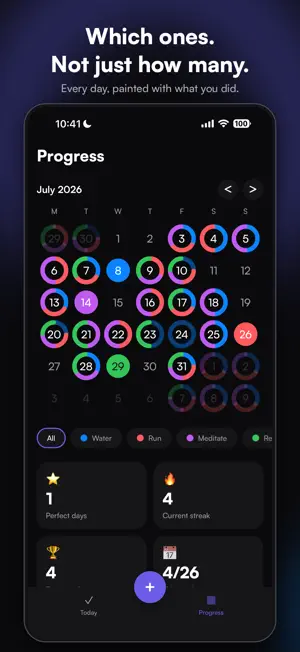
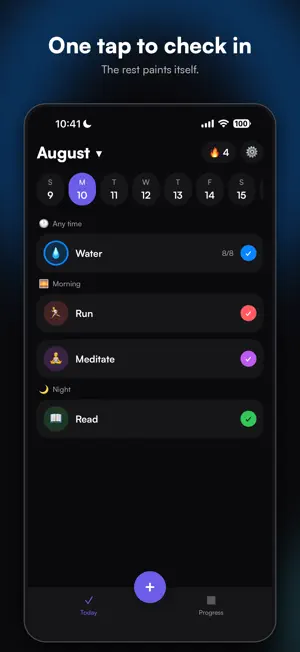
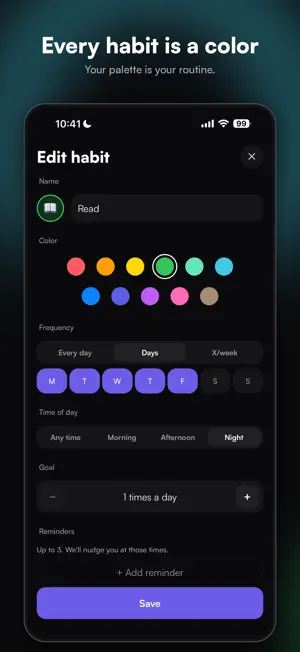
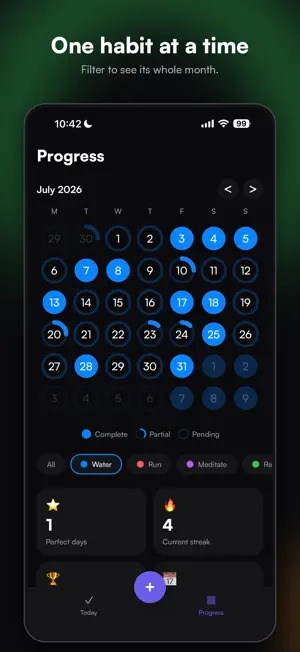
About Colors: Daily Habit Tracker
Every habit is a color. Every day you complete one, your calendar paints itself. After a month you don't read a grid of identical checkmarks. You read a picture of how you actually lived. WHY IT'S DIFFERENT Other habit trackers tell you HOW MANY habits you did. Colors tells you WHICH ones, at a glance, on a calendar you'll actually want to look at. HOW IT WORKS • Create a habit, give it a color and an emoji • Tap once to check in • Watch the month fill with color WHAT'S INSIDE • A multicolor calendar showing which habits you did each day • Filter by one habit to see its own heatmap • Streaks, perfect days and weekly progress • Reminders you can check in from, without opening the app • Flexible schedules: every day, chosen weekdays, or a few times a week • Several check-ins a day for habits you repeat • Light and dark themes, in English and Spanish A COLOR YOU CANNOT PICK Eleven colors are on the palette. There is a twelfth, hidden somewhere in the app. Good luck finding it. More colors are on the way. PRIVATE BY DESIGN No account. No sign-up. No cloud. Your habits stay on your phone. We never receive them, so we could not read them even if we wanted to. FREE AND PREMIUM Free: 3 habits, this month and last, one reminder per habit. Premium: unlimited habits, your complete history, several reminders per habit, and data export. Premium is available as an auto-renewing subscription (monthly or yearly, with a one-week free trial on the yearly plan) or as a one-time lifetime purchase. Payment is charged to your Apple Account at confirmation. Subscriptions renew automatically unless cancelled at least 24 hours before the current period ends. Manage or cancel anytime in your Apple Account settings. Terms of Use: https://getcolors.app/terms Privacy Policy: https://getcolors.app/privacy
What’s new
Version 1.1.1 · Updated September 21, 2026
• The onboarding could get stuck on the paywall with Reduce Motion turned on. Fixed. • Habit grids show three columns on every iPhone. • The 30-day rate now measures the last 30 days: a habit done yesterday reads 1/30, and the count sits next to the bar. • No more perfect-day confetti for a day that still has habits pending. • Longer titles stay centered.
App privacy
The developer, Igal Daniels, reported these privacy practices to Apple.
Data Not Linked to You
The following data, which may be collected but is not linked to your identity, may be used for the following purposes:
- Purchases: Purchase History
- Identifiers: User ID
Used for: App Functionality
Alternatives to Colors: Daily Habit Tracker
Looking for apps like Colors: Daily Habit Tracker? Here are 6 similar apps on the App Store. The highest rated is Dots - A Little Life Tracker (5.0/5), and all 6 are free to download.
-
 Habit Tracker - Habit Journal
-
 Track Easy - Habit Tracker
-
 QuietTide
-
 Tgffitness: Easy Workout Log
-
 Dots - A Little Life Tracker
5.0
Dots - A Little Life Tracker
5.0
-
 ECVSI
ECVSI
| App | Rating | Price | Last updated | Compare |
|---|---|---|---|---|
| Colors: Daily Habit Tracker | 5.0 / 5 (2 ratings) | Free | September 21, 2026 | |
| Habit Tracker - Habit Journal | – | Free | Jun 25, 2026 | Compare |
| Track Easy - Habit Tracker | – | Free | Oct 25, 2026 | Compare |
| QuietTide | – | Free | Mar 29, 2026 | Compare |
| Tgffitness: Easy Workout Log | – | Free | Oct 5, 2026 | Compare |
| Dots - A Little Life Tracker | 5.0 / 5 (1) | Free | Aug 21, 2026 | Compare |
| ECVSI | – | Free | Mar 23, 2024 | Compare |