

Yurka: Backing Tracks & Stems
Yury Sharafanovich Music iPhoneiPadiPod touch
Yurka: Backing Tracks & Stems is a free Music app for iPhone and iPad by Yury Sharafanovich. Rated 5.0/5 from 1 ratings. Requires iOS 26.0.
- Rating
- 5.0
- 1 ratings
- Price
- Free
- on the App Store
- Size
- 131 MB
- Age 4+
- Updated
- Oct 12
- 2026 · v1.0.2
Screenshots


About Yurka: Backing Tracks & Stems
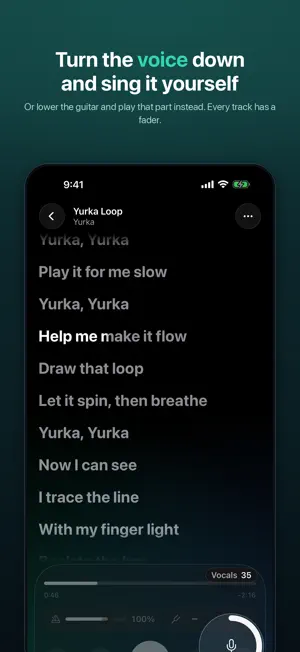
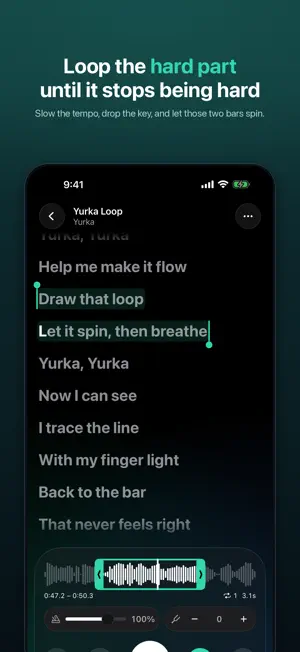
Take a song apart and learn it. Open a file you already have, and Yurka splits it into six tracks right on your phone — voice, drums, bass, guitar, keys and everything else. Mute the singer and take the lead yourself. Turn the guitar down and play that part. Slow the tempo, drop the key to fit your voice, and loop the two bars that keep tripping you up. HOW IT WORKS 1. Bring a song — from Files, Photos, your music library, or record something right now. 2. Wait for the tracks — usually under a minute on a recent iPhone. 3. Everything else — the words, the chords — arrives a moment later. WHAT YOU GET • Six separate tracks from any recording, with a fader for each • Tempo without the chipmunk effect, key in semitones • Hold and drag to loop a section; it repeats with a lap counter • Chords along the song • The words move with the music, one at a time • Sing along with the microphone, record a take, listen back, share it with the music • The same app on iPhone and iPad, with a wide layout on the big screens EVERYTHING HAPPENS ON YOUR DEVICE There is no upload and no queue: your song is separated by your own phone, and neither the audio nor your own takes ever leave the device. The app goes online only to look up words and to fetch the recognition model. Six tracks usually take under a minute on a recent iPhone, and a couple of minutes at most on the oldest supported devices. There is no account and no sign-in, and everything except looking up words works in airplane mode. WHERE THE WORDS COME FROM Yurka is not a music catalog: it does not stream, download or sell songs, and it works only with files you already have. The words are worked out in several steps. If the file carries them in its own tags, those are used. If not, the app listens to the vocal track it has just separated, on the device, and looks the song up along the way, including an open community-maintained database. Anything it cannot confirm is shown as a draft, and you can always paste your own text instead. REQUIREMENTS iOS 26 or later. Recordings up to 10 minutes. Audio and video files: MP3, M4A, AAC, WAV, AIFF, FLAC, OPUS, CAF, MP4, MOV, M4V.
What’s new
Version 1.0.2 · Updated October 12, 2026
Your voice recorded with Bluetooth headphones — AirPods or any others — now lines up with the song on its own. A fresh look: the song screen, library, recording and settings are cleaner, and lyrics are larger. Tempo changes smoothly, without dropouts. Unplug your headphones and the song pauses. On iPad, the song keeps playing when the window is resized. More reliable separation: audio from videos and songs with identical file names, and an interrupted separation no longer leaves partial results. Recordings up to 10 minutes are supported. Fixed places where Russian text appeared instead of your language.
App privacy
The developer, Yury Sharafanovich, reported these privacy practices to Apple.
Data Not Collected
The developer does not collect any data from this app.
Alternatives to Yurka: Backing Tracks & Stems
Looking for apps like Yurka: Backing Tracks & Stems? Here are 6 similar apps on the App Store. The highest rated is Homeoke: Singing Practice (4.0/5), and all 6 are free to download.
-
 HelloMusic – Metronome & Tuner
-
 Homeoke: Singing Practice
4.0
Homeoke: Singing Practice
4.0
-
 Couleurs caraïbes 972 Radio
-
 LMPlayr PRO
-
 WaveCraft-Vocal Remover Studio
-
 Singio: Vocal Phrase Trainer
| App | Rating | Price | Last updated | Compare |
|---|---|---|---|---|
| Yurka: Backing Tracks & Stems | 5.0 / 5 (1 rating) | Free | October 12, 2026 | |
| HelloMusic – Metronome & Tuner | – | Free | Oct 17, 2026 | Compare |
| Homeoke: Singing Practice | 4.0 / 5 (1) | Free | Oct 17, 2026 | Compare |
| Couleurs caraïbes 972 Radio | – | Free | Jun 7, 2026 | Compare |
| LMPlayr PRO | – | Free | Oct 24, 2026 | Compare |
| WaveCraft-Vocal Remover Studio | – | Free | Oct 19, 2026 | Compare |
| Singio: Vocal Phrase Trainer | – | Free | Oct 7, 2026 | Compare |