

Malinois Device Anti-Tampering
John Compton Utilities iPhoneiPadiPod touchApple Watch
Malinois Device Anti-Tampering is a free Utilities app for iPhone and iPad by John Compton. Rated 5.0/5 from 1 ratings. Requires iOS 17.0.
- Rating
- 5.0
- 1 ratings
- Price
- Free
- on the App Store
- Size
- 7 MB
- Age 4+
- Updated
- Oct 23
- 2026 · v1.8.1
Screenshots

About Malinois Device Anti-Tampering
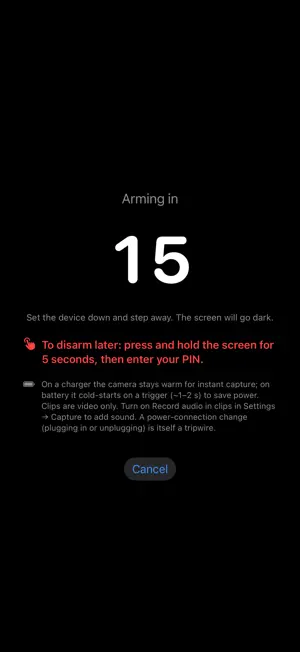
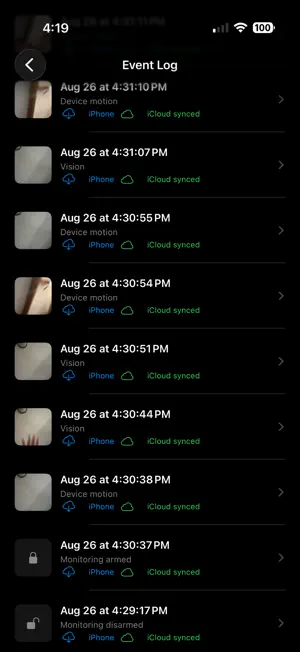
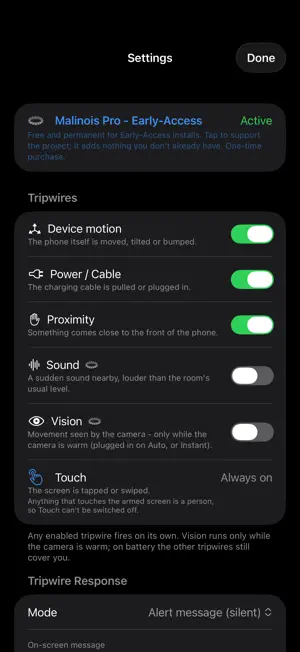
Malinois detects when someone handles your unattended iPhone, even someone who knows your iPhone passcode. Leave it on your desk, in a gym locker, or in a hotel room. The moment it detects movement, a screen touch, or a plug-in/unplug event, it writes a time-stamped record to the Event Log, then captures a photo or video when it can. It's a detector, not a lock, built for one outcome: your iPhone will either be in the same state you left it, or you'll know it wasn't. Before you rely on it, turn on Guided Access with its Side Button option off; Malinois walks you through it. HOW IT WORKS Set a Malinois PIN, ARM, and set the device down. After a short grace period it calibrates its sensors and the screen goes dark: fully black on battery, so the phone looks off; dimmed on a charger, where the camera stays ready and iOS shows its recording indicator. Disarm anytime by pressing and holding the screen and entering your Malinois PIN. TRIPWIRES YOU CONTROL • Device motion — someone picks it up or shifts it • Unplug/Plug — the charging cable is pulled or connected • Touch — the screen is tapped or swiped (always on) • Proximity — something approaches or covers it • Sound (Pro) — a sudden sound nearby • Vision (Pro) — movement in the camera's view while the camera is ready (on a charger by default) EVIDENCE THAT SURVIVES • Photo or video clips from the front or rear camera — or both at once (Pro) • Optional flash/LED so evidence isn't lost in the dark • An Event Log of every arm, disarm, and trigger, with no way to delete a single entry, not even with your PIN. It keeps your most recent events and retires the oldest automatically; a Malinois that's been wiped is itself a sign that something happened • Evidence you can export for building security or police • Each event recorded in your PRIVATE iCloud within moments, before the photo is even taken, then the photo or clip (Pro, once iCloud access is verified, when online, with iCloud backup on), so a phone switched off seconds later can still leave its record behind ALERTS ANYWHERE (Pro) Get a "tamper detected" notification on your other Apple devices the moment it trips. CHOOSE YOUR RESPONSE • Alert — a silent on-screen warning • Stealth — stay dark and silently gather evidence • Siren — an optional loud alarm to scare off an opportunistic snoop or intruder BUILT TO RESIST TAMPERING • PIN-locked disarm with brute-force lockout — Malinois can't be disarmed in the app without your PIN • Guided Access is required to arm by default: with Voice Control off, nobody can leave Malinois without your Guided Access passcode, and a forced restart, which ends the watch, is recorded when Malinois next opens • An armed-duration timer and armed timestamp on every session, so a gap in coverage is visible afterwards • Resists sensor flooding — nonstop jostling or tapping to bury the real event gets one coalesced "sustained activity" record instead of a flooded log, and Malinois keeps photographing on a timer • Detects a total signal blackout (a sign of jamming) and can go loud MALINOIS PRO Early-Access: Pro is free for every install, permanently. If Pro ever becomes a paid unlock, that will apply to new installs only. Pro adds iCloud backup of evidence, "tamper detected" alerts on your other Apple devices, both cameras at once, longer clips, and the Sound and Vision tripwires. Detection, capture, the local Event Log, and the siren are and always will be free. PRIVATE BY DESIGN Malinois has no account, no server, no analytics, and no third-party tracking. It asks for the Camera when you first arm, and for the Microphone only if you turn on Sound or clip audio; the evidence stays on your device and in your own private iCloud — the developer can't see any of it. You don't have to take that on trust: the source of every shipped release is published at github.com/john-comptonemail-com/malinois Malinois protects your own device. Please use it responsibly and in line with the laws where you live.
What’s new
Version 1.8.1 · Updated October 23, 2026
• ARM asks for your PIN when it has not been entered for 14 days. • The one-time screen before your first arm also asks you to turn Voice Control off, and the arm is cancelled after a minute without a touch. • On a second device, Home offers "Allow notifications" right after you verify iCloud access. • The log now records a stalled motion tripwire, a reinstall, a PIN change, and Guided Access ending during a watch. • Face ID unlock for the Event Log is tied to the faces or fingers enrolled when you turn it on; if they change, it turns off until you turn it on again. • If Malinois opens before your iPhone's first unlock after a restart, it waits for your settings instead of using defaults. • A clip that keeps uploading is no longer cut off; only an upload that has stalled is. • A momentary failure to look up your iCloud account no longer pauses uploads or clears your verification. • In Siren mode the alarm sounds even if the camera is slow to give up the microphone, and Malinois does not re-arm itself while a PIN recovery is pending. • Evidence pushes ask iOS for extra running time from their first step, so a lock right after a trip is less likely to cut them off. • Two rare fixes: a damaged lockout value can no longer lock the PIN pad for good, and an interruption at the moment the app leaves the screen can no longer go unrecorded.
App privacy
The developer, John Compton, reported these privacy practices to Apple.
Data Not Collected
The developer does not collect any data from this app.