

DotBGE: File Encryption
刚 熊 Utilities iPhoneiPadiPod touch
DotBGE: File Encryption is a free Utilities app for iPhone and iPad by 刚 熊. Rated 5.0/5 from 1 ratings. Requires iOS 17.6. Updated October 18, 2026.
- Rating
- 5.0
- 1 ratings
- Price
- Free
- on the App Store
- Size
- 10 MB
- Age 4+
- Updated
- Oct 18
- 2026 · v1.2.0
Screenshots


About DotBGE: File Encryption
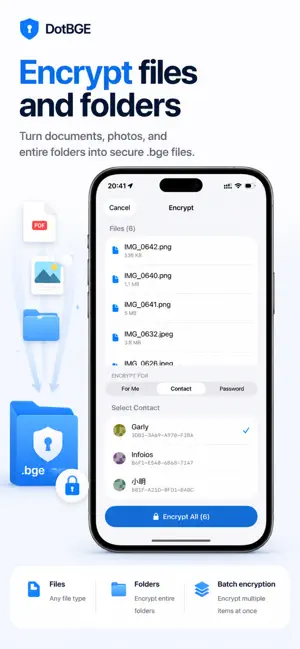
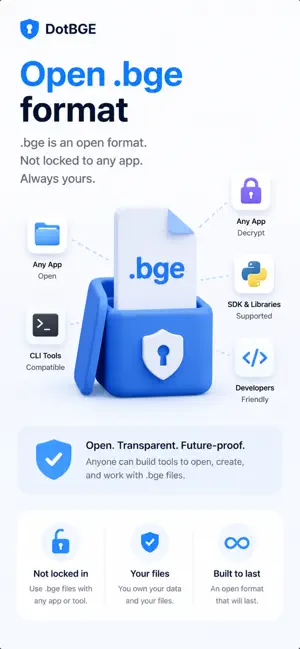
DotBGE encrypts your files right on your iPhone and iPad. No accounts, no DotBGE servers, no tracking. Your files and keys stay yours. Built on the open .bge format, DotBGE uses RSA-4096 and AES-256-GCM encryption to protect documents, photos, PDFs, media, archives, and folders. Share encrypted files with people you trust using identity cards, or lock files with a password only you know. ENCRYPT FOR A FRIEND Encrypt a file so only a specific person's identity can unlock it. Add trusted contacts, then encrypt in a few taps. No passwords to exchange and no shared secret to leak. ENCRYPT TEXT MESSAGES Type or paste text, encrypt it for yourself, a trusted contact, or a password, then share it as a .bge message file through any chat app. The recipient opens it in DotBGE to read and copy the decrypted message. IDENTITY CARDS, NOT RAW KEYS Share your identity card with a QR code or .bgekey file so others can encrypt files for you. No copy-pasting long public keys. PASSWORD MODE No contact yet? Encrypt with a passphrase instead. Anyone with the password can decrypt, which is useful for one-time sharing. OPEN .bge FILES FROM ANYWHERE Open encrypted files from Files, Mail, or any app that offers document handoff. DotBGE routes .bge files into a private decrypt-and-preview flow. OPEN .bge FORMAT Your encrypted files use a documented, self-describing container. They are portable and not locked to any account or service. FACE ID VAULT Keep encrypted files in a local vault protected by Face ID or Touch ID. Organize files into collections with names, colors, and icons; a file can belong to several collections without being duplicated. Optional iCloud sync keeps your encrypted vault and collections available across your own devices. PREVIEW AFTER DECRYPTING View photos, PDFs, text, audio, and video inside the app after decrypting without writing decrypted copies to disk. ENCRYPT FROM ANYWHERE Encrypt from Photos, Files, or other apps through the share sheet. Single-file encryption, preview, and decryption are always free. FOLDER ENCRYPTION WITH PRO Create one encrypted package or encrypt files separately. Choose where to save and whether to keep originals, and optionally hide file and folder names. Encrypt all files, only photos or videos, or selected file extensions; other files stay unencrypted. Save Quick Tasks for repeated runs. Existing encrypted outputs are skipped, even if the source files have changed. DOTBGE PRO Unlock batch encryption, folder encryption, an unlimited vault, and multiple identities. A monthly option is available for short-term projects. Decryption, preview, and single-file encryption stay free. Perfect for: • Sending sensitive documents to a specific person • Keeping private files encrypted before sharing or storing them • Professionals handling confidential files on the go • People who want their own keys, on their own device Encrypt your files. Keep your keys. Terms of Use (EULA): https://www.apple.com/legal/internet-services/itunes/dev/stdfla/ Privacy Policy: https://dotbge.app/privacy
What’s new
Version 1.2.0 · Updated October 18, 2026
Version 1.2.0 adds new ways to organize your vault and choose which files to encrypt. • Vault collections: organize files with names, colors, and icons. Add a file to several collections without duplicating it, and see each collection's file count and size. Collections sync when iCloud sync is enabled. • Folder file types: encrypt everything, only photos or videos, or selected file extensions under Advanced. The setup shows which files will stay unencrypted, and Quick Tasks remember your selection. • Background progress: on iOS 26, supported batch and folder runs can continue in the background with system progress and a stop control, subject to system availability and time limits. • Optional vault authentication reuse: reduce repeated prompts for up to five minutes while the app stays in the foreground. Off by default; enabling it requires device authentication. Per-file authentication remains the default. • Clearer option explanations and folder decryption controls, more reliable Quick Tasks and progress reporting, and consistent password-strength feedback in the app and share extension.
App privacy
The developer, 刚 熊, reported these privacy practices to Apple.
Data Not Collected
The developer does not collect any data from this app.
Alternatives to DotBGE: File Encryption
Looking for apps like DotBGE: File Encryption? Here are 6 similar apps on the App Store.
-
 KeeHolder
-
 Finalpass
-
 HelpfulHuey
-
 YoBlackBox - Password Manager
-
 Greenbox Safe
-
 PassNote: Password Vault
| App | Rating | Price | Last updated | Compare |
|---|---|---|---|---|
| DotBGE: File Encryption | 5.0 / 5 (1 rating) | Free | October 18, 2026 | |
| KeeHolder | – | Free | Apr 28, 2026 | Compare |
| Finalpass | – | Free | Aug 22, 2024 | Compare |
| HelpfulHuey | – | Free | Sep 9, 2026 | Compare |
| YoBlackBox - Password Manager | – | Free | May 19, 2026 | Compare |
| Greenbox Safe | – | Free | Feb 4, 2026 | Compare |
| PassNote: Password Vault | – | Free | Oct 1, 2026 | Compare |