

Clipboard: Copy Paste Tool
SUPER KIM KIMYA VE TEKSTIL SANAYI TICARET LIMITED SIRKETI Productivity iPhoneiPadiPod touchMac
Clipboard: Copy Paste Tool is a free Productivity app for iPhone and iPad by SUPER KIM KIMYA VE TEKSTIL SANAYI TICARET LIMITED SIRKETI. Requires iOS 17.0.
- Price
- Free
- on the App Store
- Size
- 8 MB
- Age 4+
- Updated
- Oct 26
- 2026 · v1.2.0
Screenshots


About Clipboard: Copy Paste Tool
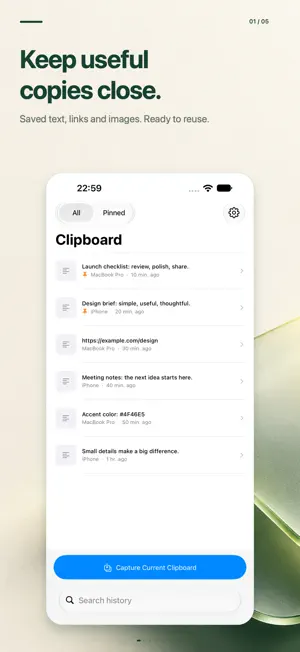
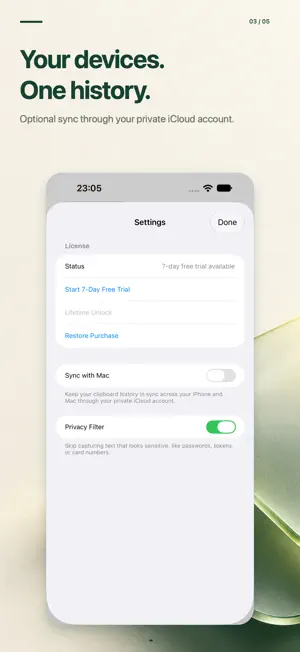
Keep useful copies within reach. Save text, links and images, find them in your history, and copy them again whenever you need them. ON MAC • Automatically saves supported clipboard content while the app is running. • Open history from the menu bar or with the customizable keyboard shortcut. The default is Command–Shift–V. • Search, preview and pin important items. • Keep text, images, rich text and supported file references. • Choose history limits, retention settings and which content types to save. ON IPHONE AND IPAD • Save the current clipboard when you tap Capture. • Send text, links and images to the app from the Share Sheet. • Search, pin and copy your saved items. • Browse history synced from your other devices. SYNC WHEN YOU WANT Enable optional sync through your private iCloud account to keep history available across your devices. Sync is off by default and requires the same iCloud account on each device. YOU CONTROL YOUR HISTORY Clear saved items when you choose. An optional privacy filter skips text that looks sensitive; it cannot detect every secret. iPhone and iPad do not continuously capture the clipboard in the background. Save items with Capture or the Share Sheet. Try the app free for 7 days, then unlock it with a one-time purchase. No subscription. ADS AND PRIVACY On iPhone and iPad, Google AdMob banner ads appear only in Settings during the 7-day free trial. The lifetime unlock is ad-free. Where required, Google's consent system (UMP) provides consent and privacy choices. Google may collect device identifiers, approximate location, ad interaction, diagnostics and performance data for advertising. Clipboard content is not used for advertising. Terms of Use (Apple Standard EULA): https://www.apple.com/legal/internet-services/itunes/dev/stdeula/
What’s new
Version 1.2.0 · Updated October 26, 2026
Your clipboard history now speaks 16 languages. Enjoy a localized interface on Mac, iPhone and iPad.
App privacy
The developer, SUPER KIM KIMYA VE TEKSTIL SANAYI TICARET LIMITED SIRKETI, reported these privacy practices to Apple.
Data Used to Track You
The following data may be used to track you across apps and websites owned by other companies:
- Identifiers: Device ID
Data Linked to You
The following data, which may be collected and linked to your identity, may be used for the following purposes:
- Location: Coarse Location
- Identifiers: Device ID
- Usage Data: Product Interaction, Advertising Data
Used for: Third-Party Advertising, Developer’s Advertising or Marketing, Analytics, App Functionality
Data Not Linked to You
The following data, which may be collected but is not linked to your identity, may be used for the following purposes:
- Diagnostics: Performance Data, Other Diagnostic Data, Crash Data
Used for: Third-Party Advertising, Developer’s Advertising or Marketing, Analytics, App Functionality
Alternatives to Clipboard: Copy Paste Tool
Looking for apps like Clipboard: Copy Paste Tool? Here are 6 similar apps on the App Store.
-
 Timi 倒數日
-
 Papeles - Smart Clipboard
-
 Copy Paste Clipboard Pro
-
 Magpie: Save Links & Photos
-
 Linkeeper - Read Later
-
 Clipboard Space: Share to PC
| App | Rating | Price | Last updated | Compare |
|---|---|---|---|---|
| Clipboard: Copy Paste Tool | – | Free | October 26, 2026 | |
| Timi 倒數日 | – | Free | Sep 30, 2026 | Compare |
| Papeles - Smart Clipboard | – | Free | Jun 16, 2026 | Compare |
| Copy Paste Clipboard Pro | – | Free | Aug 14, 2026 | Compare |
| Magpie: Save Links & Photos | – | Free | Oct 30, 2026 | Compare |
| Linkeeper - Read Later | – | Free | Oct 28, 2026 | Compare |
| Clipboard Space: Share to PC | – | Free | Nov 16, 2026 | Compare |