

Clipboard Space: Copy & Paste
Hoi Chun CHAN Productivity iPhoneiPadiPod touch
Clipboard Space: Copy & Paste is a free Productivity app for iPhone and iPad by Hoi Chun CHAN. Requires iOS 17.0. Updated October 26, 2026.
- Price
- Free
- on the App Store
- Size
- 16 MB
- Age 4+
- Updated
- Oct 26
- 2026 · v1.6
Screenshots


About Clipboard Space: Copy & Paste
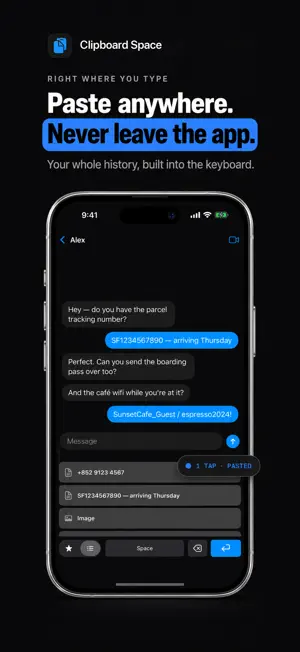
Clipboard Space is the clipboard manager for iPhone that keeps whole files — PDFs, documents, images — alongside the text you copy, on your phone and on every other screen in the room. iPhone's clipboard only holds one thing. Clipboard Space keeps your whole history, so that paragraph you copied this morning is still there tonight. PASTE WITHOUT SWITCHING APPS Clipboard's own keyboard puts your history one tap away inside any app — favorites on their own page, everything else beside them. It asks for Allow Full Access: by default the keyboard only reads what the app has already saved on your iPhone, and it has no network access at all. Turn on Capture from Keyboard in Settings and it will also save new text you copy while the keyboard is open — still entirely on your iPhone. BROADCAST HUB — SHARE WITH ANY DEVICE Turn your iPhone into a private clipboard server. Open the address it gives you in any browser on the same Wi-Fi — Mac, Windows PC, iPad, even your TV — and your clips are waiting. Copy from the page, or send text and files from your computer straight back to your iPhone. Tap any clip on the page to read it in full, edit its text or title, or preview an image. No app needed on the other side, no account, no cloud: nothing ever leaves your network. NEVER LOSE A COPY AGAIN • Automatically captures what you copy • Texts, links, images, and files — all in one place • Smart filters: All, Texts, Images, Links, Files FIND ANYTHING IN SECONDS Instant search across every clip you've saved. The thing you copied last week is one keyword away. ORGANIZE YOUR WAY • Star favorites into their own Favorites tab • Add titles to clips: "Wi-Fi password", "Office address", "IBAN" • Drag to reorder, tap to edit • Save from any app with the Share Sheet PRIVATE BY DESIGN Everything is stored locally on your iPhone and never uploaded. Lock the app with Face ID, Touch ID, or a passcode — and keep your clipboard out of the keyboard with one switch in Settings. SPEAKS YOUR LANGUAGE English, 繁體中文, 简体中文, 日本語, 한국어, Deutsch, Français, Español — the app, the Share Sheet, and the Broadcast Hub page all follow your language. FREE FOR 3 MONTHS Every feature is free for your first 3 months — capture, unlimited history, Broadcast Hub, everything. After the trial, browsing, copying and downloading stay free; a Pro subscription keeps capture and editing going. • No subscription starts by itself — you're charged only if you choose to subscribe • Monthly subscription, cancel anytime Questions or ideas? We'd love to hear from you. Terms of Use: https://www.apple.com/legal/internet-services/itunes/dev/stdeula/ Privacy Policy: https://tonychz.github.io/ClipSpaceSupportPage/privacy
What’s new
Version 1.6 · Updated October 26, 2026
Broadcast Hub now lets you open clips on the web: tap a text item to read it in full and edit its text or title, or tap an image to preview it. The keyboard gains light haptic feedback, continuous delete when you hold Delete, and an optional Capture from Keyboard setting (off by default) that saves text you copy while the keyboard is open. This update also makes the app full-width on iPad. The 3-month free trial is unchanged: every feature is free for 3 months, then browsing, copying and downloading stay free — nothing is charged unless you subscribe.
App privacy
The developer, Hoi Chun CHAN, reported these privacy practices to Apple.
Data Not Linked to You
The following data, which may be collected but is not linked to your identity, may be used for the following purposes:
- Purchases: Purchase History
Used for: Analytics, App Functionality
Alternatives to Clipboard Space: Copy & Paste
Looking for apps like Clipboard Space: Copy & Paste? Here are 6 similar apps on the App Store. The highest rated is ClipSafe (5.0/5), and all 6 are free to download.
-
 ReturnPing
-
 Cloud4Wi Roam
-
 Question Notes
-
 Quenderin: Offline AI Chat
-
 ClipSafe
5.0
-
 FastPaste - Clipboard Sync
| App | Rating | Price | Last updated | Compare |
|---|---|---|---|---|
| Clipboard Space: Copy & Paste | – | Free | October 26, 2026 | |
| ReturnPing | – | Free | Aug 24, 2026 | Compare |
| Cloud4Wi Roam | – | Free | Jun 25, 2026 | Compare |
| Question Notes | – | Free | Oct 17, 2026 | Compare |
| Quenderin: Offline AI Chat | – | Free | Nov 1, 2026 | Compare |
| ClipSafe | 5.0 / 5 (1) | Free | Aug 30, 2025 | Compare |
| FastPaste - Clipboard Sync | – | Free | Jan 13, 2026 | Compare |