

Quenderin: Offline AI Chat
Albert Nikanorov Productivity iPhoneiPadiPod touchMac
Quenderin: Offline AI Chat is a free Productivity app for iPhone and iPad by Albert Nikanorov. Requires iOS 16.4. Updated November 13, 2026.
- Price
- Free
- on the App Store
- Size
- 64 MB
- Age 17+
- Updated
- Nov 13
- 2026 · v0.6.2
Screenshots
Save to Pinterest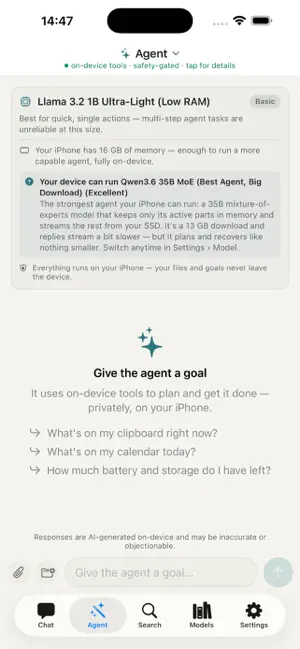


About Quenderin: Offline AI Chat
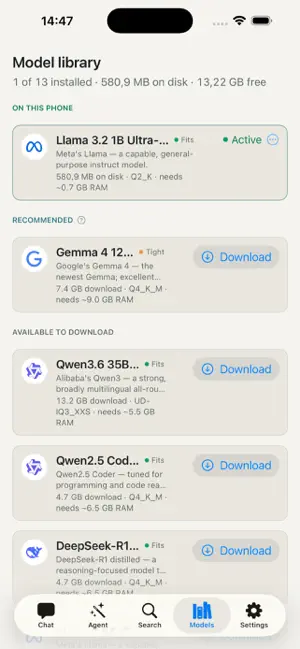
Quenderin runs open language models on your device. Download a compatible model for local offline chat, or explicitly choose a separate remote destination. Local chat needs no Quenderin account. Local model files stay on the device. • Give this chat separate on-device models for chat, for an output check, and for photos or speech. Choosing a role does not download a model. • When a checker model is already installed, a reply or a tool result is checked before it is shown. Look and Listen use a photo or speech model that is already on the device, then restore the previous local model. A missing file is not downloaded, and those replies are not presented as tested inference. • Add optional tools on this device and turn each one off. A tool that is off does not run. On Mac, a local command is available. iPhone and Android accept only a server on this device. • Doctor reports the models, notes, and tools for this chat. It does not start a chat or run a model. Practice scores saved tool questions. It does not score the model. • Choose models with download sizes, compatibility checks and memory estimates. Automatic selection uses available device and performance information; manual choices remain available. • Keep local conversations on your device. Saved Hy-Memory facts require your review and approval. • Optionally connect to DeepSeek using your own API key. That destination sends its conversation to DeepSeek under your provider account and billing terms. • Optionally connect to your own prepared Remote Harness server and trusted computer. Review the destination, trust and action approvals before remote work. Quenderin does not provide or provision a hosted AI service. • Read formatted replies, copy code, retain separate drafts and recover interrupted remote sessions. • Use separate workflows for still-image questions, verified Granite imports and local image generation on suitable hardware. Step 5 remains a separately approved connection to your prepared CUDA host. Large models need complete downloads and substantial memory. Some specialist workflows are unavailable on ordinary phones. An experimental catalog entry is a manual choice of an engine. It is not tested inference. File size and active parameter count are not RAM requirements. Internet access is needed for downloads, discovery and remote destinations. Local inference works offline after setup. Optional remote processing transmits data to the destination you select; its operator controls retained copies. On-device and remote models can make mistakes. Check important answers.
What’s new
Version 0.6.2 · Updated November 13, 2026
On a fresh install, a model that cannot be used now names the next step. Local models stay on the device. No Quenderin account.
App privacy
The developer, Albert Nikanorov, reported these privacy practices to Apple.
Data Not Collected
The developer does not collect any data from this app.
Alternatives to Quenderin: Offline AI Chat
Looking for apps like Quenderin: Offline AI Chat? Here are 6 similar apps on the App Store. The highest rated is Offline AI Chat: Maivii AI (3.0/5), and all 6 are free to download.
-
 Keep Secret: Offline AI Chat
-
 Molux: Offline AI Chatbot
-
 AI Chat Offline
1.0
-
 TensorChat: Private AI
1.0
-
 Offline AI Chat: Maivii AI
3.0
-
 Aione Ai
| App | Rating | Price | Last updated | Compare |
|---|---|---|---|---|
| Quenderin: Offline AI Chat | – | Free | November 13, 2026 | |
| Keep Secret: Offline AI Chat | – | Free | Jun 21, 2026 | Compare |
| Molux: Offline AI Chatbot | – | Free | Jun 13, 2026 | Compare |
| AI Chat Offline | 1.0 / 5 (1) | Free | Jul 14, 2026 | Compare |
| TensorChat: Private AI | 1.0 / 5 (1) | Free | May 13, 2026 | Compare |
| Offline AI Chat: Maivii AI | 3.0 / 5 (3) | Free | Sep 18, 2026 | Compare |
| Aione Ai | – | Free | Oct 12, 2026 | Compare |