

iDropper - Color Code Capture
Josh Levy Utilities iPhoneiPadiPod touch
iDropper - Color Code Capture is a free Utilities app for iPhone and iPad by Josh Levy. Rated 5.0/5 from 1 ratings. Requires iOS 17.0.
- Rating
- 5.0
- 1 ratings
- Price
- Free
- on the App Store
- Size
- 2 MB
- Age 4+
- Updated
- Aug 19
- 2026 · v1.0
Screenshots

About iDropper - Color Code Capture
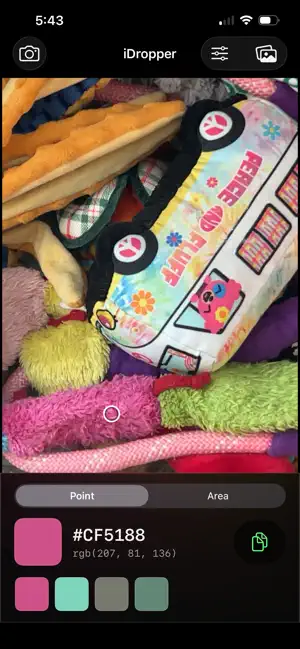
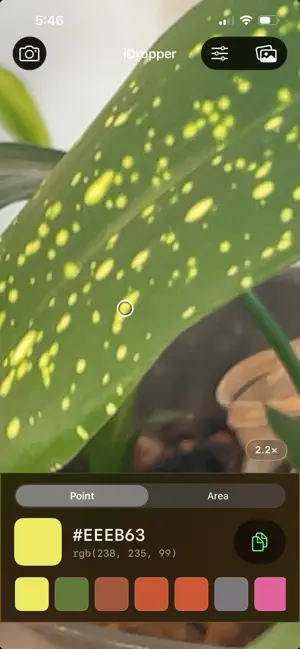
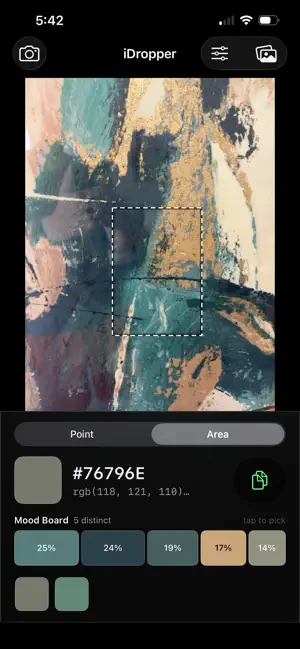
Point your camera at anything and read its color. iDropper gives you the hex code of whatever you aim at, updating live as you move. Freeze a frame when you find what you want, or work from a photo you already have. WHY THE NUMBERS ARE RIGHT Most color pickers hand you a hex code that's subtly wrong, and never tell you. iDropper pins the camera to sRGB, the color space hex codes are actually defined in, so the values you read match what your design tool will show. It averages a small block rather than a single pixel, because one pixel carries sensor noise and JPEG artifacts that can shift a reading by several values. Small differences, but they're the difference between a code you can use and one you have to eyeball afterwards. ZOOM IN ON THE DETAIL Pinch to zoom the camera itself, not just the picture on screen. That lets you isolate a single thread in a weave, one brushstroke in a painting, or one letter of printed text, instead of reading the blur of everything around it. AVERAGE AN AREA Drag a box over any still image and get the average color inside it. Useful when a surface is textured, patterned, or unevenly lit and no single point represents it. You can choose how the averaging is done. The default works in linear light, which is the physically correct way to blend colors and matches what you see when detail blurs together at a distance. The alternative averages raw values the way most tools do. On a fine pattern the two give visibly different answers. MOOD BOARD Some things don't have one color. A rug, an oil painting, a tweed jacket, a tiled floor. Their average is often a muddy shade that appears nowhere in the piece. Mood Board finds the distinct colors instead, and shows them as a single bar split by how much of your selection each one covers. You see at a glance that a carpet is 40% one brown, 25% a cream, and 15% a rust you hadn't consciously noticed. Tap any band to read and copy its hex. It groups colors the way your eye does, not the way a computer naively would, so it won't split one shade of beige into two entries while lumping a navy in with a black. WHO IT'S FOR Designers matching a client's existing brand color from a printed sample. Painters and decorators reading a wall before mixing. Interior designers pulling a palette from a rug, tile, or fabric swatch. Illustrators and digital artists collecting reference from the world. Anyone who has ever stood in front of something and wondered exactly what color it is. ALSO • Magnifier that floats above your finger, so your fingertip never hides the target • History of your last twelve colors, tap to recall • One tap to copy any hex to the clipboard • Works on photos from your library as well as the live camera PRIVACY iDropper has no account, no tracking, and no network access at all. Your photos never leave your device because nothing is ever sent anywhere. The camera is used only to show you the live preview and read colors from it.
App privacy
The developer, Josh Levy, reported these privacy practices to Apple.
Data Not Collected
The developer does not collect any data from this app.
Alternatives to iDropper - Color Code Capture
Looking for apps like iDropper - Color Code Capture? Here are 6 similar apps on the App Store. The highest rated is MistAI (4.1/5), and 5 of the 6 are free to download.
-
 Market Control for Shelly
-
 Kiosc
Kiosc
-
 Brookhaven Connect
2.6
Brookhaven Connect
2.6
-
 Markdown to PDF Fast Converter
-
 MistAI
4.1
MistAI
4.1
-
 WelcomeBob
3.0
WelcomeBob
3.0
| App | Rating | Price | Last updated | Compare |
|---|---|---|---|---|
| iDropper - Color Code Capture | 5.0 / 5 (1 rating) | Free | August 19, 2026 | |
| Market Control for Shelly | – | Free | Oct 14, 2026 | Compare |
| Kiosc | – | 8.99 USD | May 18, 2024 | Compare |
| Brookhaven Connect | 2.6 / 5 (5) | Free | Apr 3, 2025 | Compare |
| Markdown to PDF Fast Converter | – | Free | Sep 29, 2026 | Compare |
| MistAI | 4.1 / 5 (15) | Free | Sep 9, 2026 | Compare |
| WelcomeBob | 3.0 / 5 (2) | Free | Jun 10, 2026 | Compare |