

Blurpeg
Clever Iterations Pty Ltd Photo & Video iPhoneiPadiPod touch
Blurpeg is a free Photo & Video app for iPhone and iPad by Clever Iterations Pty Ltd. Requires iOS 18.0. Updated October 28, 2026.
- Price
- Free
- on the App Store
- Size
- 29 MB
- Age 4+
- Updated
- Oct 28
- 2026 · v1.7.1
Screenshots


About Blurpeg
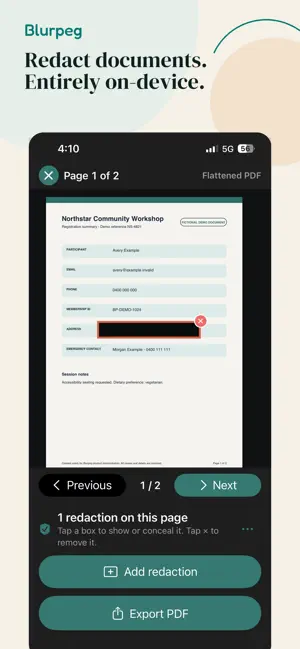
Blurpeg protects private details before you share. It combines automatic on-device face detection for photos with manual redaction for images and PDFs. BLUR FACES IN PHOTOS - Find possible faces on-device with Vectrari Face. - Review every suggested blur and choose who stays visible. - Add adjustable blur regions for faces or details the detector missed. - Choose two-pass blur, a fixed privacy mosaic, or solid concealment. - Save a newly rendered copy with the selected redactions flattened into its pixels. REDACT IMAGES AND PDFS - Open a document image from Photos or Files, or choose a PDF from Files. - Place and resize redaction regions over names, addresses, account numbers, signatures and other private details. - Move through multi-page PDFs one page at a time. - Export a separate flattened, image-only PDF. The original remains unchanged. ONE EXPORT INCLUDED - Try Blurpeg on your own material with one successful photo or complete PDF export included. - Unlock unlimited exports with a single lifetime in-app purchase. - No subscription. PRIVATE BY DESIGN - Face detection and redaction happen inside the app. - Blurpeg has no service for uploading your source to us. - No Blurpeg account, advertising or app analytics. - Processing can work without an internet connection once the source is on the device. - Existing paid-download customers retain unlimited exports. Automated face detection can miss faces or suggest face-like objects. Review every result before saving or sharing. Blurpeg does not replace consent, safeguarding, privacy or publication decisions. PDF exports are flattened, image-only copies and do not retain searchable text or source PDF annotations. BOARDING PASSES AND OTHER SENSITIVE DETAILS Manually cover names, booking references, barcodes and QR codes before sharing. Use Solid concealment for codes and cover the entire code and its border. Blurpeg does not detect these codes automatically. Check the surrounding details too. SIGNED IMAGE EXPORTS Exported JPEG images include an on-device digital signature. Use About & Privacy → Check an image export to verify whether a signed image is unchanged. Signer identity is not independently verified. The signature does not prove that a scene is real or prevent copying, and other services may remove it. PDF exports do not include this signature. Blur retains broad visual information. No redaction style guarantees anonymity or prevents AI image generation. Privacy mosaic and Solid concealment replace the selected pixels entirely. Requires iOS or iPadOS 18 or later.
What’s new
Version 1.7.1 · Updated October 28, 2026
Fixes a crash that could occur when blurring photos containing many faces.
App privacy
The developer, Clever Iterations Pty Ltd, reported these privacy practices to Apple.
Data Not Collected
The developer does not collect any data from this app.
Alternatives to Blurpeg
Looking for apps like Blurpeg? Here are 6 similar apps on the App Store. The highest rated is Pix - Photos for Watch (4.7/5), and 5 of the 6 are free to download.
-
 Refav Gallery
-
 Blur Photo & Background Tool
-
 SwipePost: Seamless Carousel
-
 Denoise Kit: Noise Reducer
-
 Blur Photo: Face Pixelate
-
 Pix - Photos for Watch
4.7
Pix - Photos for Watch
4.7
| App | Rating | Price | Last updated | Compare |
|---|---|---|---|---|
| Blurpeg | – | Free | October 28, 2026 | |
| Refav Gallery | – | Free | Oct 22, 2026 | Compare |
| Blur Photo & Background Tool | – | Free | Oct 15, 2026 | Compare |
| SwipePost: Seamless Carousel | – | Free | Oct 31, 2026 | Compare |
| Denoise Kit: Noise Reducer | – | Free | Oct 30, 2026 | Compare |
| Blur Photo: Face Pixelate | – | Free | Aug 19, 2026 | Compare |
| Pix - Photos for Watch | 4.7 / 5 (3) | 2.99 USD | Oct 9, 2026 | Compare |
Compare Blurpeg with the top alternatives: ratings, updates, ASO score and keyword gaps →