

Rostrum - Speaker Timer
Scott GREER Productivity iPhoneiPadiPod touchMac
Rostrum - Speaker Timer is a free Productivity app for iPhone and iPad by Scott GREER. Rated 5.0/5 from 1 ratings. Requires iOS 18.0.
- Rating
- 5.0
- 1 ratings
- Price
- Free
- on the App Store
- Size
- 1 MB
- Age 4+
- Updated
- Sep 16
- 2026 · v1.3
Screenshots


About Rostrum - Speaker Timer
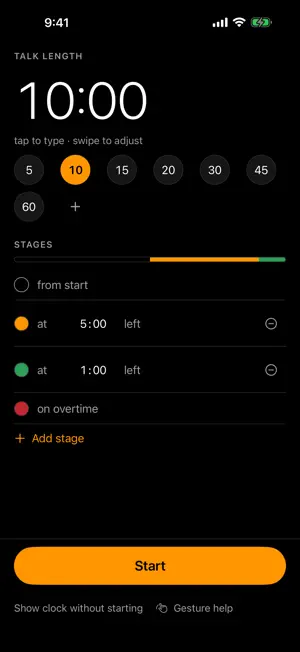
Rostrum shows a speaker how much time is left, as a clock large enough to read from the back of the room — or from a phone propped on the podium. The background changes color at times you choose. Green while there's plenty left, amber when it's time to move on, red when it isn't. You decide how many stages there are and exactly when each one starts — most timers give you three fixed colors and no say in the matter. SILENT BY DESIGN No chimes. No alerts. No notifications. Not "sounds turned off by default" — Rostrum contains no code that can make a sound. Your audience never knows the timer is there. THE CLOCK IS THE CONTROL No buttons over your countdown. Tap to start or pause. Pause it and the clock becomes the editor: swipe with one finger to adjust seconds, two fingers for minutes, three for hours. A running clock refuses those swipes on purpose — a hand steadying the phone should not be able to rewrite a talk in progress. Pinch in to leave. A one-time overlay teaches the gestures, and a quiet line along the bottom of the clock keeps the key ones in view whenever the clock is stopped. Mid-talk, nothing but the time. BUILT FOR WHOEVER IS RUNNING THE ROOM Changing a talk length takes one tap. Set your common slot lengths once — 5, 15, 30, 45 minutes, whatever your event uses — and switch between speakers instantly. ON A BIG SCREEN WHEN YOU NEED IT Connect a display with AirPlay or USB-C and the clock fills it while your phone becomes the remote: start, pause, and adjust from your hand while the speaker watches the screen. WHEN TIME RUNS OUT The screen turns red and flashes briefly, then counts upward so a speaker can see exactly how far over they are. Impossible to miss, impossible to mistake for anything else. DETAILS THAT MATTER ON STAGE • The screen never dims while the clock is up • A phone call or a lock screen never stops the countdown — the full time is there when you come back • Digits never jitter or shift as the numbers change • Text color adapts automatically so it stays readable on any background • Remembers your setup between launches Also on the Mac App Store — one free app, both platforms. Free, with no purchases, no accounts, and no data collection of any kind. Rostrum has no network code — there is nowhere for your information to go.
What’s new
Version 1.3 · Updated September 16, 2026
A more readable setup screen. Larger type that follows your Dynamic Type setting, a proper iPad layout, and Start always within reach at the bottom of the screen. The clock now protects a talk in progress. While the timer is running, swipes no longer change the time — a hand steadying your phone can't rewrite a countdown mid-sentence. Pause, and the swipes work exactly as before: one finger for seconds, two for minutes, three for hours. Pinch in to leave the clock, from anywhere on the screen. And a reminder where you need it, thanks to a user who wrote in: a quiet line along the bottom of the clock names the key gestures — tap, double-tap, pinch to leave — whenever the timer is stopped, and for a few seconds after it starts. Mid-talk, the clock is bare. These improvements came from your feedback. Keep it coming — the support link below reaches a person.
App privacy
The developer, Scott GREER, reported these privacy practices to Apple.
Data Not Collected
The developer does not collect any data from this app.
Alternatives to Rostrum - Speaker Timer
Looking for apps like Rostrum - Speaker Timer? Here are 6 similar apps on the App Store. The highest rated is ReadyTimer :) (5.0/5), and 5 of the 6 are free to download.
-
 Talklight: Speaker Timer
-
 Presentempo Presentation Timer
-
 ReadyTimer :)
5.0
ReadyTimer :)
5.0
-
 Countdown Timer Nano
3.5
Countdown Timer Nano
3.5
-
 Study Timer Display
-
 Cue Clock - Presentation App
| App | Rating | Price | Last updated | Compare |
|---|---|---|---|---|
| Rostrum - Speaker Timer | 5.0 / 5 (1 rating) | Free | September 16, 2026 | |
| Talklight: Speaker Timer | – | Free | Oct 5, 2026 | Compare |
| Presentempo Presentation Timer | – | Free | Oct 19, 2026 | Compare |
| ReadyTimer :) | 5.0 / 5 (3) | Free | Sep 28, 2026 | Compare |
| Countdown Timer Nano | 3.5 / 5 (4) | Free | Oct 23, 2026 | Compare |
| Study Timer Display | – | 1.99 USD | May 26, 2026 | Compare |
| Cue Clock - Presentation App | – | Free | Jul 14, 2026 | Compare |