

Presentempo Presentation Timer
PATRICK 1. WAGNER Productivity iPhoneiPadiPod touchApple Watch
Presentempo Presentation Timer is a free Productivity app for iPhone and iPad by PATRICK 1. WAGNER. Requires iOS 17.0. Updated October 19, 2026.
- Price
- Free
- on the App Store
- Size
- 44 MB
- Age 4+
- Updated
- Oct 19
- 2026 · v1.2.1
Screenshots


About Presentempo Presentation Timer
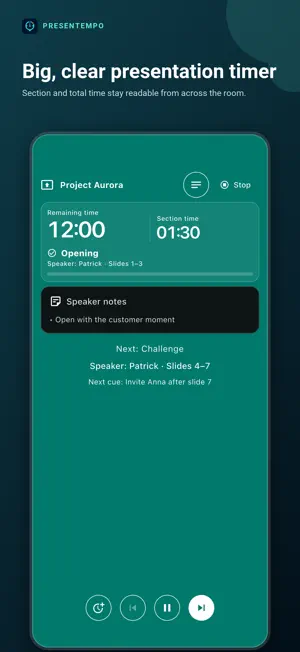
Presentempo is a presentation timer and speech timer for talks, pitches, lectures and speech clubs. A big countdown with color zones shows section and total time from across the room, and haptic cues on iPhone or Apple Watch tell you when to move on, so you never have to stare at the clock. Start in seconds with Quick Start: countdown, stopwatch, end time or a speech-club traffic light. Green, yellow and red light up at the times you choose, for example after 5, 6 and 7 minutes. In Live mode the whole screen turns the color of the light, a connected watch switches color with a haptic cue at each light, and the result shows which light you finished on. You can also run a built-in format -- pitch, class talk, conference slot, 20 × 20 -- or rehearse a structured talk. A short check before each run shows which cues will reach you. Mark real section changes, see section and total time together, compare planned with actual time, and let a synced watch carry on by itself if the phone disconnects. Runs started on a watch are always practices; start Live runs on the phone. Free is a complete timer: Quick Start with countdown, stopwatch, end time and traffic light, two editable talks with up to five sections each, direct starts from every built-in format, Live and Practice modes, the three newest results, standard cue rules, basic watch execution, and complete data backup, restore and deletion. In Free, single-speaker formats with up to five sections save with standard timing; Pro keeps their smart pacing. Presentempo Pro is an optional one-time purchase, never a subscription. Smart Fit adjusts a talk to a new target while respecting minimums, fixed sections, priorities and a protected ending. A recovery plan proposes future-only cuts when a run falls behind. Pro also unlocks multiple speakers, slide handoffs, cue cards, outline/text and PowerPoint (.pptx) import, the full local Timing Coach, advanced watch controls, custom visual zones, custom haptic/audio cue rules, additional talks and sections, complete history/statistics, and PDF, CSV and text reports. Talk content stays local unless you choose watch sync or export. PowerPoint files are parsed on-device and the working copy is removed after import. No account, advertising or activity-tracking SDK. RevenueCat and the platform store process purchase and restore information. Optional content-free beta counters are off by default and never sent automatically. Eight languages, light/dark/system appearance, responsive layouts and accessibility support.
What’s new
Version 1.2.1 · Updated October 19, 2026
Fixes the recovery-plan button in the built-in examples for Free users. It now clearly offers to unlock with Pro and reliably opens the upgrade screen. Closing it returns to the running timer.
App privacy
The developer, PATRICK 1. WAGNER, reported these privacy practices to Apple.
Data Not Linked to You
The following data, which may be collected but is not linked to your identity, may be used for the following purposes:
- Purchases: Purchase History
Used for: Analytics, App Functionality
Alternatives to Presentempo Presentation Timer
Looking for apps like Presentempo Presentation Timer? Here are 6 similar apps on the App Store. The highest rated is Rostrum - Speaker Timer (5.0/5), and all 6 are free to download.
-
 SilentCue
4.8
SilentCue
4.8
-
 タイムプラス
-
 INSIDE CONTABILIDADE
-
 Affirmation Lock: App Blocker
-
 Rostrum - Speaker Timer
5.0
Rostrum - Speaker Timer
5.0
-
 Talk Timer: Speech & Pitch
| App | Rating | Price | Last updated | Compare |
|---|---|---|---|---|
| Presentempo Presentation Timer | – | Free | October 19, 2026 | |
| SilentCue | 4.8 / 5 (5) | Free | Aug 25, 2026 | Compare |
| タイムプラス | – | Free | Sep 16, 2026 | Compare |
| INSIDE CONTABILIDADE | – | Free | Dec 12, 2025 | Compare |
| Affirmation Lock: App Blocker | – | Free | Jan 31, 2026 | Compare |
| Rostrum - Speaker Timer | 5.0 / 5 (1) | Free | Sep 16, 2026 | Compare |
| Talk Timer: Speech & Pitch | – | Free | Aug 18, 2026 | Compare |