

KinLine Family Organizer
AADSTRA LLC Productivity iPhoneiPadiPod touch
KinLine Family Organizer is a free Productivity app for iPhone and iPad by AADSTRA LLC. Rated 5.0/5 from 8 ratings. Requires iOS 26.1.
- Rating
- 5.0
- 8 ratings
- Price
- Free
- on the App Store
- Size
- 27 MB
- Age 4+
- Updated
- Oct 24
- 2026 · v1.0.6
Screenshots


About KinLine Family Organizer
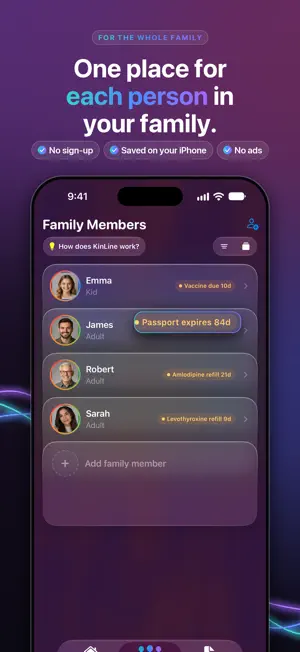
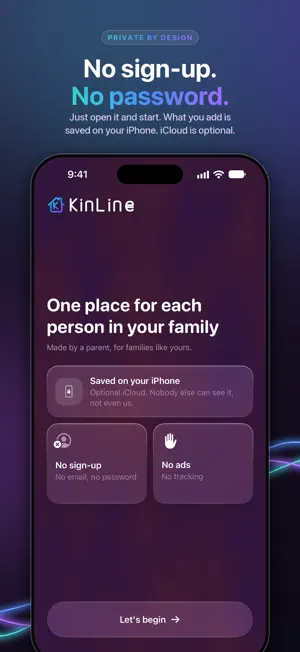
One place for each person in your family. IDs, insurance cards, doctor visits, medicines, allergies, documents and the dates you can't miss, organized by person. When the school, the clinic or the babysitter asks, the answer is already on your phone. NO SIGN-UP. NO PASSWORD. Just open KinLine and start. There's no account to create and no email to give. PRIVATE BY DESIGN • What you add is saved on your iPhone. • iCloud is optional. Turn it on for backup and to share with family. • Nobody else can see your records, not even us. • No ads. No tracking. SIMPLE BY DESIGN 1. Add a person: you, your kids, your parents. A name is all you need. 2. Save their records: type what you know and tap Save. Add a photo of the card if you like. 3. Find any detail in seconds: type a name and what you need. 4. Get reminded before passports, licenses, refills, check-ups and vaccines are due. EACH PERSON GETS THEIR OWN SPACE • Medical visits, insurance, IDs, assets, will and estate papers, documents, appointments, reminders and a journal • Emergency Info: allergies, medicines, doctors, pharmacy and contacts on one screen, plus a PDF you can print or share with a babysitter, school or caregiver • What's Coming: everything dated across the family, soonest first SHARE ONE PERSON, NOT EVERYTHING Share a single person, three ways. You choose who sees what. • Share via iCloud: for family with an iPhone, as view-only or can-edit. • Send a Copy: a file for anyone, iPhone or Android, by WhatsApp, Messages, AirDrop or email. Add a password if you like. • Sync at Home: for people you live with. Scan a code once, and both phones stay up to date on your home Wi-Fi. A HELPER, NEVER IN CHARGE On iPhones with Apple Intelligence, KinLine can suggest some fields from a photo of a card. It runs on your iPhone, you check every suggestion before saving, and you can turn it off. Nothing is sent to AI companies. AVAILABLE IN 27 LANGUAGES Including English, Spanish, Hindi, Gujarati, Telugu, Tamil, Kannada, Malayalam, Marathi, German, French, Japanese, Chinese, Portuguese, Korean and Arabic. FREE TO START Free includes 2 people and 3 records per person in each main card. Emergency info, appointments and reminders are unlimited. KinLine+ unlocks your whole family and unlimited records, with monthly or annual plans. The annual plan includes a free trial. Works with Family Sharing. Payment is charged to your Apple Account and renews automatically unless canceled at least 24 hours before the end of the period. Manage or cancel anytime in your Apple Account settings. Made by a parent, for families like yours. KinLine is an organization tool and does not provide medical diagnosis, treatment or professional medical advice. Terms of Use (EULA): https://www.apple.com/legal/internet-services/itunes/dev/stdeula/ Privacy Policy: https://kinlineapp.com/privacy/
Ratings & reviews
5.0
8 ratings
What’s new
Version 1.0.6 · Updated October 24, 2026
Sharing your family made simpler • One Share button. Open a person, tap Share, and choose Share via iCloud. A short note now explains what sharing means: you look after them together, and changes show on both phones. • Family on Android? A small "Send a copy" link is right under the Share button. • People shared with you are clearer: the app says whether you can update their records or only view them, and only the owner can share them on. • Removing someone shared with you is instant and stays removed, even if you're offline. • Copies sent between phones now keep both people's changes when you each update the same record. Appointment cards on your Lock Screen • One card per appointment. No more duplicates. • Cards show who it's with, your note, the address, and buttons for Maps or Google Maps. • A card you swipe away stays away. Recurring appointments get a card each time. • Appointments and reminders added on another phone, or by family who share with you, now get their alerts and cards too. A friendlier start • KinLine opens straight to Family Members, with one simple card to add your first person. • "How does KinLine work?" now shows what you get, in four quick picture steps. Plus many smaller fixes for sharing, sharing files into KinLine, and reliability.
App privacy
The developer, AADSTRA LLC, reported these privacy practices to Apple.
Data Not Collected
The developer does not collect any data from this app.
Alternatives to KinLine Family Organizer
Looking for apps like KinLine Family Organizer? Here are 6 similar apps on the App Store. The highest rated is SIGMA: Fuels Association (5.0/5), and all 6 are free to download.
-
 Birthday Reminder: Tracker
-
 LifeVault: Family Organizer
4.6
LifeVault: Family Organizer
4.6
-
 Reminday: Birthdays & More
-
 Birthday Reminder Plus+
-
 SIGMA: Fuels Association
5.0
SIGMA: Fuels Association
5.0
-
 OmniAI - AI Chat Assistant
4.9
OmniAI - AI Chat Assistant
4.9
| App | Rating | Price | Last updated | Compare |
|---|---|---|---|---|
| KinLine Family Organizer | 5.0 / 5 (8 ratings) | Free | October 24, 2026 | |
| Birthday Reminder: Tracker | – | Free | Aug 3, 2026 | Compare |
| LifeVault: Family Organizer | 4.6 / 5 (5) | Free | Oct 17, 2026 | Compare |
| Reminday: Birthdays & More | – | Free | Oct 25, 2026 | Compare |
| Birthday Reminder Plus+ | – | Free | Sep 20, 2026 | Compare |
| SIGMA: Fuels Association | 5.0 / 5 (1) | Free | Aug 22, 2026 | Compare |
| OmniAI - AI Chat Assistant | 4.9 / 5 (9) | Free | Jun 24, 2026 | Compare |