

LifeVault: Family Organizer
Pixel Street Media LLC Productivity iPhoneiPadiPod touch
LifeVault: Family Organizer is a free Productivity app for iPhone and iPad by Pixel Street Media LLC. Rated 4.6/5 from 5 ratings. Requires iOS 15.1.
- Rating
- 4.6
- 5 ratings
- Price
- Free
- on the App Store
- Size
- 52 MB
- Age 4+
- Updated
- Oct 17
- 2026 · v1.2.2
Screenshots


About LifeVault: Family Organizer
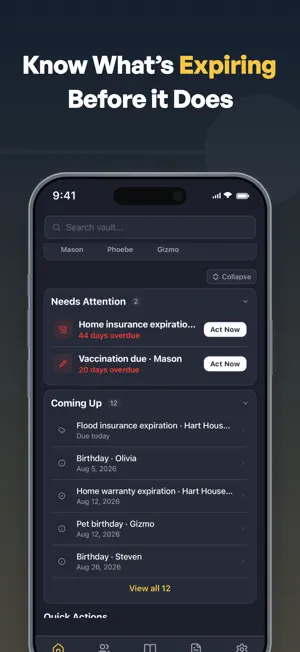
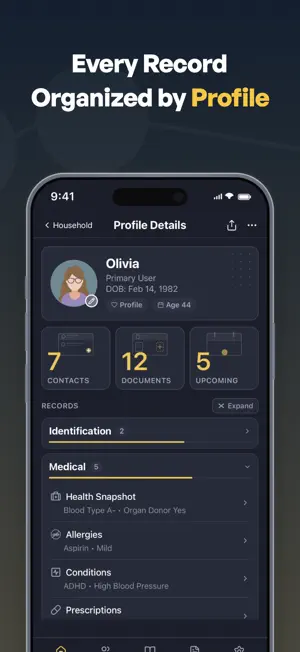
Stop typing your family's paperwork. LifeVault is a private family organizer that scans your documents and fills in the records for you. The important information for the people, pets, and home you love lives in one place. FROM FILES TO RECORDS Most apps store files. LifeVault turns them into organized, searchable records, connected to the people, pets, and home they belong to. SCAN. IT FILLS ITSELF IN. Take a photo or add a PDF: a driver's license, passport, insurance card, prescription, or vaccination record. LifeVault reads the key details into a structured record for you to check, then files the original in your Documents Vault, attached to it. Scanning works for 39 record types, and it all happens on your phone. A PROFILE FOR EVERYONE Create profiles for people, pets, and your home, each with the records that fit it: medical, insurance, IDs, school, travel, legal, vehicle, and pet care. You get 90+ record types, and you can hide the sections you don't need. A MEDICAL TIMELINE YOU CAN HAND A DOCTOR Check "Add to Timeline" on records like medications and procedures. Add hospital stays, falls, or cognitive changes in the History section. Now you can show any doctor what's changed, at a glance. SEE WHAT'S COMING UP Expiration dates on passports, licenses, and policies show up in Coming Up before they're due, and LifeVault keeps your history as things change. IT BACKS ITSELF UP Every record, document, and profile is encrypted on your phone before it goes anywhere, then saved to your own iCloud as you use the app. Add a record this morning and it is already protected. There is nothing to switch on and no password to remember. It is separate from your iPhone's own iCloud Backup. NO PHONE RESET REQUIRED You can get your vault back without a whole-phone restore. You don't wipe a new iPhone or rebuild it from an Apple backup. Install LifeVault, sign in to iCloud, and it finds your vault on its own. A NEW PHONE, AND YOUR VAULT COMES BACK Pick a restore point and your people, pets, home, documents, and photos come back the way you left them. Sign in to iCloud on the new iPhone and your restore points are there waiting. LifeVault keeps your recent backups plus a restore point for many of the days you used it, reaching back months, so if you delete something by mistake, you can still go back to how things were before. PDFS YOU CAN HAND OVER Share a profile as one clean, styled PDF, choosing which sections to include, or export your whole household in a single document for a doctor, teacher, babysitter, or pet sitter. Support Guides and Behavior Guides for pets also have their own PDF, so you can hand one to a teacher or sitter on its own. PRIVATE BY DESIGN • No account, and no password of yours on anyone's server • Backups go to your own iCloud, never to our servers • No ads, cross-app tracking, or data selling • Stored on your device, locked with Face ID, Touch ID, or your passcode • Every backup encrypted (AES-256-GCM), plus your own Backup File to keep LifeVault is free to download and use. Your records live on your device, and they stay yours.
Ratings & reviews
4.6
5 ratings
What’s new
Version 1.2.2 · Updated October 17, 2026
Share exactly what someone needs. NEW: DOCUMENT PACKET Choose documents and combine them into one PDF, with a contents page. PREVIEW BEFORE YOU SHARE Every PDF opens in a preview first, so you can check it before it goes anywhere. SMARTER SCANNING Vehicle registrations, titles, insurance cards, prescriptions, and driver's licenses read more accurately. When LifeVault isn't sure which value belongs where, it leaves the field blank instead of guessing. A scanned registration selects the matching vehicle by its VIN. MORE FOR VEHICLES AND BILLS • More than one vehicle per household, each with its own issues list • Utility bills read account numbers and the latest bill amount • Records show in full, grouped by the document they came from ALSO IN THIS UPDATE • Opens in your chosen Light or Dark theme from the very first screen • Clearer document names, and an Attached Documents list in your PDFs • Keeps your 5 most recent backups plus 14 daily restore points • Fixes to forms, phone numbers, times, and Timeline titles Same private, on-device app. No account, no ads.
App privacy
The developer, Pixel Street Media LLC, reported these privacy practices to Apple.
Data Not Linked to You
The following data, which may be collected but is not linked to your identity, may be used for the following purposes:
- Usage Data: Product Interaction
Used for: Analytics
Alternatives to LifeVault: Family Organizer
Looking for apps like LifeVault: Family Organizer? Here are 6 similar apps on the App Store. The highest rated is LifeVault Family (5.0/5), and all 6 are free to download.
-
 Life Vault : Digital Legacy
-
 LifeVault Family
5.0
-
 Return Radar
3.0
-
 Amal- Track, Compete, Improve
5.0
-
 HomeVault Documents
-
 beckett: life assistant
5.0
| App | Rating | Price | Last updated | Compare |
|---|---|---|---|---|
| LifeVault: Family Organizer | 4.6 / 5 (5 ratings) | Free | October 17, 2026 | |
| Life Vault : Digital Legacy | – | Free | Sep 4, 2026 | Compare |
| LifeVault Family | 5.0 / 5 (1) | Free | May 21, 2026 | Compare |
| Return Radar | 3.0 / 5 (2) | Free | Apr 16, 2026 | Compare |
| Amal- Track, Compete, Improve | 5.0 / 5 (2) | Free | Jul 2, 2026 | Compare |
| HomeVault Documents | – | Free | Jul 7, 2026 | Compare |
| beckett: life assistant | 5.0 / 5 (4) | Free | Oct 21, 2026 | Compare |