

Pick & Crop AI Photo Assistant
Yan Li Photo & Video iPhoneiPadiPod touch
Pick & Crop AI Photo Assistant is a free Photo & Video app for iPhone and iPad by Yan Li. Requires iOS 17.0. Updated August 17, 2026.
- Price
- Free
- on the App Store
- Size
- 13 MB
- Age 4+
- Updated
- Aug 17
- 2026 · v1.0
Screenshots

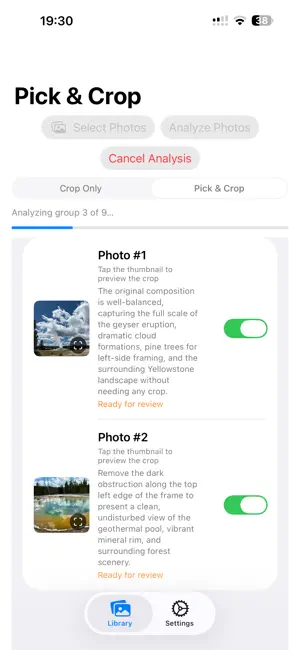
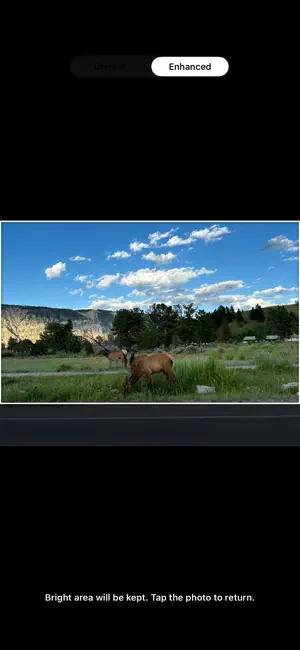
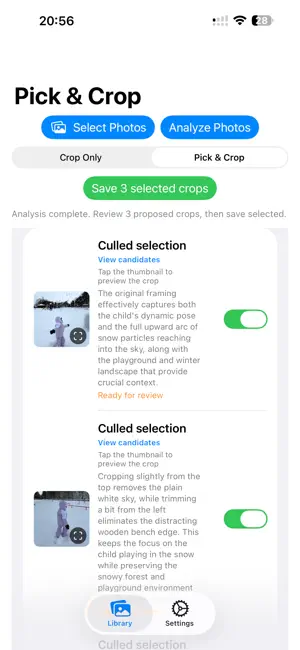
About Pick & Crop AI Photo Assistant
Pick & Crop is an AI photo assistant that helps you choose the strongest images, improve photo composition, and organize the results—all while keeping you in control. PICK THE BEST SHOTS Select up to 30 photos at a time. Pick & Crop identifies groups of similar images and recommends the strongest photo from each group based on expression, sharpness, composition, subject presentation, and overall photographic quality. Want a different winner? Open the candidate view and choose another photo before saving. IMPROVE COMPOSITION Pick & Crop recommends thoughtful crops that consider: • The likely subject and intent of the photo • Background and environmental context • Visual balance and composition • Headroom, eye room, and direction of movement • Important people and objects near the frame edges • A natural result that preserves the character of the original scene You can also use Crop Only when you want to improve each selected photo without comparing or culling similar shots. REVIEW BEFORE SAVING Every recommendation remains under your control: • Preview the proposed crop over the original image • Compare Original and Enhanced versions • Accept or reject each result individually • Choose a different winner from a group of similar photos • Keep originals or move accepted originals to Recently Deleted Pick & Crop does not automatically delete an original without your review and confirmation. LOCAL ENHANCEMENT AND PHOTO ORGANIZATION Optional Auto Enhance is performed on your device. When saving, Pick & Crop preserves supported information from the source photo, including capture date, location, favorite status, available camera metadata, and eligible album memberships. Processed photos are organized in the Pick & Crop album. PRIVATE BY DESIGN Full-resolution originals remain on your device. For AI analysis, Pick & Crop sends downscaled copies of the selected photos and, when useful, temporary face-detail crops to its cloud service. The app does not use advertising or track you across other companies’ apps and websites. FREE TO TRY New accounts receive 50 photo-processing credits. Pick & Crop Plus includes: • 300 photo analyses per monthly subscription period • AI-assisted photo selection • Composition-aware crop recommendations • Local image enhancement • Purchase restoration across reinstalls and account deletion Unused monthly subscription credits do not roll over. Unused free credits remain available. Pick & Crop Plus renews automatically unless canceled through your Apple Account subscription settings. The App Store displays the localized price and subscription terms before purchase. Support: https://gen-lang-client-0552459518.web.app Privacy Policy: https://gen-lang-client-0552459518.web.app/privacy Terms of Use: https://gen-lang-client-0552459518.web.app/terms
App privacy
The developer, Yan Li, reported these privacy practices to Apple.
Data Not Linked to You
The following data, which may be collected but is not linked to your identity, may be used for the following purposes:
- Identifiers: User ID
- Usage Data: Product Interaction, Other Usage Data
- Diagnostics: Crash Data, Other Diagnostic Data
Used for: Analytics, App Functionality
Alternatives to Pick & Crop AI Photo Assistant
Looking for apps like Pick & Crop AI Photo Assistant? Here are 6 similar apps on the App Store. The highest rated is PhotoPicky (5.0/5), and all 6 are free to download.
-
 ordoo photos
-
 PhotoPicky
5.0
PhotoPicky
5.0
-
 Turnr: Rotate & Clean Photos
-
 FrameFit - Auto Reframe
-
 True Color: Layer Photo Editor
-
 LutLog
| App | Rating | Price | Last updated | Compare |
|---|---|---|---|---|
| Pick & Crop AI Photo Assistant | – | Free | August 17, 2026 | |
| ordoo photos | – | Free | Jul 28, 2026 | Compare |
| PhotoPicky | 5.0 / 5 (2) | Free | Jul 14, 2026 | Compare |
| Turnr: Rotate & Clean Photos | – | Free | Feb 23, 2026 | Compare |
| FrameFit - Auto Reframe | – | Free | Sep 24, 2026 | Compare |
| True Color: Layer Photo Editor | – | Free | Aug 18, 2026 | Compare |
| LutLog | – | Free | Jul 9, 2026 | Compare |