

PhotoPicky
Hojin Lee Photo & Video iPhoneiPadiPod touch
PhotoPicky is a free Photo & Video app for iPhone and iPad by Hojin Lee. Rated 5.0/5 from 2 ratings. Requires iOS 18.6. Updated July 14, 2026.
- Rating
- 5.0
- 2 ratings
- Price
- Free
- on the App Store
- Size
- 12 MB
- Age 4+
- Updated
- Jul 14
- 2026 · v1.5.6
Screenshots
About PhotoPicky
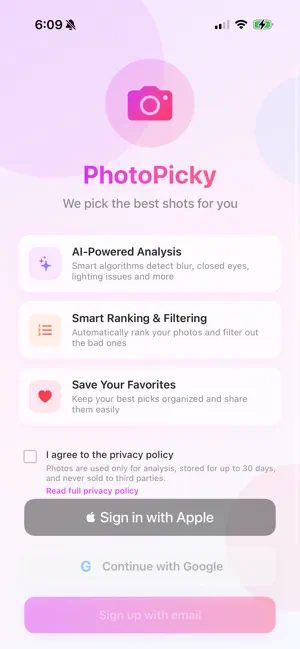
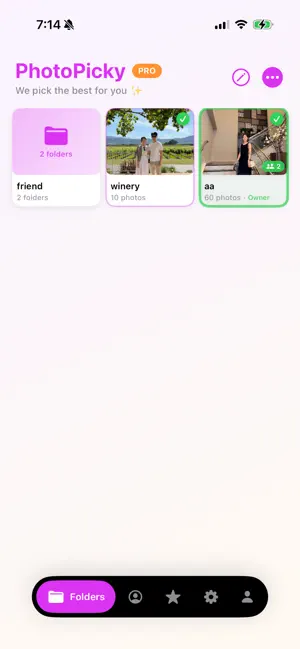
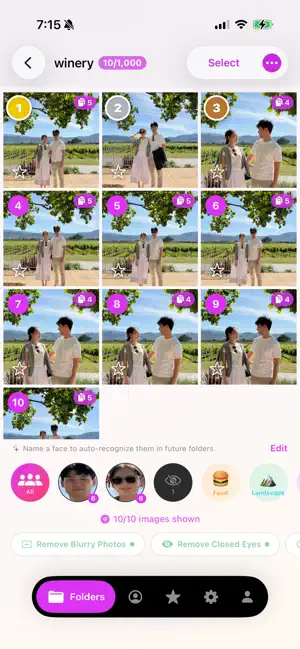
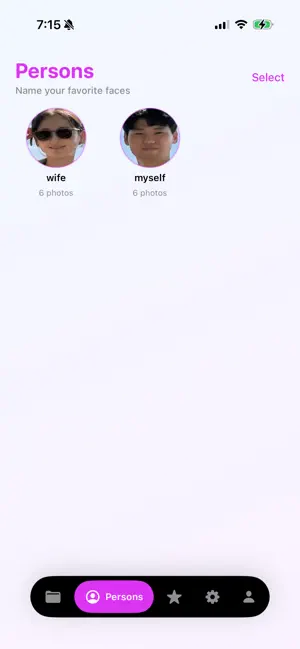
Stop scrolling through hundreds of similar photos — let AI find your best shots. PhotoPicky uses artificial intelligence to analyze your photos and rank them by quality. Simply create a folder, add your photos, and tap "Analyze with AI." In seconds, you'll know which photos are the sharpest, best-lit, and most flattering. KEY FEATURES • AI-Powered Analysis — Automatically detects blurry photos, closed eyes, poor lighting, obstructed faces, and duplicates. • Smart Filters — Apply filters like "Remove Blurry Photos" or "Prefer Good Smiles" with adjustable strictness levels (Relaxed, Moderate, Strict). • Ranked Results — See your photos ranked from best to worst so you always keep the right ones. • Favorites — Save your top picks to an in-app favorites collection for quick access. • Shared Folders — Invite friends and family to collaborate on shared folders. Everyone can add photos and vote on the best ones together. • Folder Groups — Organize your folders into groups for events, trips, or projects. • People Detection — Browse photos grouped by the people in them. • Photo Album Export — Save your best photos directly to a "PhotoPicky" album in your Photos library. • Share Easily — Share your top-ranked photos with friends and family in one tap. • Cloud Sync — Sign in with Google to sync your folders and data across devices. PERFECT FOR • Choosing the best group photo • Sorting through vacation or event photos • Cleaning up your camera roll • Picking the best selfie • Photographers reviewing large batches Download PhotoPicky and let AI do the picking for you. Terms of Use (EULA): https://www.apple.com/legal/internet-services/itunes/dev/stdeula/ Privacy Policy: https://hjlee9295.github.io/photo_picky_privacy/ Both links are also displayed in the app's subscription paywall screen. 수백 장의 비슷한 사진을 일일이 넘길 필요 없어요 — AI가 최고의 사진을 골라드립니다. PhotoPicky는 인공지능으로 사진을 분석하고 품질 순으로 순위를 매겨줍니다. 폴더를 만들고, 사진을 추가하고, "AI로 분석하기"를 누르기만 하면 됩니다. 몇 초 안에 어떤 사진이 가장 선명하고, 조명이 좋고, 잘 나왔는지 알 수 있습니다. 주요 기능 • AI 분석 — 흐릿한 사진, 감은 눈, 나쁜 조명, 가려진 얼굴, 중복 사진을 자동으로 감지합니다. • 스마트 필터 — "흐릿한 사진 제거", "좋은 미소 선호" 등의 필터를 세기 조절(여유, 보통, 엄격)과 함께 적용할 수 있습니다. • 랭킹 보기 — 사진을 최고에서 최저 순으로 정렬하여 항상 가장 잘 나온 사진을 보관할 수 있습니다. • 즐겨찾기 — 마음에 드는 사진을 앱 내 즐겨찾기에 저장하여 빠르게 접근할 수 있습니다. • 공유 폴더 — 친구와 가족을 초대하여 함께 사진을 모으고, 가장 좋은 사진을 함께 골라보세요. • 폴더 그룹 — 이벤트, 여행, 프로젝트별로 폴더를 그룹으로 묶어 정리하세요. • 인물별 분류 — 사진 속 인물별로 사진을 모아 볼 수 있습니다. • 사진 앨범 내보내기 — 최고의 사진을 사진 라이브러리의 "PhotoPicky" 앨범에 바로 저장할 수 있습니다. • 간편 공유 — 한 번의 탭으로 최고 순위 사진을 친구와 가족에게 공유하세요. • 클라우드 동기화 — Google로 로그인하여 기기 간 폴더와 데이터를 동기화할 수 있습니다. 이런 분들에게 추천합니다 • 단체 사진에서 최고의 한 장을 고르고 싶을 때 • 여행이나 행사 사진을 정리하고 싶을 때 • 카메라 롤을 깔끔하게 정리하고 싶을 때 • 가장 잘 나온 셀카를 고르고 싶을 때 • 대량의 사진을 검토하는 사진작가 PhotoPicky를 다운로드하고 AI에게 선별을 맡겨보세요.
What’s new
Version 1.5.6 · Updated July 14, 2026
What's New in v1.5.6 English • Favorites, upgraded: tap a folder to browse its favorites in a grid, download them per folder or all at once, and save any photo right from the preview • Your favorites now stay safe — at full quality — even after their folder is deleted • New Favorites filter in folders: see only the photos you starred • People tab: select and remove faces that don't belong — they disappear from folder filters too • Clean up your photo library: delete a folder's photos from your camera roll while keeping all your favorites • Photos saved to your library keep their original capture date • Share a folder before analyzing — invite friends right away • Filters now stay applied when you switch tabs, and sideways photos no longer break the grid • The Analysis Pack is now easy to find in Settings • Many stability and performance improvements 한국어 • 즐겨찾기 대폭 개선: 폴더를 탭하면 그리드로 모아 보고, 폴더별·전체 다운로드, 미리보기에서 바로 저장까지 • 폴더를 삭제해도 즐겨찾기한 사진은 원본 화질로 안전하게 유지됩니다 • 폴더에 즐겨찾기 필터 추가 — 내가 찜한 사진만 모아 보기 • 인물 탭: 관련 없는 얼굴을 선택해 삭제 — 폴더의 얼굴 필터에서도 함께 사라집니다 • 사진 보관함 정리: 즐겨찾기는 남기고 폴더의 나머지 사진만 사진 앱에서 삭제 • 사진 앱에 저장한 사진이 실제 촬영 날짜를 유지합니다 • 분석 전에도 폴더를 공유하고 바로 친구를 초대할 수 있어요 • 탭을 오가도 필터가 유지되고, 가로 사진이 그리드를 깨뜨리지 않습니다 • 설정에서 분석 팩을 쉽게 찾을 수 있어요 • 다수의 안정성·성능 개선
App privacy
The developer, Hojin Lee, reported these privacy practices to Apple.
Data Linked to You
The following data, which may be collected and linked to your identity, may be used for the following purposes:
- Contact Info: Email Address
- User Content: Photos or Videos
- Identifiers: Device ID
Used for: App Functionality
Alternatives to PhotoPicky
Looking for apps like PhotoPicky? Here are 6 similar apps on the App Store. The highest rated is VinciPhoto: AI Photo Cleanup (5.0/5), and all 6 are free to download.
-
 Pick & Crop AI Photo Assistant
-
 PeekCut
-
 Tabby Picks
-
 NekoPicky: AI Photo Rater
-
 VinciPhoto: AI Photo Cleanup
5.0
-
 Framr: Video Highlights AI
| App | Rating | Price | Last updated | Compare |
|---|---|---|---|---|
| PhotoPicky | 5.0 / 5 (2 ratings) | Free | July 14, 2026 | |
| Pick & Crop AI Photo Assistant | – | Free | Aug 17, 2026 | Compare |
| PeekCut | – | Free | Sep 8, 2026 | Compare |
| Tabby Picks | – | Free | Jun 9, 2026 | Compare |
| NekoPicky: AI Photo Rater | – | Free | Apr 29, 2026 | Compare |
| VinciPhoto: AI Photo Cleanup | 5.0 / 5 (2) | Free | Sep 28, 2026 | Compare |
| Framr: Video Highlights AI | – | Free | Apr 20, 2026 | Compare |
Compare PhotoPicky with the top alternatives: ratings, updates, ASO score and keyword gaps →