

Lumiva – Draw & Coloring
Sercan Colak Graphics & Design iPhoneiPadiPod touch
Lumiva – Draw & Coloring is a free Graphics & Design app for iPhone and iPad by Sercan Colak. Rated 5.0/5 from 2 ratings. Requires iOS 16.4.
- Rating
- 5.0
- 2 ratings
- Price
- Free
- on the App Store
- Size
- 67 MB
- Age 4+
- Updated
- Nov 2
- 2026 · v1.2.7
Screenshots

About Lumiva – Draw & Coloring
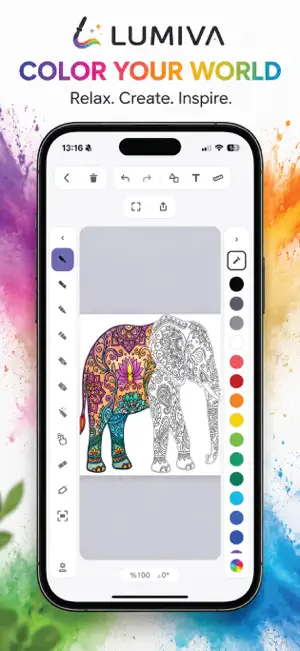
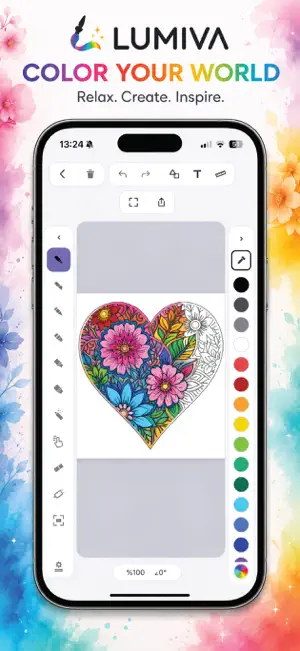
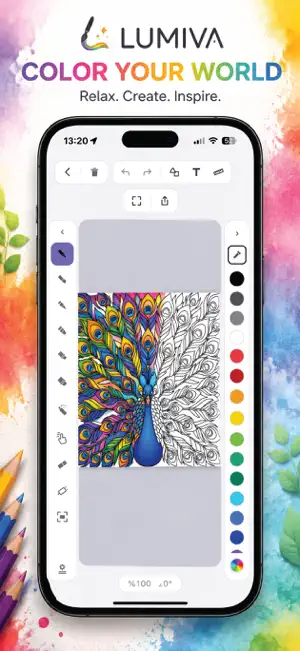
Lumiva – Coloring & Drawing Turn blank spaces into something uniquely yours. Lumiva is a relaxing digital coloring and drawing experience designed for anyone who wants to slow down, create, and enjoy the simple pleasure of color. Explore a growing collection of carefully crafted illustrations, choose your colors, and bring every detail to life at your own pace. Whether you want a calm moment at the end of the day or a creative space to express yourself, Lumiva is always ready when inspiration strikes. Create without limits • Discover beautifully designed coloring templates • Choose from millions of colors • Color detailed areas with precision • Create freely on a blank canvas • Enjoy a smooth experience designed for iPhone and iPad • Save your creations and continue whenever you want From simple illustrations to detailed artwork, every canvas is a chance to create something different. No rules. No pressure. Just you, your colors, and your imagination. Start coloring with Lumiva. Lumiva Premium (optional subscription) For access to all premium templates and cloud backup: • Lumiva Premium Monthly — 1 month • Lumiva Premium Yearly — 1 year Prices are shown in your local currency inside the app. Subscriptions renew automatically unless canceled at least 24 hours before the end of the current period, and are charged to your Apple account. You can manage or cancel your subscription in your App Store account settings after purchase. Privacy Policy: https://lumiva.pages.dev/ Terms of Use (EULA): https://www.apple.com/legal/internet-services/itunes/dev/stdeula/
What’s new
Version 1.2.7 · Updated November 2, 2026
Try Premium free for 7 days. Cancel before the trial ends and you pay nothing. The Premium screen has been redesigned, and it now shows step by step how the trial works. Fixed: when you shared a drawing coloured with Spill Protection, the exported image showed the colour spilling outside the lines. Fixed: after colouring with Spill Protection, the paint bucket sometimes filled the wrong area.
App privacy
The developer, Sercan Colak, reported these privacy practices to Apple.
Data Linked to You
The following data, which may be collected and linked to your identity, may be used for the following purposes:
- Purchases: Purchase History
- Contact Info: Email Address
- User Content: Other User Content
- Identifiers: User ID
Used for: Analytics, App Functionality
Data Not Linked to You
The following data, which may be collected but is not linked to your identity, may be used for the following purposes:
- Identifiers: Device ID
- Usage Data: Product Interaction
Used for: Analytics
Alternatives to Lumiva – Draw & Coloring
Looking for apps like Lumiva – Draw & Coloring? Here are 6 similar apps on the App Store. The highest rated is Just Color (5.0/5), and all 6 are free to download.
-
 Cloudo: AR Sketch & Trace Draw
4.5
-
 Just Color
5.0
-
 Bloomwash - Watercolor Studio
-
 ARtify Studio
-
 PixelEven - Pixel Art Maker
-
 Wax
5.0
| App | Rating | Price | Last updated | Compare |
|---|---|---|---|---|
| Lumiva – Draw & Coloring | 5.0 / 5 (2 ratings) | Free | November 2, 2026 | |
| Cloudo: AR Sketch & Trace Draw | 4.5 / 5 (2) | Free | Oct 26, 2026 | Compare |
| Just Color | 5.0 / 5 (2) | Free | Oct 27, 2026 | Compare |
| Bloomwash - Watercolor Studio | – | Free | Sep 23, 2026 | Compare |
| ARtify Studio | – | Free | Jun 2, 2025 | Compare |
| PixelEven - Pixel Art Maker | – | Free | Oct 9, 2026 | Compare |
| Wax | 5.0 / 5 (1) | Free | Oct 21, 2026 | Compare |