

ShareByLight File Transfer
Dragos Roua Utilities iPhoneiPadiPod touch
ShareByLight File Transfer is a free Utilities app for iPhone and iPad by Dragos Roua. Requires iOS 17.0. Updated November 17, 2026.
- Price
- Free
- on the App Store
- Size
- 5 MB
- Age 4+
- Updated
- Nov 17
- 2026 · v1.0.6
Screenshots
Save to Pinterest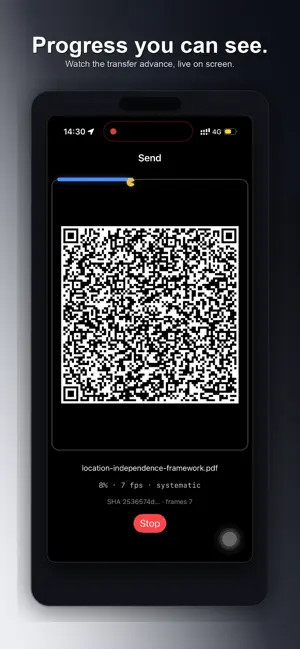


About ShareByLight File Transfer
ShareByLight moves files from one device to another using only the screen and camera. What it’s for • Pass a file when you don’t want (or can’t use) Wi-Fi or Bluetooth, between air gapped devices • Share between iPhone, iPad, and Mac without a network • Keep the transfer offline and local to the devices in front of you How it works 1. On one device, choose a file and start the stream 2. On the other device, open Receive and point the camera at the screen 3. When the transfer finishes, save the file Features • Send and receive on the same app • Works across iPhone, iPad, and Mac • Optional password protection for the file • Clear progress while the transfer runs • Free: one direction and small files • Pro: both directions and larger files Tips for a smooth transfer • Max brightness on the sending screen • Hold steady and fill the frame • Reduce glare and strong backlight No account required. No cloud. Data moves as light between the devices you choose.
What’s new
Version 1.0.6 · Updated November 17, 2026
• Small fixes and improvements
App privacy
The developer, Dragos Roua, reported these privacy practices to Apple.
Data Not Collected
The developer does not collect any data from this app.
Alternatives to ShareByLight File Transfer
Looking for apps like ShareByLight File Transfer? Here are 6 similar apps on the App Store.
-
 Unlisted: Remove My Info
-
 PhotonDrop: File Transfer
-
 BBShare Multi-Transfer
-
 QR Offline - Lite
-
 Fast File Transfer - Burstsend
-
 Pitfix: Coding for BMW & MINI
| App | Rating | Price | Last updated | Compare |
|---|---|---|---|---|
| ShareByLight File Transfer | – | Free | November 17, 2026 | |
| Unlisted: Remove My Info | – | Free | Nov 16, 2026 | Compare |
| PhotonDrop: File Transfer | – | Free | Sep 4, 2026 | Compare |
| BBShare Multi-Transfer | – | Free | Aug 21, 2026 | Compare |
| QR Offline - Lite | – | Free | Aug 3, 2026 | Compare |
| Fast File Transfer - Burstsend | – | Free | Sep 30, 2026 | Compare |
| Pitfix: Coding for BMW & MINI | – | Free | Nov 28, 2026 | Compare |