

Fast File Transfer - Burstsend
ENES EKEN Utilities iPhoneiPadiPod touch
Fast File Transfer - Burstsend is a free Utilities app for iPhone and iPad by ENES EKEN. Requires iOS 16.0. Updated September 30, 2026.
- Price
- Free
- on the App Store
- Size
- 124 MB
- Age 4+
- Updated
- Sep 30
- 2026 · v1.1.0
Screenshots

About Fast File Transfer - Burstsend
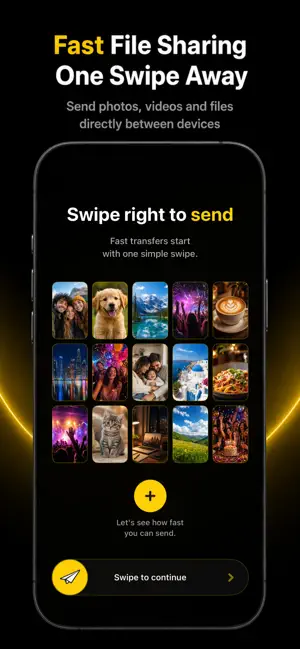
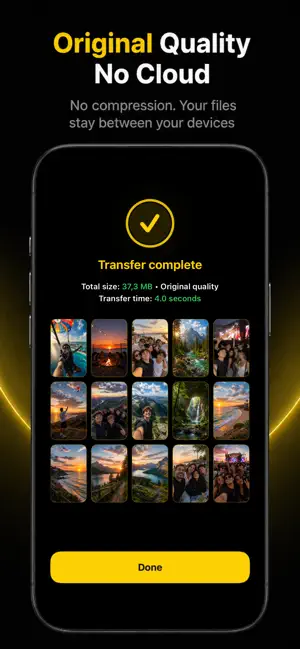
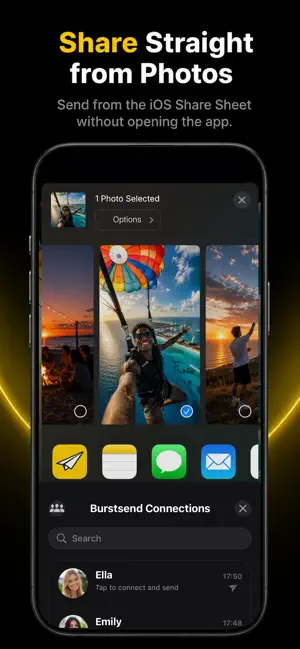
Burstsend is a fast, private file transfer app for sending photos, videos, music, documents, and other files directly between nearby devices—without cloud uploads or quality loss. Move large files and mixed batches over a local connection while keeping photos and videos in their original quality. No account, no ads, no cables, and no waiting for cloud uploads. No internet connection is required when both devices can reach each other locally—simply keep Wi-Fi enabled. FAST AND EASY FILE SHARING - Discover nearby devices or connect securely with a QR code - Send photos, videos, music, documents, and mixed file batches - Share directly from Photos, Files, and other apps using the iOS Share Sheet - Follow transfer progress in real time - Send files to one person or multiple people - Designed for both iPhone and iPad WHOLE ALBUMS AND FOLDERS - Search your albums and send their photos and videos together, without picking every item - Send folders with their subfolders, keeping file names and structure intact - Watch file counts progress while your selection is prepared SAVE THEM YOUR WAY - Save incoming photos and videos to Photos automatically - Choose a default folder for document and folder transfers, or save each one manually - Open any past transfer in Transfer History as a gallery, grouped by album, folder, and media type - Save a past transfer to Files, or save just its photos and videos to Photos—even when they arrived inside a folder PRIVATE BY DESIGN - Files travel directly between devices - Transferred files are not uploaded to a Burstsend cloud server - Transfers between paired devices are encrypted - No account or sign-in required - No ads ORIGINAL QUALITY Burstsend transfers your files without compressing your photos or videos. The recipient receives the original file, making Burstsend ideal for large videos, photo collections, work documents, school projects, and everyday sharing. NINE LANGUAGES Burstsend is available in English, Turkish, German, French, Spanish, Dutch, Hindi, Russian, and Arabic, with a right-to-left layout for Arabic. Choose your language inside the app, independently of your device settings. FREE FILE TRANSFER - Send up to 100 photos, videos, documents, or other files in one transfer - Group send to up to 3 people - Try interrupted transfers again from the beginning - Send and receive files without creating an account BURSTSEND PRO Unlock lifetime Pro access with a one-time in-app purchase: - Maximum-speed mode for faster device-to-device transfers - Resume interrupted transfers from where they stopped - Send more than 100 items in a single transfer - Larger albums and bigger folders in one transfer - Send to groups of up to 6 people - Transfer to multiple recipients in parallel - Keep your device awake during long transfers Burstsend Pro is a one-time purchase. There is no subscription or automatic renewal. Both devices must have Burstsend installed and Wi-Fi enabled for nearby transfers. Privacy Policy: https://sites.google.com/view/burstsend-privacy-policy Terms of Use: https://www.apple.com/legal/internet-services/itunes/dev/stdeula
What’s new
Version 1.1.0 · Updated September 30, 2026
Burstsend now speaks nine languages, sends whole albums and folders, and saves what you receive where you want it. NINE LANGUAGES Burstsend is now available in English, Turkish, German, French, Spanish, Dutch, Hindi, Russian and Arabic, with a right-to-left layout for Arabic. Choose your language in Settings — it applies to the app and to sharing from other apps, whatever your device is set to. ALBUMS AND FOLDERS - Search your albums and send their photos and videos together, without picking every item - Send folders with their subfolders, keeping file names and structure intact - Watch file counts progress while your selection is prepared, with transfer limits checked before it begins SAVING WHAT YOU RECEIVE - Save incoming photos and videos to Photos automatically, or choose a default folder for document and folder transfers - Open any past transfer as a gallery grouped by album, folder and media type, with its date and time - Save a past transfer to Files, or just its photos and videos to Photos — even when they arrived inside a folder A MORE PERSONAL BURSTSEND - Choose an avatar or add your own photo, and tap a selected avatar again to deselect it - Tap a profile picture to see it larger IMPROVEMENTS - A better fit on iPad, with larger controls, more consistent sheets and refined spacing - Sharing from other apps handles folders better, responds faster and explains itself more clearly - Smoother album browsing, consistent haptic feedback, and a link to Burstsend on TikTok in Settings Thanks for sharing with Burstsend.
App privacy
The developer, ENES EKEN, reported these privacy practices to Apple.
Data Not Linked to You
The following data, which may be collected but is not linked to your identity, may be used for the following purposes:
- Purchases: Purchase History
Used for: Analytics, App Functionality
Alternatives to Fast File Transfer - Burstsend
Looking for apps like Fast File Transfer - Burstsend? Here are 6 similar apps on the App Store. The highest rated is DomainLog - Domain Tracking (5.0/5), and all 6 are free to download.
-
 GapRelay: File Transfer
-
 CrossTransfer - File Transfer
-
 DomainLog - Domain Tracking
5.0
-
 Copy My Data: Phone Transfer
-
 Quick Share File Transfer
5.0
-
 PDF Tools – Convert & Merge
| App | Rating | Price | Last updated | Compare |
|---|---|---|---|---|
| Fast File Transfer - Burstsend | – | Free | September 30, 2026 | |
| GapRelay: File Transfer | – | Free | Aug 28, 2026 | Compare |
| CrossTransfer - File Transfer | – | Free | Oct 7, 2026 | Compare |
| DomainLog - Domain Tracking | 5.0 / 5 (1) | Free | Jul 14, 2026 | Compare |
| Copy My Data: Phone Transfer | – | Free | Oct 15, 2026 | Compare |
| Quick Share File Transfer | 5.0 / 5 (5) | Free | Oct 21, 2026 | Compare |
| PDF Tools – Convert & Merge | – | Free | Oct 23, 2026 | Compare |