

Quick Share File Transfer
江鹏 董 Utilities iPhoneiPadiPod touchMac
Quick Share File Transfer is a free Utilities app for iPhone and iPad by 江鹏 董. Rated 5.0/5 from 5 ratings. Requires iOS 13.0. Updated October 21, 2026.
- Rating
- 5.0
- 5 ratings
- Price
- Free
- on the App Store
- Size
- 66 MB
- Age 4+
- Updated
- Oct 21
- 2026 · v1.0.8
Screenshots

About Quick Share File Transfer
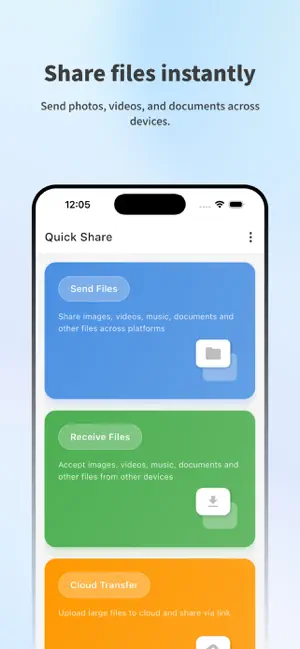
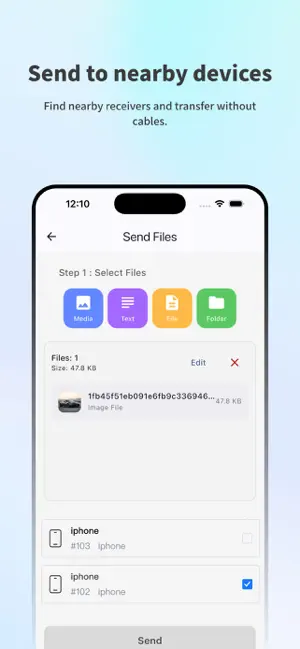
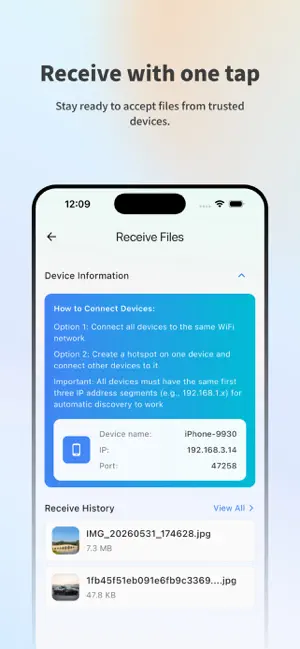
Quick Share is a simple file sharing app for sending files, photos, videos, documents, folders, and text between your devices. Use Quick Share to share between your iPhone, iPad, computers, and other supported devices. When devices are nearby, Quick Share uses your local Wi-Fi or LAN to discover them automatically and transfer files directly. No cables, no manual IP address setup, and no complicated pairing process. When devices are not on the same network, Cloud Transfer lets you upload selected files temporarily and share them with a link. It is useful for sending large files across different networks or when direct local transfer is not available. Key features: • Send photos, videos, documents, folders, and text • Share between your iPhone, iPad, computers, and other supported devices • Discover nearby devices on the same Wi-Fi or local network • Transfer files directly between selected devices • Share files by temporary cloud link when needed • Use free Cloud Transfer quota before upgrading • Protect cloud links with optional password protection • Manage received files and recent transfers easily • Clean, fast interface for everyday sharing Quick Share is built for everyday file sharing between phones, tablets, and computers. Use local transfer for fast nearby sharing, and Cloud Transfer when you need to send files beyond your local network. Local transfers are sent directly between selected devices on your network. Cloud Transfer uploads only the files you choose so they can be accessed through a shared link. Privacy Policy: https://quick-share.app/apple/privacy-policy Terms of Use (EULA): https://www.apple.com/legal/internet-services/itunes/dev/stdeula/
Ratings & reviews
5.0
5 ratings
What’s new
Version 1.0.8 · Updated October 21, 2026
Added support for multiple languages, making it easier to use the app in your preferred language.
App privacy
The developer, 江鹏 董, reported these privacy practices to Apple.
Data Used to Track You
The following data may be used to track you across apps and websites owned by other companies:
- Identifiers: Device ID
Data Not Linked to You
The following data, which may be collected but is not linked to your identity, may be used for the following purposes:
- Identifiers: Device ID, User ID
- Usage Data: Product Interaction
- Diagnostics: Crash Data
- Contact Info: Email Address, Name
- User Content: Photos or Videos
Used for: Third-Party Advertising, Analytics, App Functionality
Alternatives to Quick Share File Transfer
Looking for apps like Quick Share File Transfer? Here are 6 similar apps on the App Store. The highest rated is MeDrop: File Sharing (5.0/5), and all 6 are free to download.
-
 MeDrop: File Sharing
5.0
-
 Drop Files Air Share
2.0
-
 Quick Share : File Sharing
4.5
-
 Quick Share - Data Transfer
3.3
-
 ShareMe - File sharing
4.3
-
 ShareMe: Fast File Sharing
4.4
| App | Rating | Price | Last updated | Compare |
|---|---|---|---|---|
| Quick Share File Transfer | 5.0 / 5 (5 ratings) | Free | October 21, 2026 | |
| MeDrop: File Sharing | 5.0 / 5 (1) | Free | Oct 26, 2026 | Compare |
| Drop Files Air Share | 2.0 / 5 (4) | Free | May 31, 2025 | Compare |
| Quick Share : File Sharing | 4.5 / 5 (3,028) | Free | Aug 6, 2026 | Compare |
| Quick Share - Data Transfer | 3.3 / 5 (68) | Free | Aug 12, 2026 | Compare |
| ShareMe - File sharing | 4.3 / 5 (407) | Free | Jan 6, 2025 | Compare |
| ShareMe: Fast File Sharing | 4.4 / 5 (2,664) | Free | Jul 30, 2024 | Compare |