

Fuse 3d
Toby Naumov Utilities iPhoneiPadiPod touch
Fuse 3d is a free Utilities app for iPhone and iPad by Toby Naumov. Rated 5.0/5 from 2 ratings. Requires iOS 26.0. Updated September 30, 2026.
- Rating
- 5.0
- 2 ratings
- Price
- Free
- on the App Store
- Size
- 9 MB
- Age 4+
- Updated
- Sep 30
- 2026 · v1.2
Screenshots

About Fuse 3d
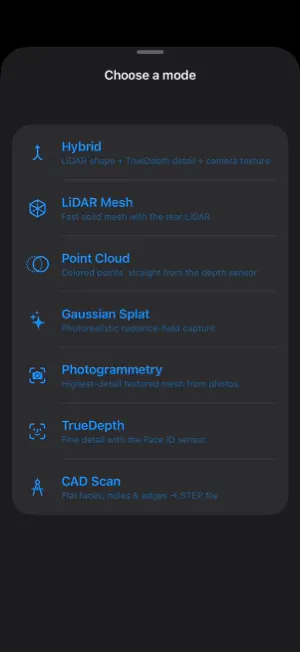
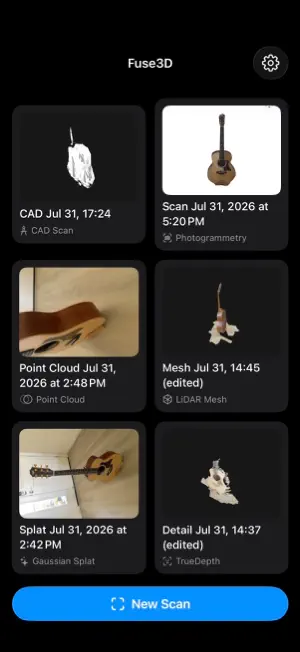
Fuse is a free 3D scanning app for iPhone that uses the hardware you already own. Seven scanning modes, each suited to different subjects and hardware: • LiDAR Mesh — fast, real-time mesh reconstruction using your iPhone's LiDAR scanner • Point Cloud — dense point cloud capture for precise spatial data • Gaussian Splat — photorealistic 3D Gaussian Splatting reconstruction • Photogrammetry — multi-photo 3D reconstruction, works on any iPhone • TrueDepth — high-precision face and close-range object scanning using the front face-id camera • CAD Scan — structured capture aimed at accurate dimensional models • Hybrid — combines rear LiDAR for overall shape with front TrueDepth for fine detail and RGB texture, for the most complete scan Export your scans as PLY, OBJ, STL, or USDZ for use in CAD software, 3D printing, AR/VR, or game engines. Fuse3D runs entirely on-device using Apple's ARKit, LiDAR, and TrueDepth sensors. Hardware Limitations: LiDAR-based modes require an iPhone/iPad Pro model with a LiDAR scanner. TrueDepth modes require Face ID hardware. Photogrammetry works on any supported device.
What’s new
Version 1.2 · Updated September 30, 2026
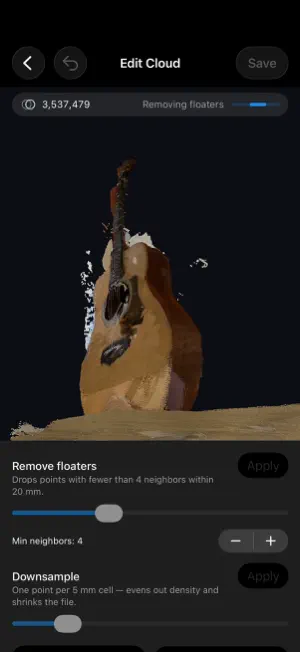
Fuse 3D now runs on iPad, and every mode has had a big round of work. • iPad support, including front camera (TrueDepth) and Hybrid scans on iPad Pro • New Record Only mode: capture now, build the model later • Photogrammetry on iPhones and iPads without LiDAR: take photos, then build the model • Cleaner LiDAR scans with less ghosting and drift, including round objects like pots • Point clouds merge repeat passes into one surface instead of stacked layers • Front camera scans track longer and crop the table away when you save • Textures fill every gap instead of leaving black patches • View in AR now shows the scan's colour instead of a white model • Gaussian Splats train properly when you tap Finish • A soft haptic tells you when a scan has stopped adding frames • Large room scans no longer run out of memory when you finish • Many stability fixes Future Support for Mac App and Processing
App privacy
The developer, Toby Naumov, reported these privacy practices to Apple.
Data Not Collected
The developer does not collect any data from this app.
Alternatives to Fuse 3d
Looking for apps like Fuse 3d? Here are 6 similar apps on the App Store. The highest rated is Memo 3D Scanner (5.0/5), and all 6 are free to download.
-
 OpticALLY 3D Scan
3.0
OpticALLY 3D Scan
3.0
-
 MetaSmile Face Scan
-
 Memo 3D Scanner
5.0
Memo 3D Scanner
5.0
-
 DepthCapture|LiDAR Point Cloud
-
 Lagarsoft LiDAR Scanner
-
 LiDAR Depth Map 3D Scanner
| App | Rating | Price | Last updated | Compare |
|---|---|---|---|---|
| Fuse 3d | 5.0 / 5 (2 ratings) | Free | September 30, 2026 | |
| OpticALLY 3D Scan | 3.0 / 5 (2) | Free | May 19, 2026 | Compare |
| MetaSmile Face Scan | – | Free | Jun 17, 2026 | Compare |
| Memo 3D Scanner | 5.0 / 5 (1) | Free | Sep 5, 2026 | Compare |
| DepthCapture|LiDAR Point Cloud | – | Free | Oct 12, 2026 | Compare |
| Lagarsoft LiDAR Scanner | – | Free | Sep 8, 2026 | Compare |
| LiDAR Depth Map 3D Scanner | – | Free | Sep 14, 2026 | Compare |
Compare Fuse 3d with the top alternatives: ratings, updates, ASO score and keyword gaps →