

RecoiroQ: Short Video Editor
Gachatech Photo & Video iPhoneiPadiPod touchMac
RecoiroQ: Short Video Editor is a free Photo & Video app for iPhone and iPad by Gachatech. Requires iOS 26.5. Updated October 19, 2026.
- Price
- Free
- on the App Store
- Size
- 8 MB
- Age 4+
- Updated
- Oct 19
- 2026 · v1.5.1
Screenshots


About RecoiroQ: Short Video Editor
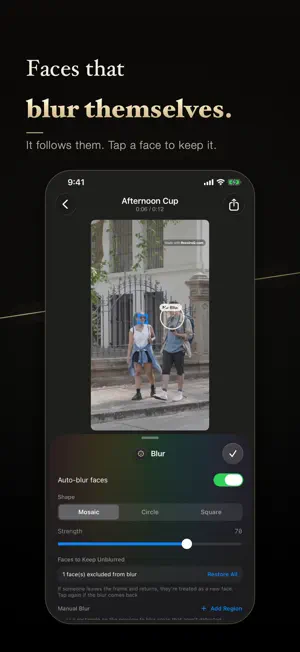
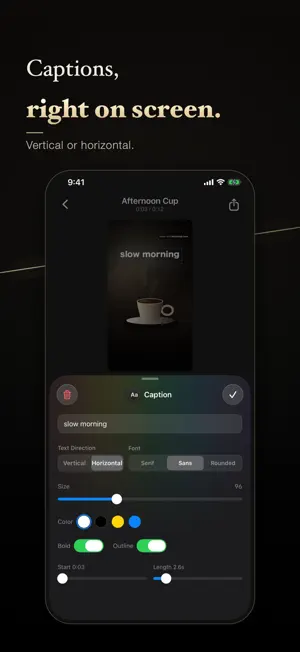
Short videos, made fast and simple. RecoiroQ is an editor built for one thing: vertical 9:16 short video. Line up clips from your library, stitch them together, drop in captions — vertical Japanese text included — and let a blur follow a face. Only the tools you need, exactly where you expect them. ■ Stitch, then trim Pull several videos in from your library, line them up, and drag a clip edge to trim. They are joined in order and exported as a single file. ■ Real vertical (tategaki) captions Vertical or horizontal text, in mincho, gothic or rounded gothic, with control over size, colour and outline. Drag a caption into place right on the preview. ■ Find a face, follow it Faces are detected automatically and the blur follows them as they move. Choose mosaic, circle or square — or draw the area yourself for anything else you want hidden. Detection and processing happen entirely on your device. ■ Narration Record a voice-over on the spot and lay it over your video. Clip audio ducks automatically while you speak, so your voice never gets buried. Recordings can be transcribed too. ■ iPhone, iPad and Mac An interface that suits each device, with keyboard shortcuts on Mac and iPad. A project can be exported as a single .recoiroq file and handed to another device over AirDrop or the Files app. ■ Export 9:16 mp4 at 720p, 1080p or 4K, 30 or 60 fps. Save straight to your photo library or share it to another app. ――― Pricing ――― Every editing feature is free. The only difference with Pro is whether a small "Made with RecoiroQ.com" watermark appears on what you export. RecoiroQ Pro (in-app purchase) - RecoiroQ Pro Monthly: auto-renews every month - RecoiroQ Pro Yearly: auto-renews every year Prices are shown in the App Store and vary by region. Payment is charged to your Apple Account at confirmation of purchase. A subscription renews automatically unless auto-renew is turned off at least 24 hours before the end of the current period, and the account is charged for renewal within 24 hours prior to the end of that period. Subscriptions can be managed or cancelled at any time in your App Store account settings. Terms of Use: https://recoiroq.com/en/terms.html Privacy Policy: https://recoiroq.com/en/privacy.html ――― Please note ――― Automatic face detection is not perfect. Profiles, backlight, and small or partly hidden faces can be missed. Always play the exported video back and check that everything you want hidden really is hidden before you publish, and add a manual blur area where you need one. Landscape footage is fitted into the 9:16 frame with bars above and below. Portrait footage fills the frame, so anything wider than 9:16 — 4:5, for example — is cropped at the sides. The output is always 9:16.
What’s new
Version 1.5.1 · Updated October 19, 2026
- Added support for iPhone Duo. - Made a few design refinements.
App privacy
The developer, Gachatech, reported these privacy practices to Apple.
Data Not Collected
The developer does not collect any data from this app.
Alternatives to RecoiroQ: Short Video Editor
Looking for apps like RecoiroQ: Short Video Editor? Here are 6 similar apps on the App Store. The highest rated is MojiPic - Text On Photos (5.0/5), and all 6 are free to download.
-
 VisionCut: Pro Video Editor
-
 MojiPic - Text On Photos
5.0
MojiPic - Text On Photos
5.0
-
 Before After: Compare Photos
-
 MojiMov - Text on the video.
-
 ViLine Video Editor
5.0
ViLine Video Editor
5.0
-
 JoinCut - Video Merge & Trim
4.7
JoinCut - Video Merge & Trim
4.7
| App | Rating | Price | Last updated | Compare |
|---|---|---|---|---|
| RecoiroQ: Short Video Editor | – | Free | October 19, 2026 | |
| VisionCut: Pro Video Editor | – | Free | Oct 21, 2026 | Compare |
| MojiPic - Text On Photos | 5.0 / 5 (1) | Free | Sep 4, 2026 | Compare |
| Before After: Compare Photos | – | Free | Apr 16, 2026 | Compare |
| MojiMov - Text on the video. | – | Free | Sep 8, 2026 | Compare |
| ViLine Video Editor | 5.0 / 5 (1) | Free | Oct 23, 2026 | Compare |
| JoinCut - Video Merge & Trim | 4.7 / 5 (3) | Free | Oct 22, 2026 | Compare |