

To-Do List Wallpaper: Daylist
Ferhat Aksoy Productivity iPhoneiPadiPod touch
To-Do List Wallpaper: Daylist is a free Productivity app for iPhone and iPad by Ferhat Aksoy. Rated 1.0/5 from 1 ratings. Requires iOS 17.0.
- Rating
- 1.0
- 1 ratings
- Price
- Free
- on the App Store
- Size
- 15 MB
- Age 4+
- Updated
- Sep 9
- 2026 · v1.2
Screenshots
About To-Do List Wallpaper: Daylist
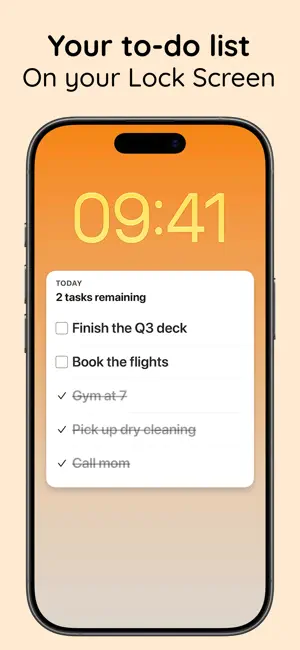
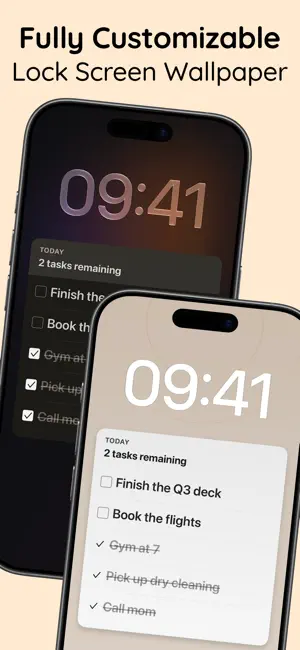
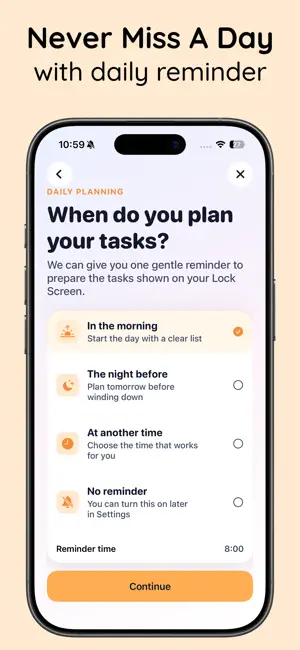
Daylist turns your daily task list into your Lock Screen wallpaper. No unlocking, no opening an app, no notifications that vanish — your list is just there, every single time you look at your phone. Add and complete tasks in the app. A single Apple Shortcut rebuilds your wallpaper automatically when you open or close Daylist, so your Lock Screen always shows the current state of your day: what's left, what's done, and how far you've come. WHY DAYLIST - Beautiful, legible wallpaper with your tasks on a clean card - "N tasks remaining" header so you always know where you stand - Completed tasks show with a satisfying strikethrough - Automatic updates via one shared Shortcut + App Open/Close automations - A gentle daily planning reminder at the time you choose - Up to 8 tasks visible on the wallpaper, with "+N more in Daylist" overflow - "All clear" celebration state when everything's done - 100% on-device. No account, no cloud, no tracking. HOW IT WORKS 1. Add your tasks for the day in Daylist. 2. Install the shared "Update Daylist Wallpaper" Shortcut — one tap, guided in-app. 3. Set up two personal automations (App Open / App Close), guided in-app. 4. Daylist renders your list to your Lock Screen automatically — no need to keep the app open. BUILT FOR PEOPLE WHO FORGET WHAT THEY CAN'T SEE Lock Screen widgets are tiny. Notifications disappear the moment you swipe them. Live Activities expire. Daylist keeps your whole list in front of you — as your wallpaper — so it's there the 90-plus times a day you pick up your phone. Great for staying on task, building a phone-pickup planning habit, and for anyone who works better when the list is impossible to miss. PRIVATE BY DESIGN Everything stays on your device. No sign-up, no accounts, no analytics, no cloud sync. Your tasks are yours. Requires iPhone on iOS 17 or later. The automatic wallpaper feature uses Apple Shortcuts and runs on your device. DAYLIST PRO Daylist Pro unlocks the full wallpaper styling controls, extra tasks on the Lock Screen, removal of the "Daylist" mark, and progress statistics. It is an auto-renewable subscription offered monthly or yearly, with a free trial. - Payment is charged to your Apple Account at confirmation of purchase. - The subscription renews automatically unless it is canceled at least 24 hours before the end of the current period. Your account is charged for renewal within 24 hours before the end of the current period. - Manage or cancel your subscription in your Apple Account settings after purchase. Any unused portion of a free trial is forfeited when you buy a subscription. Privacy Policy: https://daylist-nine.vercel.app/privacy.html Terms of Use (EULA): https://www.apple.com/legal/internet-services/itunes/dev/stdeula/
What’s new
Version 1.2 · Updated September 9, 2026
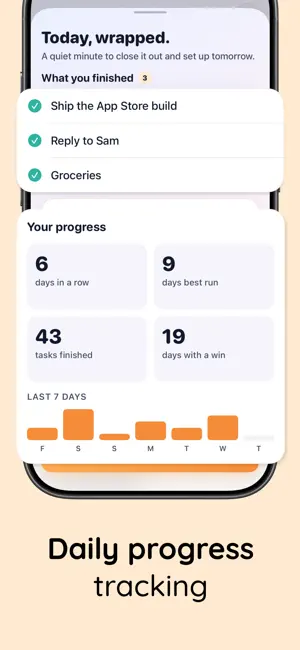
What's new in Daylist: - Daily Review: close out your day, keep your streak going, and see your totals and history at a glance. - Built-in Lock Screen backgrounds: pick a ready-made background instead of hunting for the right photo. - Daylist Pro: unlock the full styling controls (colors, text size, spacing, card style), up to 8 tasks on your Lock Screen, and remove the small "Daylist" mark. Free for 3 days, then weekly or yearly. - Polish and fixes across the wallpaper preview and guided setup. Thanks for using Daylist! Questions or ideas? Reach us at https://daylist-nine.vercel.app
App privacy
The developer, Ferhat Aksoy, reported these privacy practices to Apple.
Data Not Linked to You
The following data, which may be collected but is not linked to your identity, may be used for the following purposes:
- Purchases: Purchase History
Used for: App Functionality
Alternatives to To-Do List Wallpaper: Daylist
Looking for apps like To-Do List Wallpaper: Daylist? Here are 6 similar apps on the App Store. The highest rated is Fridge: Lock Screen Notes (5.0/5), and 5 of the 6 are free to download.
-
 Peekdo: Lock Screen To-Do List
-
 Daily Planner on Wallpaper
-
 Rito - One Task at a Time
-
 Claritist
4.5
-
 AWAKE — Stay On Task
-
 Fridge: Lock Screen Notes
5.0
| App | Rating | Price | Last updated | Compare |
|---|---|---|---|---|
| To-Do List Wallpaper: Daylist | 1.0 / 5 (1 rating) | Free | September 9, 2026 | |
| Peekdo: Lock Screen To-Do List | – | Free | Oct 14, 2026 | Compare |
| Daily Planner on Wallpaper | – | Free | Aug 27, 2026 | Compare |
| Rito - One Task at a Time | – | Free | Sep 17, 2026 | Compare |
| Claritist | 4.5 / 5 (2) | 9.99 USD | Sep 1, 2026 | Compare |
| AWAKE — Stay On Task | – | Free | May 26, 2026 | Compare |
| Fridge: Lock Screen Notes | 5.0 / 5 (1) | Free | Oct 12, 2026 | Compare |