

Cut List Optimizer: SawKit
Armen Ter-Oganezov Productivity iPhoneiPadiPod touchMac
Cut List Optimizer: SawKit is a free Productivity app for iPhone and iPad by Armen Ter-Oganezov. Requires iOS 26.0. Updated November 4, 2026.
- Price
- Free
- on the App Store
- Size
- 8 MB
- Age 4+
- Updated
- Nov 4
- 2026 · v1.3.1
Screenshots
Save to Pinterest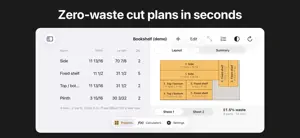


About Cut List Optimizer: SawKit
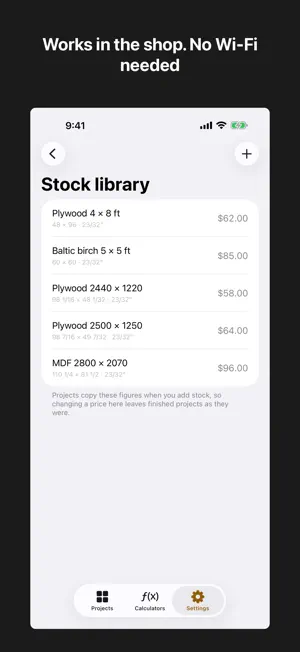
SawKit works out how to cut your parts from sheets of plywood, MDF or melamine — and timber, battens and tube from the lengths you buy — with the least waste. Then it walks you through the cuts at the saw, one at a time. Type your cut list the way you'd say it. 15 3/16. 3/4". 4' 6". Millimetres if that's your shop. A unit written on a number always wins, so imported hardware drops into a metric project without doing sums. WHAT IT DOES • Lays out sheets. It tries twelve packing strategies on your list and keeps the best, across as many sheets as it takes — and says how many sheets to buy, or how many more you need. • Lays out lengths. Rails, legs and battens are cut from your bar lengths, with the offcut shown on each bar. • Respects the grain. Give a part a material with grain and it follows that grain on its own. Set it by hand wherever you want. • Accounts for the blade. Kerf and edge trim are part of the calculation, and you can change them right in the project. • Takes you to the saw. One cut at a time, both sides of the blade in big figures, each cut ticked off and grayed on the drawing. The screen stays on. • Cuts the way a saw cuts. Every cut runs edge to edge across the piece in your hands — never one that stops halfway. • Prints. A page per sheet and per set of bars, plus a shopping list with prices and a total — to mark off as you work. • Runs on iPhone, iPad and Mac. On the iPhone it works on its side too. • Works with no signal at all. Workshops are usually the worst room in the building for that. FREE The whole calculation, the drawings for sheets and bars, the saw screen and the shop calculators. Up to 25 parts, three projects, one kind of sheet and one kind of bar. PRO (one payment, no subscription) Unlimited parts, projects and stock, with several materials in one project. PDF export and printing. The cut order on the drawing. Edge banding edge by edge: parts cut to size, banding counted and priced. Offcuts kept in your library and used first next time. Your own stock list with prices. Your projects on every device you own through iCloud, kept in step as you work. SHOP CALCULATORS — always free Board feet with cost. Purchase allowance, done properly: waste comes out of what you buy, not what you need, so 15% waste means buying about 18% more — not 15%. Project cost with markup. PRIVACY Nothing is collected. No account, no analytics, no tracking. Your cut lists stay on your devices and in your own iCloud.
What’s new
Version 1.3.1 · Updated November 4, 2026
• The price, before the work: everything in Pro is marked Pro, and Settings shows what Pro costs — once, no subscription. • A question or an idea? "Contact the developer" is in Settings. • On iPhone, the PDF button sits right on the layout. • Kerf and trim show under each project's stock and can be changed there. • Working in inches: the demo comes in round inches, and edge banding is counted in feet. • At the saw, cuts already made turn gray on the drawing, and on a phone on its side nothing hides behind the button. • Fixed: New Cut List in Siri and Shortcuts keeps to the free three projects.
App privacy
The developer, Armen Ter-Oganezov, reported these privacy practices to Apple.
Data Not Collected
The developer does not collect any data from this app.
Alternatives to Cut List Optimizer: SawKit
Looking for apps like Cut List Optimizer: SawKit? Here are 6 similar apps on the App Store. The highest rated is Kesim: Cut List Optimizer (5.0/5), and all 6 are free to download.
-
 Cut List Optimizer - Boardcut
-
 CutList Optimizer - Carpenter
-
 WorkshopCut: Cut List Planner
-
 Kesim: Cut List Optimizer
5.0
-
 Cutlist: Cabinet Planner
-
 FINOpti — Cut List Optimizer
| App | Rating | Price | Last updated | Compare |
|---|---|---|---|---|
| Cut List Optimizer: SawKit | – | Free | November 4, 2026 | |
| Cut List Optimizer - Boardcut | – | Free | Nov 13, 2026 | Compare |
| CutList Optimizer - Carpenter | – | Free | Sep 10, 2026 | Compare |
| WorkshopCut: Cut List Planner | – | Free | Oct 30, 2026 | Compare |
| Kesim: Cut List Optimizer | 5.0 / 5 (1) | Free | Sep 22, 2026 | Compare |
| Cutlist: Cabinet Planner | – | Free | Jul 24, 2026 | Compare |
| FINOpti — Cut List Optimizer | – | Free | Sep 5, 2026 | Compare |