

FINOpti — Cut List Optimizer
BLENDI YMERI Productivity iPhoneiPadiPod touch
FINOpti — Cut List Optimizer is a free Productivity app for iPhone and iPad by BLENDI YMERI. Requires iOS 16.0. Updated September 5, 2026.
- Price
- Free
- on the App Store
- Size
- 5 MB
- Age 4+
- Updated
- Sep 5
- 2026 · v1.2
Screenshots

About FINOpti — Cut List Optimizer
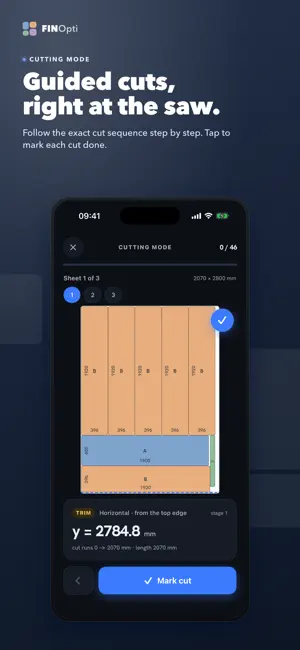
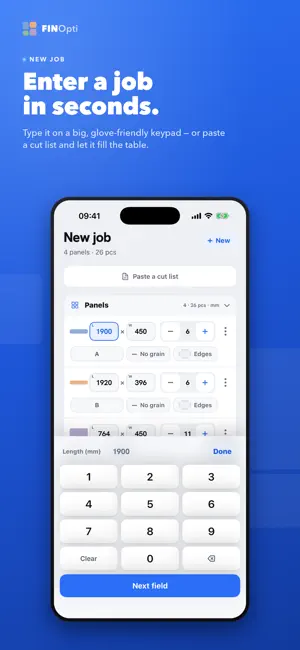
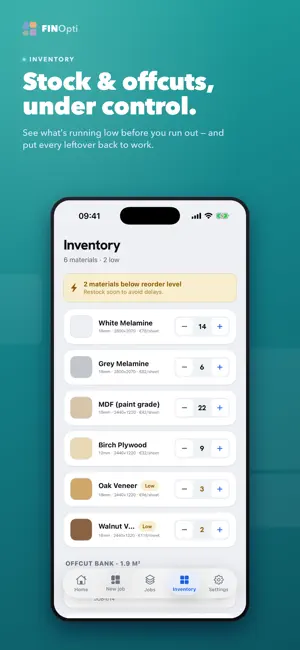
FINOpti turns your cut list into an optimized cutting plan in seconds — so you get more parts from every sheet, waste less material, and cut with confidence. Built for carpenters, joiners, and cabinet makers working with plywood, MDF, melamine, and veneered panels. ENTER A JOB IN SECONDS • Type panels on a big, glove-friendly keypad, or paste a cut list and let it fill the table. • Set your stock sheets, saw kerf, grain direction, and edge banding. GET AN OPTIMIZED PLAN • The on-device engine nests your parts to maximize yield and minimize offcuts. • See every sheet laid out, with utilization, sheet count, and estimated cost. CUT WITH CONFIDENCE • Cutting Mode guides you through the cuts one at a time, with the exact fence dimension for each — tap to mark each cut done. • The plan respects kerf and grain, so what you see is what you cut. STAY ORGANIZED • Save jobs and reopen their plans anytime. • Track material stock and get a heads-up before you run low. • Bank your offcuts and reuse them on future jobs. EVERY FEATURE INCLUDED — FREE No subscription, no unlocks, nothing held back: • Defect zones — mark knots and damage; parts are placed around them. • Move parts — drag a part; every move snaps to a cut the saw can make. • Rotate sheet — re-pack any sheet the other way with one tap. • Client quote — export a clean, professional quote PDF for your customer. PRIVATE BY DESIGN • Works offline — no account, no sign-in, and we never ask for your name, email or phone. Nothing you enter ever leaves your phone. • Your jobs, materials, and offcuts stay on your device. • FINOpti is free and supported by a few clearly-marked sponsored cards on the Home, Jobs, and Inventory screens — never while you're cutting. They are not personalised and you are not tracked. • Available in English and Albanian, in millimetres, centimetres, or inches. Cut smarter. Waste less. — Privacy Policy: https://finopti.net/privacy
What’s new
Version 1.2 · Updated September 5, 2026
FINOpti 1.2 — the native iOS update: • A fully native interface: real iOS navigation bars, tab bar, lists, search, pickers and Settings — with the new Liquid Glass look on iOS 26. • Rotate a sheet the way you mean it: the parts are re-optimized in the opposite direction and the board is turned. • Home Screen widget, a Control Center button (iOS 18) and Siri / Spotlight shortcuts: "Start a new job in FINOpti", "Continue my draft", "Show my jobs". • Swipe and long-press on panels and jobs, one Import menu for cut lists, and zoom transitions on iOS 18. • Cutting mode and the layout editor with proper toolbars and progress. • Edge-banding marks under each dimension in the full job report, and a smaller watermark. • Fixes: opening a saved job in the optimizer from its detail page; ad settings now apply at every launch.
App privacy
The developer, BLENDI YMERI, reported these privacy practices to Apple.
Data Not Collected
The developer does not collect any data from this app.
Alternatives to FINOpti — Cut List Optimizer
Looking for apps like FINOpti — Cut List Optimizer? Here are 6 similar apps on the App Store.
-
 CutList Optimizer - Carpenter
-
 Cutbench: Cut List Optimizer
-
 CUTs! Material Cut List
-
 Cut List Optimizer - Boardcut
-
 WorkshopCut: Cut List Planner
-
 Koff Club
| App | Rating | Price | Last updated | Compare |
|---|---|---|---|---|
| FINOpti — Cut List Optimizer | – | Free | September 5, 2026 | |
| CutList Optimizer - Carpenter | – | Free | Sep 10, 2026 | Compare |
| Cutbench: Cut List Optimizer | – | Free | Oct 27, 2026 | Compare |
| CUTs! Material Cut List | – | Free | May 31, 2026 | Compare |
| Cut List Optimizer - Boardcut | – | Free | Oct 25, 2026 | Compare |
| WorkshopCut: Cut List Planner | – | Free | Oct 20, 2026 | Compare |
| Koff Club | – | Free | Apr 2, 2026 | Compare |