

Winston - Productivity & Focus
Marco Tulio Teixeira Productivity iPhoneiPadiPod touchApple Watch
Winston - Productivity & Focus is a free Productivity app for iPhone and iPad by Marco Tulio Teixeira. Requires iOS 17.0. Updated September 14, 2026.
- Price
- Free
- on the App Store
- Size
- 21 MB
- Age 4+
- Updated
- Sep 14
- 2026 · v1.23
Screenshots

About Winston - Productivity & Focus
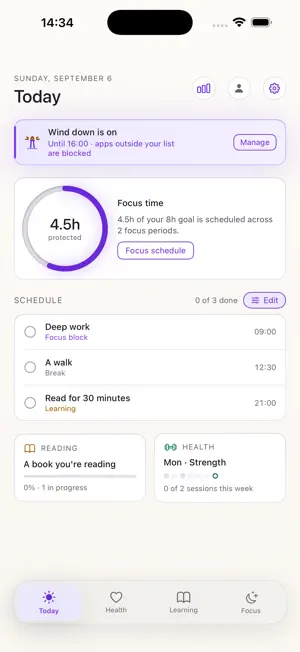
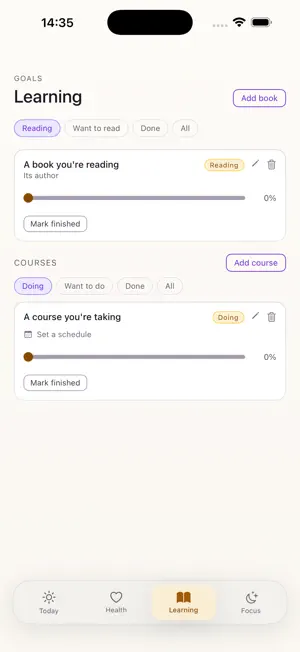
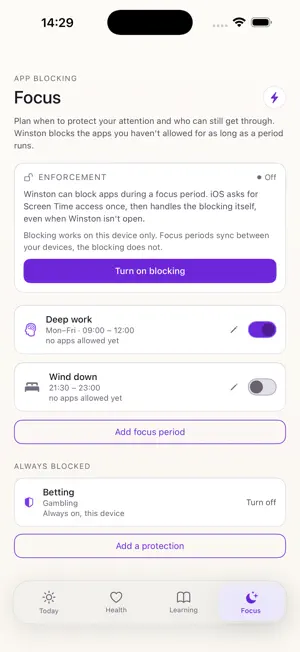
Your phone, on your side. Winston is a goal tracker with teeth. Set a focus period and iOS itself blocks the apps you didn't allow, even when Winston is closed. Everything else lives in one calm place: your day, your habits, your books, your training week. FOCUS Plan when to protect your attention. Each period blocks everything except the apps you allow on it, enforced by Screen Time rather than by willpower. Periods repeat on the weekdays you choose, so deep work can end when the weekend starts. TODAY The whole day on one screen: your schedule, how much of it is protected, and what comes next. LEARNING Books and courses, with the progress you actually made. Put a course on a weekly schedule and it shows up on your day. HEALTH A weekly training plan, and the small habits worth keeping. Tick them off today; they reset for tomorrow. PRIVATE BY DESIGN No ads. No tracking. Winston never learns which apps you have or open; the list of what stays allowed lives with iOS on your device. Your goals sync to your own account, so they follow you to a new phone. Sign in with Apple when you want that, and delete your account from inside the app whenever you choose. Winston is free.
What’s new
Version 1.23 · Updated September 14, 2026
Winston now runs on Apple Watch. Start a focus session from your wrist, see how long is left, and stop it there. Your phone still does the blocking, and the watch says so when it cannot reach it. Winston also runs properly on iPad now, with the layout it should always have had there. Protections are new: a block that stays on with no schedule, for the apps you would rather not decide about again. You choose a waiting period when you create one, so turning it off later takes 24 or 72 hours to take effect, while changing your mind back is always immediate. A gambling protection also blocks a list of known gambling sites in Safari. A running focus period can now be paused for 5, 15 or 30 minutes when you genuinely need something back. It returns on its own. The weekly review opens with the time your schedule kept clear that week, and what that adds up to. Course reminders arrive shortly before each scheduled study slot, and weekdays that run together now read as a range, like Mon to Fri.
App privacy
The developer, Marco Tulio Teixeira, reported these privacy practices to Apple.
Data Linked to You
The following data, which may be collected and linked to your identity, may be used for the following purposes:
- Contact Info: Email Address, Name
- User Content: Other User Content
- Identifiers: User ID
Used for: App Functionality
Data Not Linked to You
The following data, which may be collected but is not linked to your identity, may be used for the following purposes:
- Diagnostics: Other Diagnostic Data
Used for: Analytics
Alternatives to Winston - Productivity & Focus
Looking for apps like Winston - Productivity & Focus? Here are 6 similar apps on the App Store. The highest rated is Phrase: AI Meeting Note Taker (4.8/5), and all 6 are free to download.
-
 Voicini: Voice Notes
-
 Wick-Deep Work, Study & Focus
-
 Mini Focus Timer
-
 Capsla: Pomodoro Focus Timer
-
 Phrase: AI Meeting Note Taker
4.8
Phrase: AI Meeting Note Taker
4.8
-
 Hacking Timer: Watch Alarm
| App | Rating | Price | Last updated | Compare |
|---|---|---|---|---|
| Winston - Productivity & Focus | – | Free | September 14, 2026 | |
| Voicini: Voice Notes | – | Free | Oct 17, 2026 | Compare |
| Wick-Deep Work, Study & Focus | – | Free | Oct 12, 2026 | Compare |
| Mini Focus Timer | – | Free | Oct 15, 2026 | Compare |
| Capsla: Pomodoro Focus Timer | – | Free | Oct 19, 2026 | Compare |
| Phrase: AI Meeting Note Taker | 4.8 / 5 (8) | Free | Oct 17, 2026 | Compare |
| Hacking Timer: Watch Alarm | – | Free | Oct 5, 2026 | Compare |