

Capsla: Pomodoro & App Blocker
Ramiz Kichibekov Productivity iPhoneiPadiPod touchApple Watch
Capsla: Pomodoro & App Blocker is a free Productivity app for iPhone and iPad by Ramiz Kichibekov. Requires iOS 26.0. Updated November 18, 2026.
- Price
- Free
- on the App Store
- Size
- 31 MB
- Age 4+
- Updated
- Nov 18
- 2026 · v2.0.0
Screenshots
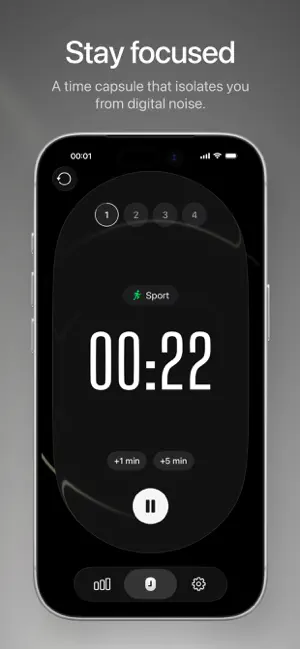


About Capsla: Pomodoro & App Blocker
With auto-start on, a focus session runs on its own. Capsla blocks the apps you choose, moves from focus to break and back without a tap, and keeps a calm, living scene on screen. On iPad, Capsla fills the whole screen. No account, no ads, and Capsla collects nothing. Block distracting apps while you focus: Capsla asks for Screen Time access and lifts the block the moment the phase ends. You can keep it on through a pause. It's a Pomodoro timer for studying, deep work and anything that needs your full attention. Set your focus length, short and long breaks, and the number of cycles. With auto-start, focus, break and the next focus follow each other until the long break. Focus tagged Meditation, Walk or Sport can be saved to Health, and finished sessions to a calendar of your choice. Capsla only writes there and never reads. The timer is wherever you look: in a Live Activity and the Dynamic Island, on the Lock Screen, on Apple Watch, in widgets, in Control Center and on the Action button. Capsla has its own Apple Watch app: start and pause from your wrist even when your iPhone isn't nearby, feel a tap when a phase ends, and keep the timer on your watch face. Notifications do real work. A quiet heads-up shortly before focus ends, a signal when a phase is over, buttons to start the break or the next focus right from the banner, and an optional reminder to come back after a break. Notifications are Time Sensitive, so they come through Do Not Disturb. Statistics show where your attention went: net focus time by week, month and all time, a chart by day, the hours you focus best, days with focus and time by tag. History starts the day you install Capsla, the app adds nothing on its own, and you can add a missed focus by hand. Export all of it as a CSV file whenever you like. FEATURES • iPad: full screen, tags in a sidebar, statistics in three columns • Custom focus and break lengths from 1 to 999 minutes, 1 to 10 cycles • Auto-start: a whole session runs without a tap • Save focus to Health; log sessions to Calendar or schedule them there • Block distracting apps during focus • Focus without a timer: time counts up, to 4 hours • Live Activity, Dynamic Island and a Lock Screen widget with a start button • An Apple Watch app with complications, a Smart Stack card and a Control Center button • Timer and statistics widgets, a Control Center control, the Action button • Siri and Shortcuts: start, pause, resume, skip a break, ask how long you focused today • Tags with icons and colors; a Focus filter can pick the tag for you • Apple Intelligence on device, where available: tag suggestions, similar notes grouped in Statistics, a review of the week, month or all time • “Working on”: a short note for your focus, shown on the timer, the Lock Screen and Apple Watch, in Statistics and in Calendar • 16 sounds and three vibration patterns, chosen separately for each phase • Six calm free backgrounds, including Night and Sky, which follows the time of day • Dark Mode, VoiceOver, larger text and increased contrast • 17 languages CAPSLA+ A one-time purchase with no subscription, shared with your family: seventeen more backgrounds, including Solar System with the real Earth, Black Hole, Depths, Fireplace and Snowfall with Frost, which slowly ices over the timer, more palettes and an accent color, typefaces for the timer, celebration effects and background noise while you focus. BUILT HONESTLY No ads. The core of Capsla, including the timer, the Apple Watch app, app blocking, statistics, tags, widgets and Siri, is free and stays free. Capsla+ adds looks and sound only: nothing that was free moved behind it, and there are no pop-ups asking you to buy. There is no Capsla account. Tags and focus history sync only through your own iCloud; settings stay on your device. Capsla collects nothing: no analytics, no crash reporting of its own, no advertising identifiers.
What’s new
Version 2.0.0 · Updated November 18, 2026
Capsla on iPad: • Full screen in any orientation and in a window of any size • Tags in the sidebar: tap one to set the tag for your next focus, with today’s time next to it • Beside the timer: what you’re working on, the whole cycle with the time the session ends, and your focus today by the hour • Statistics in three columns • Capsla+ and your history through iCloud are the same as on iPhone New background, Cherry Blossom: petals drift across a spring sky, sparse during focus and thicker on breaks. Free for everyone from March 20 to April 30, and part of Capsla+ the rest of the year.
App privacy
The developer, Ramiz Kichibekov, reported these privacy practices to Apple.
Data Not Collected
The developer does not collect any data from this app.
Alternatives to Capsla: Pomodoro & App Blocker
Looking for apps like Capsla: Pomodoro & App Blocker? Here are 6 similar apps on the App Store. The highest rated is Pomodoro Focus: Study Timer (4.0/5), and all 6 are free to download.
-
 Nagi: Pomodoro Focus Timer
-
 Pomodoro Focus: Study Timer
4.0
-
 Needle · Pomodoro Timer
-
 Halo: Pomodoro Focus Timer
-
 Quartz: Focus & Flow
-
 Pomochan: Cute Pomodoro Timer
| App | Rating | Price | Last updated | Compare |
|---|---|---|---|---|
| Capsla: Pomodoro & App Blocker | – | Free | November 18, 2026 | |
| Nagi: Pomodoro Focus Timer | – | Free | Jul 14, 2026 | Compare |
| Pomodoro Focus: Study Timer | 4.0 / 5 (1) | Free | Oct 15, 2026 | Compare |
| Needle · Pomodoro Timer | – | Free | Oct 27, 2026 | Compare |
| Halo: Pomodoro Focus Timer | – | Free | Jul 17, 2026 | Compare |
| Quartz: Focus & Flow | – | Free | Nov 8, 2026 | Compare |
| Pomochan: Cute Pomodoro Timer | – | Free | Nov 16, 2026 | Compare |