

Spriteer: 8×8 Pixel Art Studio
Swiftian Inc. Graphics & Design iPhoneiPadiPod touchMac
Spriteer: 8×8 Pixel Art Studio is a free Graphics & Design app for iPhone and iPad by Swiftian Inc. Rated 4.7/5 from 6 ratings. Requires iOS 17.0.
- Rating
- 4.7
- 6 ratings
- Price
- Free
- on the App Store
- Size
- 13 MB
- Age 4+
- Updated
- Oct 15
- 2026 · v4.0.1
Screenshots


About Spriteer: 8×8 Pixel Art Studio
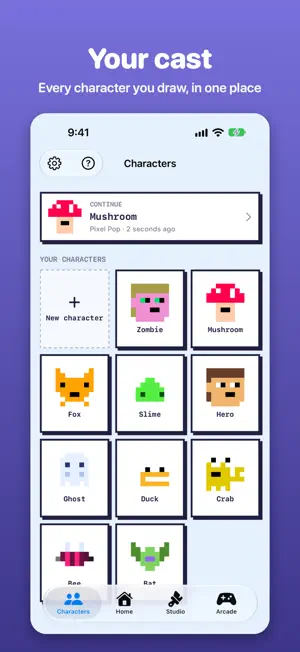
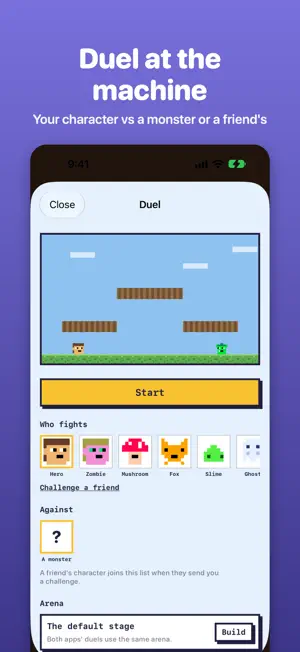
The canvas is eight by eight. That is the whole rule — and it is enough. Draw a hero, a zombie, a gem, a door. One small frame per pose; the engine breathes in the rest — the walk beat, the floating treasure, the bounce of a slime. Your sprite starts living the moment you lift your finger. What you draw is yours to keep. Export any sprite as a PNG, or a character as an animated GIF, and take it wherever you like. Then prove it. Thirty-eight real arcade games are built in — mines, factories, haunted manors — and every one of them instantly wears YOUR art. Outrun boulders as the hero you drew; hunt the zombie you gave those red eyes. Your work lives in skins, like resource packs: each skin is a complete project — every character, tile, and item in one place, with your progress counted. Wear one skin at a time and switch styles in a tap. Share the file anywhere, or open it in Pythoneer and play whole worlds dressed in your sprites. Mirror drawing, a fixed sixteen-color palette, onion skin, a live walk preview, undo — serious tools, one simple rule. Unlock All — one purchase, no subscription: make as many characters of your own as you like. Five are free, and so are skins, every export, every color, drawing, playing and sharing. Sixty-four pixels. Yours.
Ratings & reviews
4.7
6 ratings
What’s new
Version 4.0.1 · Updated October 15, 2026
A bigger canvas on iPhone, iPad and Mac — a cell you can actually tap. Drawing stays smooth no matter how many skins you keep.
App privacy
The developer, Swiftian Inc., reported these privacy practices to Apple.
Data Not Linked to You
The following data, which may be collected but is not linked to your identity, may be used for the following purposes:
- Identifiers: Device ID
- Usage Data: Product Interaction
- User Content: Customer Support
- Diagnostics: Crash Data, Performance Data
Used for: Analytics, App Functionality
Alternatives to Spriteer: 8×8 Pixel Art Studio
Looking for apps like Spriteer: 8×8 Pixel Art Studio? Here are 6 similar apps on the App Store.
-
 PixSprite: Pixel Art Studio
-
 Chroma8: Pixel Art Studio
-
 nemodot - Pixel Art Editor
-
 dotStudio
-
 Pixel Art Maker - Anywhere
-
 PixelCreater
| App | Rating | Price | Last updated | Compare |
|---|---|---|---|---|
| Spriteer: 8×8 Pixel Art Studio | 4.7 / 5 (6 ratings) | Free | October 15, 2026 | |
| PixSprite: Pixel Art Studio | – | Free | Oct 25, 2026 | Compare |
| Chroma8: Pixel Art Studio | – | Free | Oct 18, 2026 | Compare |
| nemodot - Pixel Art Editor | – | Free | Oct 10, 2026 | Compare |
| dotStudio | – | Free | Jan 29, 2026 | Compare |
| Pixel Art Maker - Anywhere | – | Free | Aug 4, 2026 | Compare |
| PixelCreater | – | Free | Aug 28, 2026 | Compare |